

- A value statement: what the agent does for you, in your own words.
- A criticality rating: how critical the agent is to your operations.
- Key metrics: the outcomes worth counting, which the agent records as they happen.
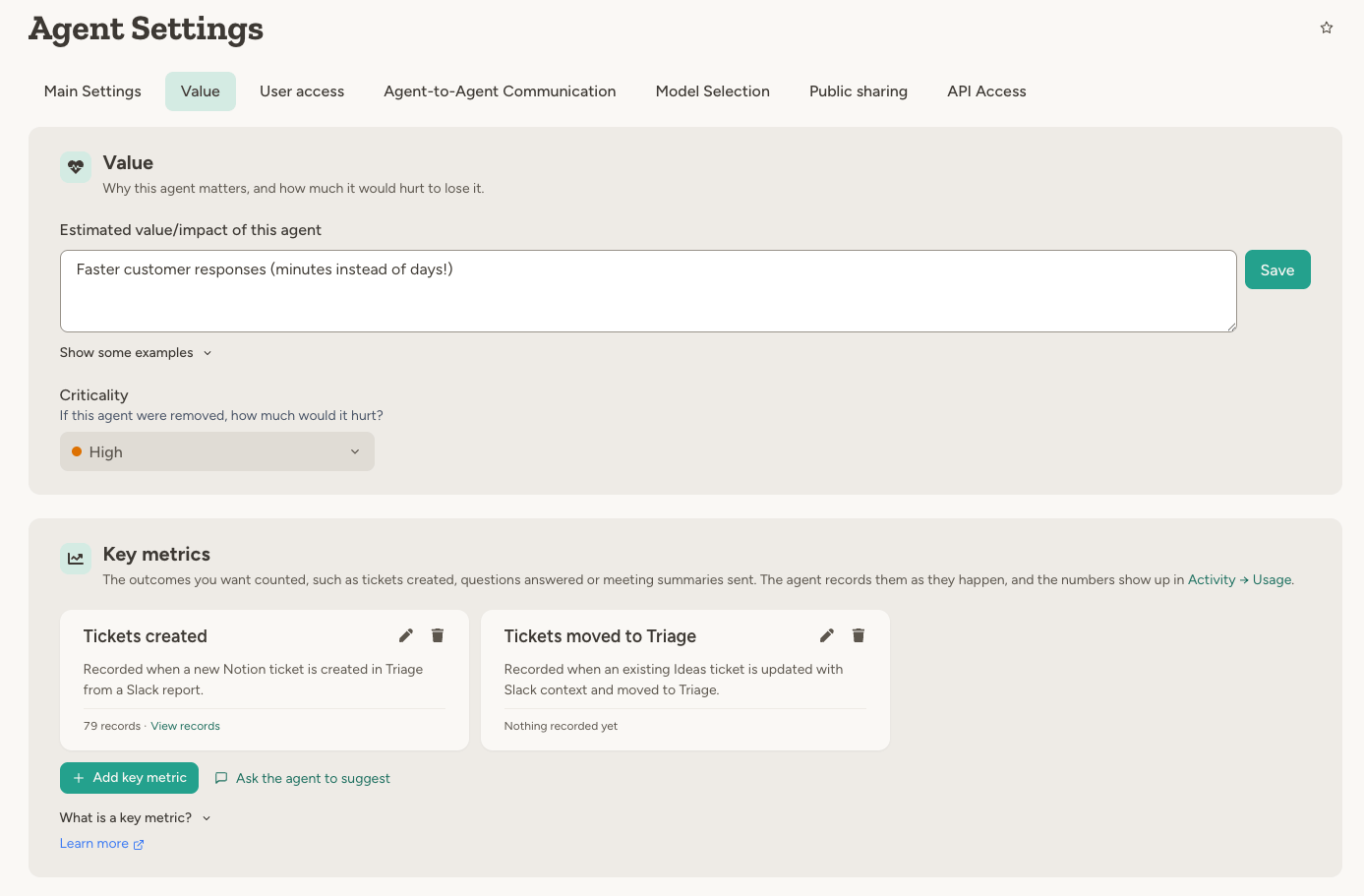
Value statement
One or two sentences answering “what is the point of this agent” or “why is this worth paying for”. This is your assessment, so anything you would say to a colleague belongs here: the problem it removes, the time or money it saves, the risk it catches, or what you hope it will do once it has proved itself. Estimates are fine here; they are yours, not the agent’s. Some examples:- Saves about 10 hours of tedious work per week for engineers
- Ideas and bug reports in Slack no longer get lost or duplicated
- Catches vendor maintenance windows before they show up as unexplained outages
- If this works, on-call engineers stop being paged for false alarms
Criticality
How critical is this agent to your operations? Pick Critical, High, Medium or Low. An agent without a rating shows as Not rated. Criticality is the quickest way to sort a large fleet: the Agent usage table and Agent management both filter and sort by it.Key metrics
A key metric is a simple way to track and visualise the value an agent creates. You define the outcomes worth counting, and the agent records them with a built-in tool as they happen. No extra setup is needed. Sample metrics: Tickets created, Meeting summaries sent, PRs merged, Questions answered, Alerts handled. For example, each time it has created a ticket, the agent calls: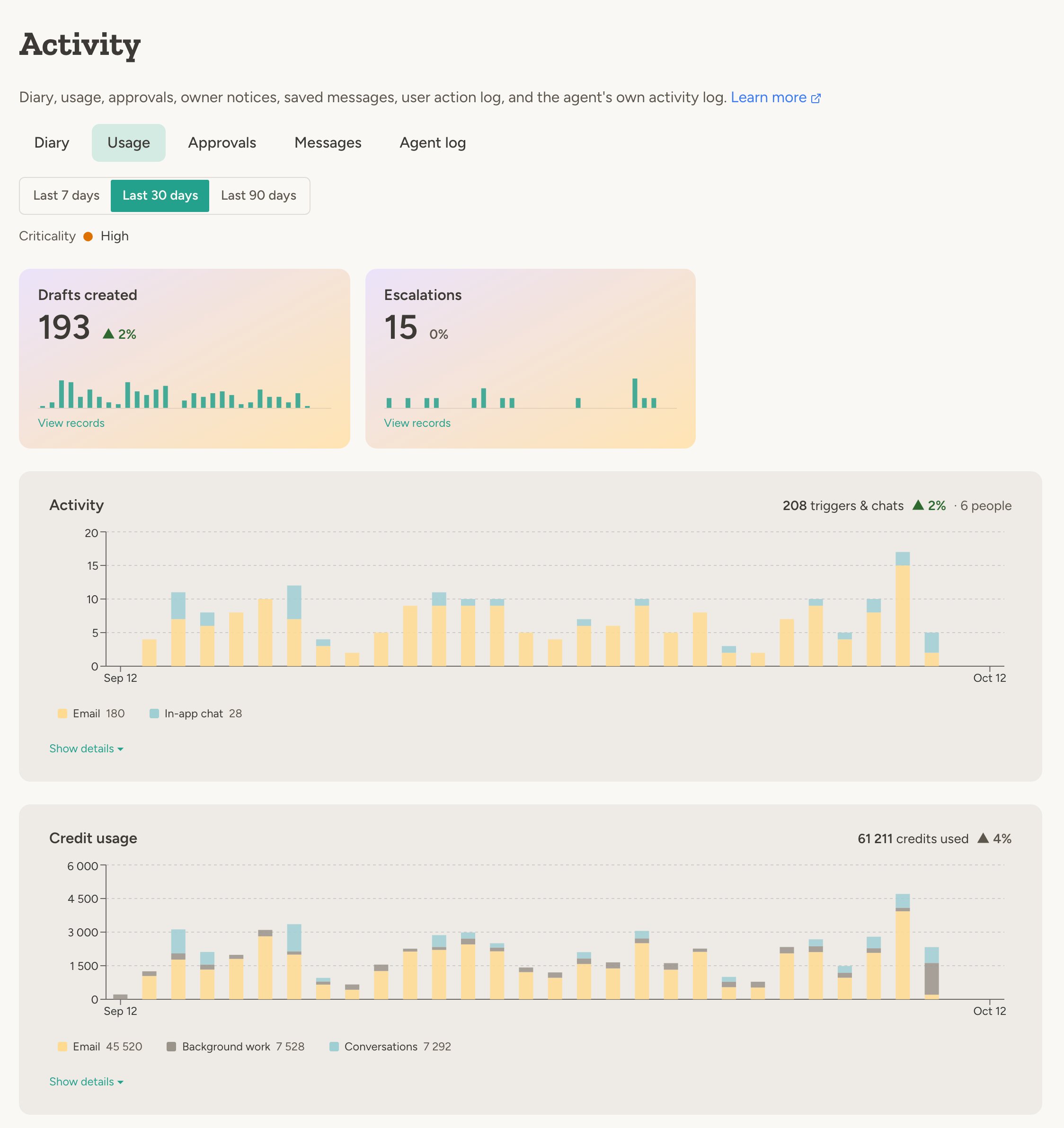
Choosing key metrics
- Pick concrete outcomes the agent can see and count for itself: a ticket it created, a question it answered, a summary it sent. Avoid subjective estimates such as time saved; those belong in the value statement.
- One or two metrics is usually enough. Pick what you would put in a status report.
- Prefer the end result over the intermediate step when the agent can observe it: PRs merged rather than PRs opened.
Defining a key metric
A key metric has:- Name — for example “Meeting summaries sent”. This is both what people see and what the agent uses when recording, so you can refer to it by name in the agent’s instructions. Renaming a metric keeps its history.
- Description — the agent sees this in every run, so it is the recording rule: when to record and what not to count. Each record can also carry a ref, an id such as a ticket number or link so the same outcome is not counted twice, and a note, a short label shown in the list of records; say what to put in them. One to three sentences is typical: Record when I have sent a reply to a support ticket. ref = ticket id. note = ticket subject. or Record once per image, not once per revision. ref = request id. note = what the image shows.
- Measurement, optionally — when the amount matters and not just the count: minutes of audio transcribed, or cycle time of merged PRs. Give it a unit and say whether to show the total or the average.
How recording works
The agent’s system prompt lists its key metrics. When one of those outcomes has actually happened, the agent callsrecord_key_metrics with the metric’s name, a value for measured metrics, and, when the outcome has one, a ref such as a ticket number, a meeting date or a link. Recording the same ref again updates the earlier record instead of duplicating it, so retries and repeats are safe. A short note, such as the ticket title, is shown next to the ref in the list of records. The agent can also pass an earlier timestamp to backfill history, for example tickets it created last month, and read its own records with get_key_metric_records when you ask it how it is doing.
If the agent records a name that is not defined, the tool tells it which names exist and how to get a new one added.
Removing a key metric hides its records but does not delete them; adding a metric with the same name again brings them back.
Deleting records that were wrong
If the agent recorded outcomes it should not have — a backfill with the wrong rule, or tickets another agent actually created — ask it to delete them. Individual records are deleted by ref straight away. Deleting in bulk, by metric name and date range, always needs your approval first — in the chat, or on the agent’s Activity tab when the agent was responding to a trigger. The approval card shows the metric, the period and how many records would go, so a slip cannot wipe a big chunk of history unnoticed. There is no setting that lets the agent skip this approval.Letting the agent help
You can fill in the Value tab yourself, or ask the agent in chat:- Key metrics — Ask the agent to suggest on the Value tab opens a chat where the agent reads its own instructions, proposes outcomes it can actually observe, and adds them after you confirm. It can also edit or remove definitions when you ask.
- Value statement — ask the agent to write or update it, for example after telling it what the agent has achieved. The agent only changes it when you ask.
Where value tracking shows up
- The agent’s Activity → Usage tab — its value statement and criticality, and a card per key metric with the count, trend and daily records for the period.
- The workspace Usage → Agent usage table — one row per agent with criticality, key metrics, triggers & chats and credits side by side, so you can compare what agents deliver with what they cost. See Usage & limits.
- Agent management — filter agents by criticality, and by whether they have a value statement or key metrics.
- Workspace Explorer and Team Explorer agents — can read all three, and summarise key metrics across the workspace or a team.
- Workspace API — the agent object carries the value statement, criticality and key metric definitions, and the agent usage and key metrics endpoints return the figures. See Workspace API.
FAQ
Can I put hours or money saved in the value statement?
Can I put hours or money saved in the value statement?
Yes. The value statement is your assessment, so an estimate or an observed saving is exactly what belongs there.
Keep such estimates out of key metrics, which should only count outcomes the agent can observe itself.
Who can edit the Value tab?
Who can edit the Value tab?
Anyone with Edit access to the agent, plus workspace admins and team admins of the agent’s team. With the Update
Agent Settings capability, the agent can too, when you ask it.
Does the agent need the Update Agent Settings capability to record key metrics?
Does the agent need the Update Agent Settings capability to record key metrics?
No. Recording is on as soon as the agent has a key metric; the capability only lets the agent change its own
settings, including the key metric definitions.
What happens to the records when a key metric is removed or renamed?
What happens to the records when a key metric is removed or renamed?
Removing a key metric hides its records but keeps them; adding a metric with the same name brings them back.
Renaming moves the history to the new name.
Learn more
Usage & limits
Triggers, chats, channels and credits per agent
Agent management
The admin view of every agent, with criticality filters