

How it works
Every agent automatically gets its own email address (e.g.,<your-agent>.<your-workspace>@agent.abundly.ai). The agent uses this as its own identity—it doesn’t access your email account or send emails on your behalf (unless you enable a capability to access your email account).
Enterprise customers on a dedicated deployment have their own agent email domain, in the form
<your-agent>.<your-workspace>@<your-tenant>.agent.abundly.ai. You can see an agent’s actual address on its page in Abundly.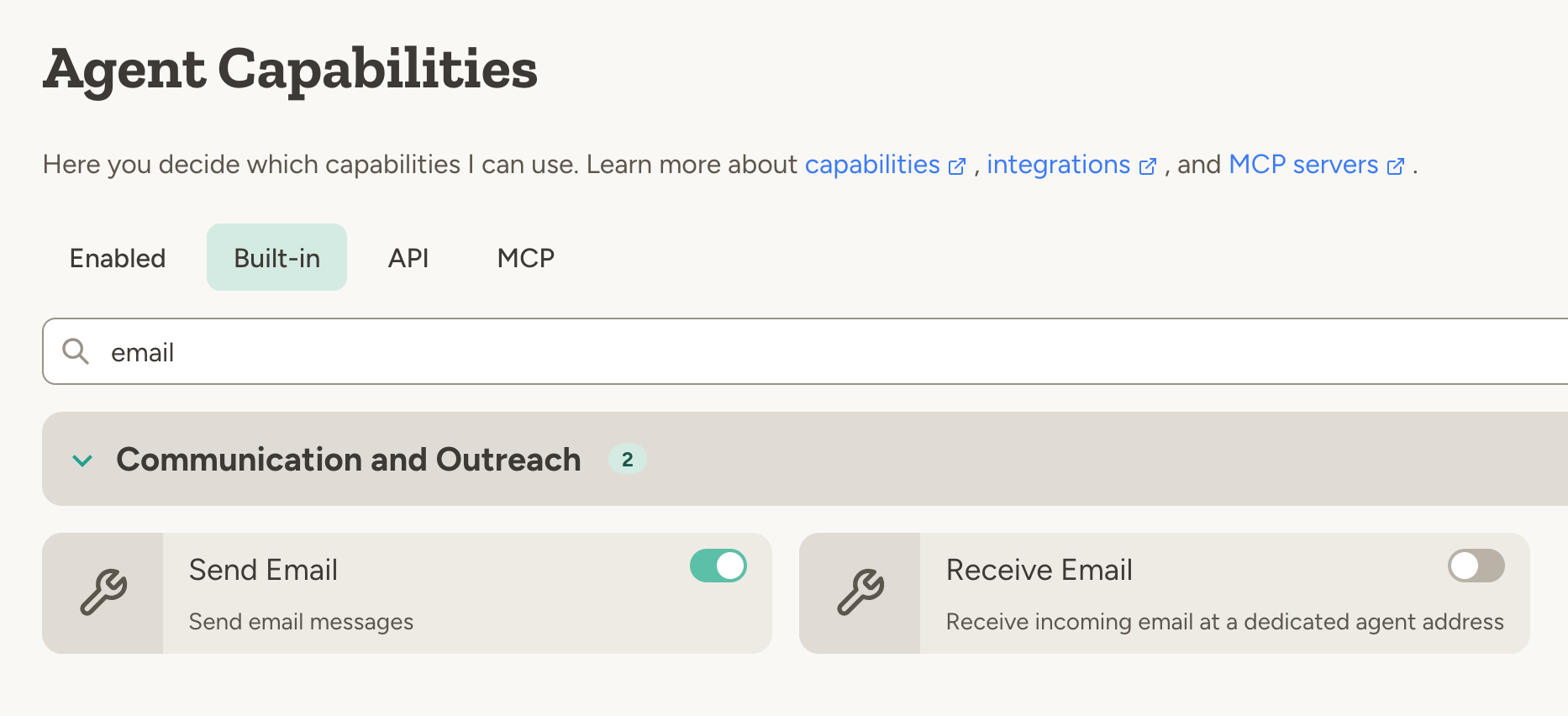
- Send Email — Allows the agent to send emails from its address
- Receive Email — Triggers the agent when emails arrive at its address
Handling incoming messages
When the agent receives an email or SMS, it needs instructions on what to do—otherwise it will likely ignore it. Add guidance in your agent’s instructions. By default there is no mailbox layer—each incoming message triggers the agent, which processes it according to your instructions. The platform also keeps a copy of every sent and received email and SMS so you can review them in the UI (see Activity monitoring); message logging can be paused per agent from that tab. You can also ask the agent to keep its own record (for example in a database)Example use cases
Sending emails:- “Every Friday, email me a summary of this week’s completed tasks”
- “Email the sales team whenever a new lead comes in, and attach a PDF summary of the company research”
- “When you receive an email with an invoice, extract the details, validate against our vendor list, and add to the invoice database”
- “When you receive a support email, check the knowledgebase and reply if the answer is clear. Otherwise, forward to support@company.com”
- “Store all incoming emails in a database. Create the database if it doesn’t exist.”
- “Log all outgoing emails with recipient, subject, and timestamp”
- “Send a text reminder to all attendees 24 hours before their appointment”
- “Text me if a critical alert comes in after hours”
What agents can do with email
Agents can handle email much like a human would:- Attachments — Read incoming attachments (PDFs, images, documents) and add attachments to outgoing emails
- CC and BCC — Include additional recipients
- Reply and forward — Respond to threads or forward to others
- Rich formatting — Send nice-looking HTML emails with embedded images and formatting
Guardrails and approval
Giving an agent the ability to email externally is powerful—but it also requires care. You can configure guardrails to limit what the agent can do with email: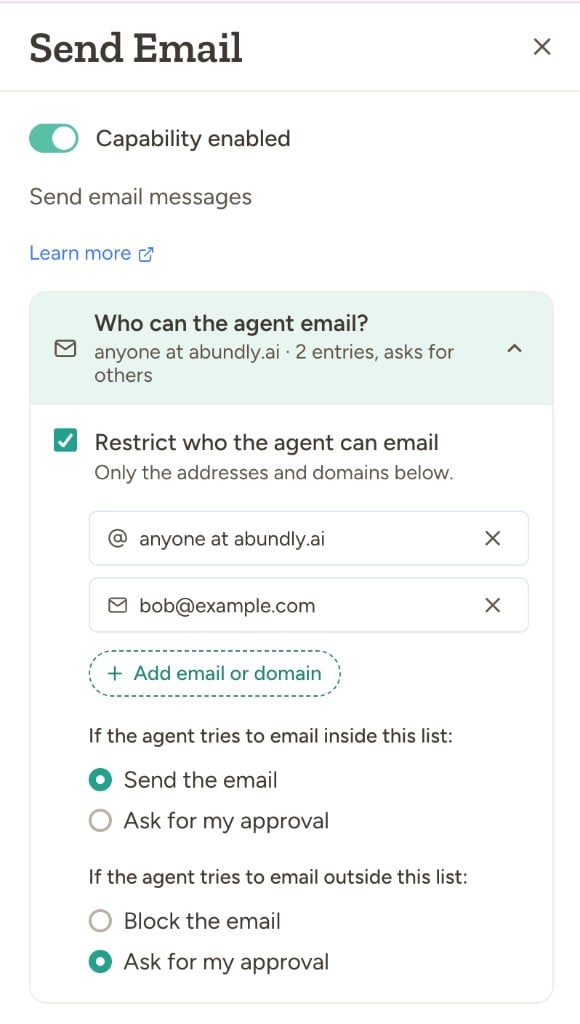
Allowed recipients
Turn on Restrict who the agent can email to limit who the agent can contact. The allowed list mixes two kinds of entries:- Specific addresses — individual inboxes, e.g.
name@example.com - Whole domains — written as
@example.com, matches anyone at that domain
Approval
When the agent is restricted, you choose what happens for recipients inside and outside the allowed list independently:
By default the agent sends to allowed recipients without asking and blocks everything else. Switch the outside-list rule to “Ask for my approval” if you’d rather review unknown recipients than block them outright. Switch the inside-list rule to “Ask for my approval” if you want a human in the loop even for known contacts.
When restriction is off, you instead get a single “Ask before every email” toggle — useful when you want broad reach but a human in the loop on every send.
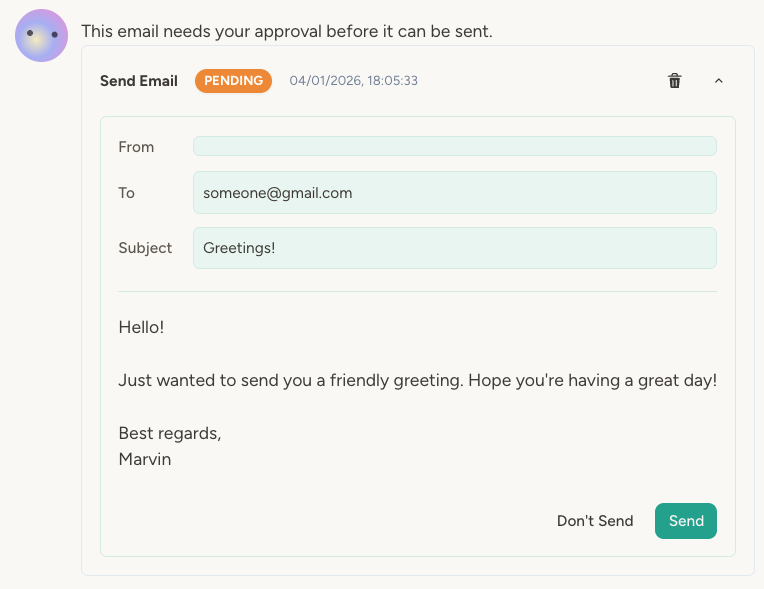
- In a chat context, approval requests show up as a widget in the chat.
- When responding to triggers, approval requests show up in the Activity tab.
SMS
Agents can send and receive text messages for time-sensitive communication.SMS capabilities are currently hidden. Contact support@abundly.ai to enable them for your account.
- Send SMS — Agent can send text messages
- Receive SMS — Agent is triggered by incoming texts (requires a dedicated phone number)
Security considerations
Email and SMS give your agent the ability to contact people outside the platform. Before enabling these capabilities, consider:- What data can the agent access? If it has access to sensitive information, be careful about who it can contact.
- What are the consequences of a mistake? An agent emailing the wrong person or sending incorrect information could cause problems.
- What guardrails are appropriate? Start restrictive (allowed list + approval for anyone not on it) and loosen as you gain confidence.