

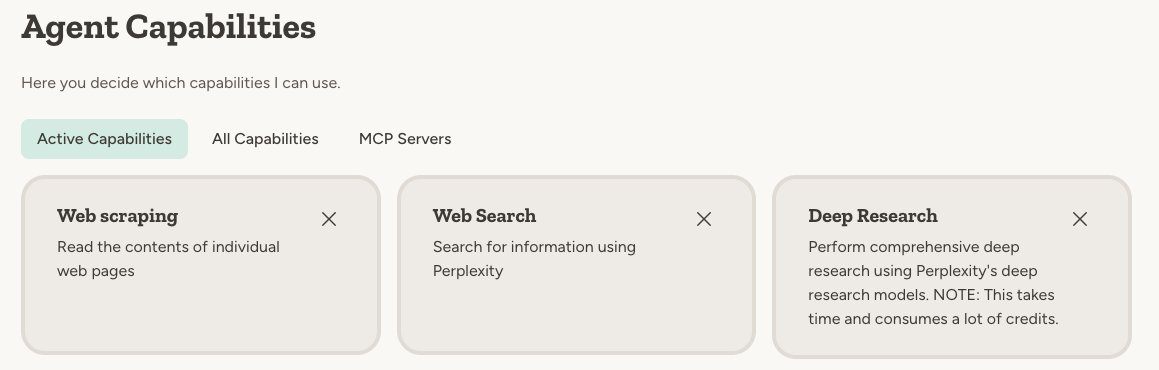
These capabilities are built into the platform — no API keys or configuration required.
The four search capabilities
Web search
The most commonly used capability. The agent uses Perplexity, an AI-powered search engine, to search for information online. Results come back in seconds with citation URLs. Example prompts:- “What are the latest AI regulations in the EU?”
- “Find the current USD to EUR exchange rate”
- “Who won the most recent Nobel Prize in Physics?”
Web scraping
Allows the agent to read the actual content of individual web pages. Useful when you need exact, up-to-the-minute information from a specific source. Example prompts:- “Read this article and summarize the key points: [URL]”
- “Check the pricing on their website: [URL]”
- “What are the exact dates listed on this page: [URL]”
Deep research
Performs comprehensive research on a given topic — digging through multiple sources, following leads, cross-referencing, and synthesizing findings until the analysis is complete. This is time-consuming and uses significantly more credits, but the results are extremely powerful — often comparable to days of manual research work. Example prompt:Analyze the competitive landscape for our product [Product X]. Find other companies offering similar products — their pricing, target market, overall strategy, and recent developments. Identify the top 3 competitors, compare their strengths and weaknesses to ours, and give me your strategic recommendations.
How to choose the right capability
The agent does a decent job of automatically choosing between web scraping, web search, or deep research based on your request. But if you already know what you want it to do, just tell it — either in the chat or in the agent’s instructions.Example: Finding course dates
Suppose you ask: “When is the next Abundly agent design course?” The agent uses web search and returns results that are correct but slightly out of date. This is normal — Perplexity is a search engine, so its index isn’t always 100% current. Then you write: “Read their course page and check exact dates” Now the agent uses web scraping to read the actual page athttps://www.abundly.ai/courses. Since it’s reading the live page content, it gives a 100% accurate answer.
The pattern: Web search is great for finding things, and web scraping is great for reading specific pages. Combine them for best results.
Why web search matters
Agents know a lot from their base training data, but that information is typically several months old. Web search makes your agent much more versatile:- Current information — Access news, prices, and facts that happened after the model’s training cutoff
- Reduced hallucination — The agent can cross-check its responses against current web sources rather than relying solely on training data
- Verifiable sources — Web search returns citation URLs, so you can verify the information. When an agent responds purely from training data, there are no references to check.
FAQ
Can the agent access pages that require login?
Can the agent access pages that require login?
No. Web scraping only works on publicly accessible pages. For internal systems, consider integrations like Notion, SharePoint, or Google Drive.
How do I know which capability the agent used?
How do I know which capability the agent used?
The agent typically mentions what it did in its response — for example, “I searched for…” or “I read the page at…”. You can also toggle “Show details” in the chat UI to see exactly which tools the agent used.
Can I disable web search if I don't want the agent going online?
Can I disable web search if I don't want the agent going online?
Yes. Go to the agent’s capabilities and toggle off Web Search and Web Scraping. The agent will then only use its training knowledge and any instructions and documents you provide.
Learn more
Perplexity
The AI search engine powering web search and deep research
Firecrawl
The service powering web scraping capabilities