

Two ways to run code
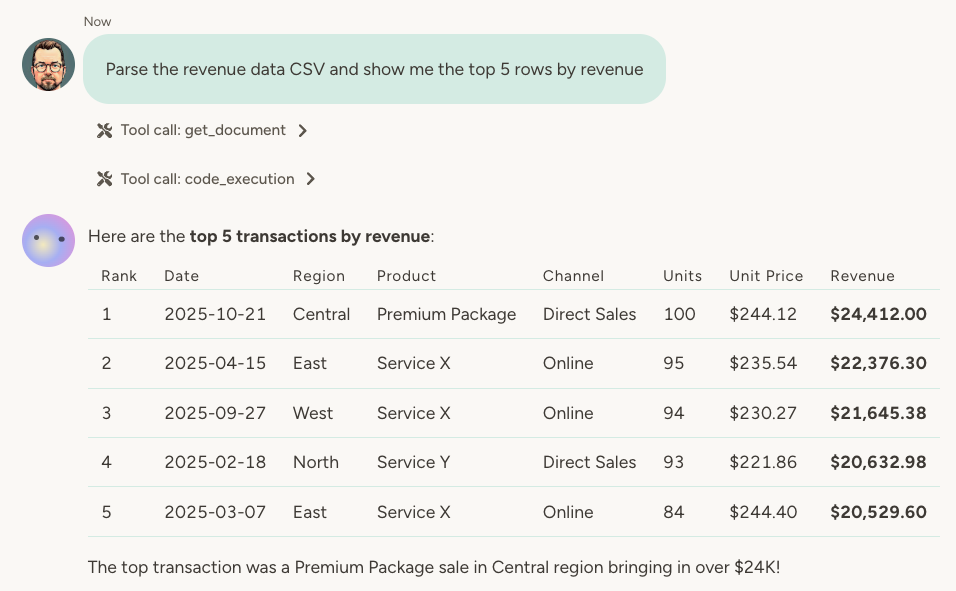
1. Execute code in the chat The agent can write and run code on the fly during a conversation. Ask it to calculate something, transform data, or process a file—it writes the code, runs it, and shows you the result.- “Calculate the compound interest on these loan terms”
- “Parse this CSV and show me the top 5 rows by revenue”
- “Convert this JSON to a markdown table”
- “The data import you just did—save that script and run it every Saturday morning for that week’s sales data”
- “Create a script that checks our inventory levels and alerts me when anything drops below 10 units”
- “Save this report generation code so I can run it at the end of each month”
Scripts as direct trigger handlers
Scripts can also be linked directly to triggers—scheduled tasks, webhooks, HTTP API endpoints, and MCP tools. When a script is linked to a trigger, it executes immediately when the trigger fires, bypassing the full agent pipeline entirely. This means no LLM call—just the script running with access to the agent’s toolbox. The result is returned directly to the caller (for webhooks, HTTP endpoints, and MCP tools) or logged to the activity log (for scheduled tasks). When to use this pattern:
If part of the work needs AI reasoning, the script can hand off to the full agent by returning
{ escalate: true, message: "..." }. The agent then runs as it normally would on a trigger (with attack detection for untrusted content), using the message as context. A common pattern: the script handles the mechanical work and escalates only items that require judgment.
Script arguments
The sandbox runs your code as(async function(args) { ... }). The single args parameter has a unified shape used in both chat and trigger contexts:
args.body— the canonical payload. In chat, this is whatever you pass via the tool’sinputfield (any JSON value; default{}). In trigger-linked scripts, this is the trigger data (webhook body, scheduled message, MCP params, etc.).args.triggerType—"webhook" | "http_api" | "scheduled" | "mcp". Set for trigger-linked runs, undefined in chat.args.headers— HTTP request headers (for webhook/API triggers) or null.args.meta—{ timestamp, triggerName, agentId }. Set for trigger-linked runs, undefined in chat.
body is a plain object its properties are also available directly on args (e.g. args.message is the same as args.body.message). This means existing scripts that destructure fields directly from args continue to work. This might be removed in the future so make sure to use the body property as a rule.
Handoff to the full agent only applies to trigger-linked scripts: return { escalate: true, message: "…" } when you want the normal agent pipeline to run with that message as context. Any other return finishes the script without escalation. Optional: attackDetection: false or runAttackDetection: false only if the message is built entirely from trusted internal data—never for raw webhook or user-supplied text. (Default is to run attack screening on escalations.)
Why code instead of AI?
When an agent processes data “manually,” it reads each item, thinks about it, and produces output—one token at a time. That works fine for small datasets, but it’s slow, expensive, and unreliable for large datasets. Code runs instantly and costs a fraction of the price. Example: Suppose you ask your agent to analyze 500 customer feedback records—find sentiment trends, identify common issues, and calculate satisfaction scores.- Without code: The agent reads each record, thinks about it, and builds up its analysis token by token. This might take 5 minutes and cost $2.
- With code: The agent writes a script to process all records, calculate statistics, and format the results. Runs in 2 seconds, costs $0.01.
Scripts can use all agent tools
Here’s where it gets powerful: code execution has access to all the agent’s capabilities. If your agent can search the web, read a spreadsheet, send emails, or query a database—it can do all of that from within a script. Example use cases:- Customer enrichment: You have a customer list in a spreadsheet. A weekly script checks each customer’s website for updates (using web search), then updates the corresponding row with any new information.
- Automated reporting: A script queries your agent database, generates a summary report, and emails it to stakeholders every Monday.
- Data synchronization: Pull data from an external API, transform it, and update your internal records—all in a single scheduled script.
- Competitive monitoring: Search for news about competitors, extract key insights, and log them to a tracking database.
When to use scripts
Scripts shine when:
A single script run can use up to 256 MB of memory. If a script hits that ceiling—usually because it loads a very large file or query result all at once—process the data in smaller batches, or filter it before loading it into the script.
A script can run for a long time as long as it keeps yielding—awaiting a tool call, a fetch, or a sleep. Code that blocks the sandbox with synchronous work for more than two minutes, typically an infinite loop, is terminated with an error.
You don’t always need to tell the agent when to use code vs. AI. It often figures this out on its own—but you can guide it: “This will run on thousands of records, so write a script for efficiency.”
Creating and managing scripts
Scripts are stored as agent documents. You can:- View the code: Open the script document to see exactly what it does
- Edit manually: Modify the code yourself if needed
- Ask the agent to update it: “Add error handling to the import script”
- Track versions: Every change is saved in version history, just like other documents
- Schedule execution: Combine with scheduling to run scripts automatically
Connecting to other documents
Scripts work naturally with other agent documents:- Agent databases: Query, insert, update, and delete records programmatically
- Other scripts: Scripts can call other scripts to perform complex tasks
- The agent reads the ticket and reasons about it—what’s the priority? Which category? Is this a VIP customer?
- The agent calls a saved script, passing in those parameters:
routeTicket({ priority: "high", category: "billing", customerTier: "enterprise" }) - The script handles the mechanical work—updates the database, notifies the right person, logs the action
Learn more
Agent Documents
Scripts are stored as agent documents with full version history
Agent Databases
Query and update structured data from your scripts
Scheduled Tasks
Link scripts to scheduled tasks for automatic, pipeline-free execution