

Voice input using the microphone button
Press the microphone button in the chat to speak instead of type, then press again when you are done. Your speech is transcribed to text and sent to the agent. You can speak in your native language, the agent understands most languages fluently.
- You speak faster than you type, and want to save time.
- You want to “think out loud” and ramble unstructured thoughts without having to think about how to phrase them.
- You are on the go, taking a walk or sitting in a car, and don’t want to type.
- You are discussing something with your colleague, and want the agent to record it so it can summarize the key points, or offer feedback.
- You have just finished a meeting. Press the mic button, hand the phone around to the other participants and ask them to share their thoughts and insights after the meeting. Then ask the agent to send a summary to everyone.
- You can edit your message or complement your message with info that is more easily typed or copy/pasted, for example a URL or email address.
- You can click the mic button again to add more to your message before sending.
- You can attach files or images to your message before sending.
Text-to-speech using the speak button
Hover over a chat message, and click the “speak” button to have it read aloud. This is useful if you prefer to listen rather than read, for example because you are taking a walk or making coffee or having lunch.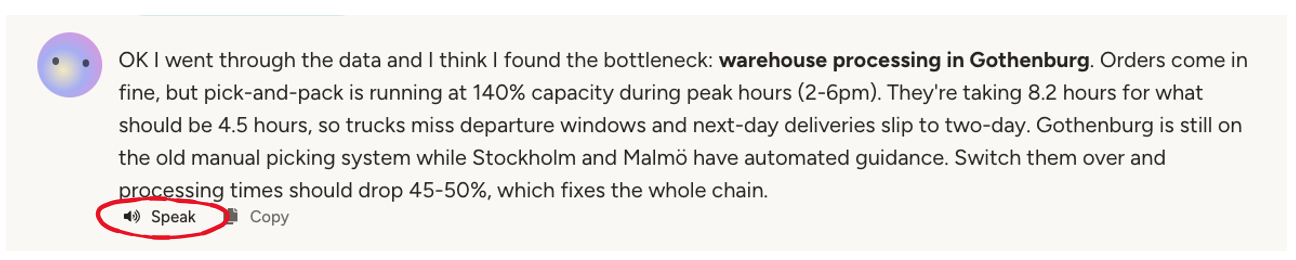
Choosing the agent’s voice
Under Settings → Basic Information → Voice, you can pick which voice the agent uses for the Speak button and Walk & Talk mode. The dropdown groups voices by provider — OpenAI voices are always available, and ElevenLabs voices appear when the integration is configured, including premade, professional, and cloned voices. Click the preview button next to the dropdown to hear a short sample before committing.This voice is the agent’s “identity” — how it sounds when talking to you. It’s separate from the Text to Speech capability, where the agent picks a voice per request when generating audio files as a tool.
Walk & Talk mode
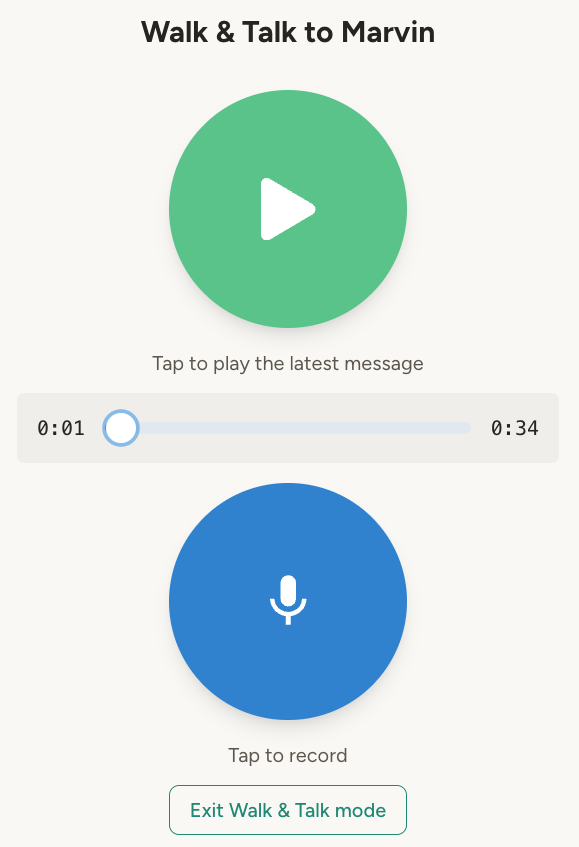
Walk & Talk mode is a mostly hands-free variant of the chat, optimized for situations where you want to look at your phone as little as possible—like walking, driving, or having lunch. To activate it, press “Walk & Talk” below the chat input. The flow is:- Press the mic button to start speaking. Press again when done.
- Your speech gets transcribed, the agent generates a response, and it’s automatically converted to speech.
- Press the play button to hear the response.
Live voice
Prefer a flowing back-and-forth conversation? Live voice lets you talk with your agent in real time—you speak, the agent answers out loud within a second, and it can use its tools while you talk. You choose how turns are taken (hands-free, push-to-talk, or toggle), the conversation is transcribed live and saved to your chat list, and you can type or share images mid-conversation. The one real tradeoff is intelligence: live voice uses a realtime voice model rather than the agent’s configured model, and realtime models prioritize speed and natural conversation over deep reasoning. Use Live voice for natural conversation and quick questions; use chat or Walk & Talk for complex tasks.Phone calls (beta)
Everyone has a phone. That makes phone calls a universal interface—anyone can talk to your agent just by calling, and your agent can call anyone. No apps to install, no accounts to create. Your agent can make outbound calls (to you, your colleagues, or external contacts) and receive inbound calls from anyone with the phone number.Phone calls are in beta. Contact support@abundly.ai to enable this feature. To receive calls, your agent will need a dedicated phone number, which we set up manually for now.
Current limitations
Phone calls use real-time voice models, which have the same tradeoffs described above. Most importantly, reduced intelligence compared to text-based interaction. This means:- Simple queries work well — “Can you summarize the orders you processed today?” or “What’s on my calendar tomorrow?”
- Complex tasks may fail — Multi-step problems involving several tool calls are more likely to produce mistakes or hallucinations
Workaround: the receptionist pattern
For complex requests, treat phone calls like a receptionist: capture the problem, confirm it with the caller, then solve it after the call. In the platform, when a call ends, the agent receives a “phone call ended” trigger with the full transcript. This lets the agent process the request using its full capabilities—not the speed-optimized real-time model. In practice, this means instructing your agent to say things like: “Got it, I’ll look into that and get back to you later.” The caller experiences one agent, but the heavy lifting happens after the call with the agent’s full intelligence.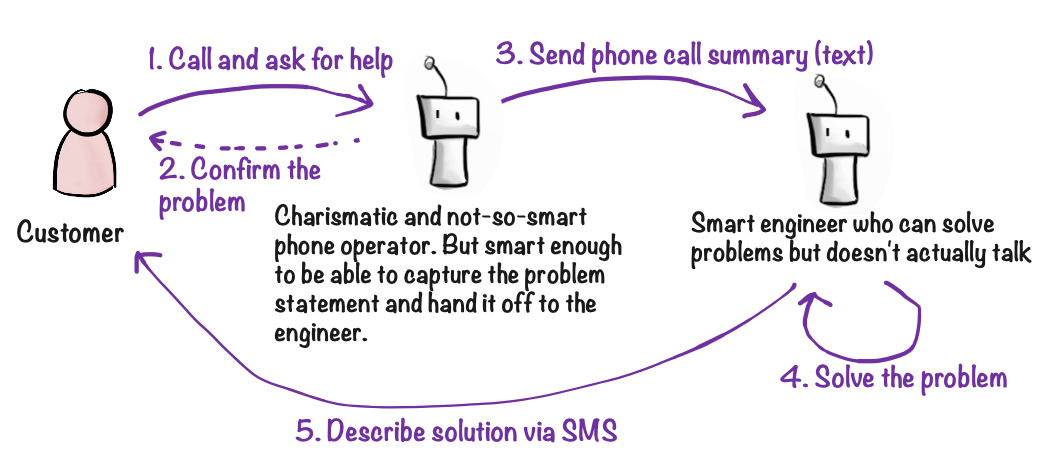
Example instructions
- “When someone calls about a technical issue, interview them to understand the problem, confirm it, then say you’ll follow up. After the call, send me an email summary and add a ticket to Notion.”
- “If a photographer calls to swap shifts, capture the details and confirm. After the call, update the schedule and text them a confirmation.”
- “Every monday morning, call all customers who signed up within the last week (and opt-in on receiving calls). Interview them about their first impressions (see the guide document for details). After the call, save the transcript in our customer interview database.”
Configuration
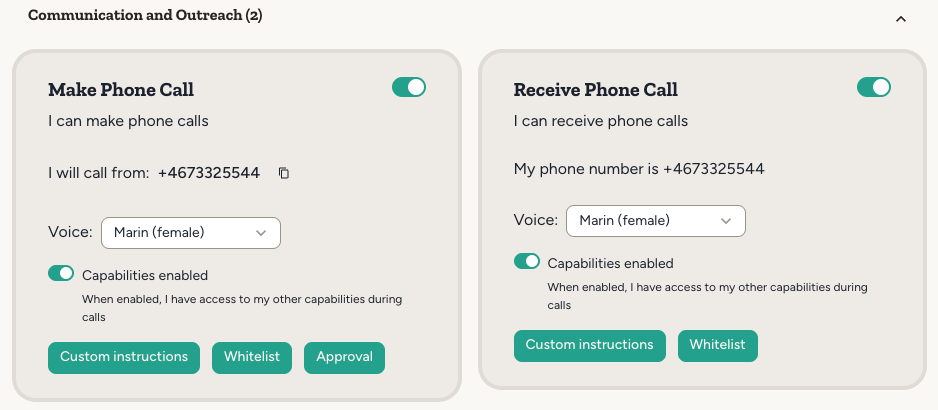
Once you have enabled the Make Phone Call and Receive Phone Call capabilities, you can configure them. This gives you better control over the agent’s behavior during phone calls.- Capabilities during calls: Pick exactly which of the agent’s capabilities are available while it is on a call. Limiting the set is useful for safety reasons, and reduces the risk of the agent being distracted by tools it doesn’t need.
- Custom instructions: You can configure custom instructions for phone conversations. These will replace the agent’s normal instructions. This is useful if your agent’s normal instructions contain a bunch of information that is not relevant to the phone call, which may potentially confuse the agent. Instructions can be written inline as text, or sourced from an agent document—useful when you want to edit and version them alongside other agent content.
- Voice & Behavior: Pick the voice and speaking speed, set the language the agent expects the caller to speak (improves transcription accuracy and latency), choose how the agent detects when the caller is done speaking (smart/semantic vs. silence-based), tune noise reduction for the caller’s environment, and add transcription keywords so that names, jargon, and product terms are recognised correctly.
- Advanced: Choose the realtime voice model — Stable (default, proven reliability) or Latest (newer model with improved capabilities) — fine-tune the response style (more precise vs. more creative), pick a higher-accuracy transcription model for difficult accents or noisy environments, and adjust the voice-activity threshold when using silence-based turn detection.
- Escalation number: Set a phone number that the agent can transfer the call to when the caller needs a human. When configured, the agent gets a “transfer call” tool it can use mid-conversation. Without it, the agent will explain that it can’t transfer calls.
- Whitelist: You can configure a whitelist of phone numbers that the agent is allowed to call.
- Approval: You can configure whether the agent needs user approval to make or receive calls.
These settings essentially let you make a simplified version of the agent when making or taking phone calls, which compensates for the reduced intelligence of the real-time voice model.
Related integrations
ElevenLabs
High-quality text-to-speech voices
Twilio
SMS and phone call infrastructure
OpenAI
Realtime voice API for phone conversations