

Lifecycle phases are available on the Enterprise plan. A workspace admin turns them on under
Workspace → Lifecycle.
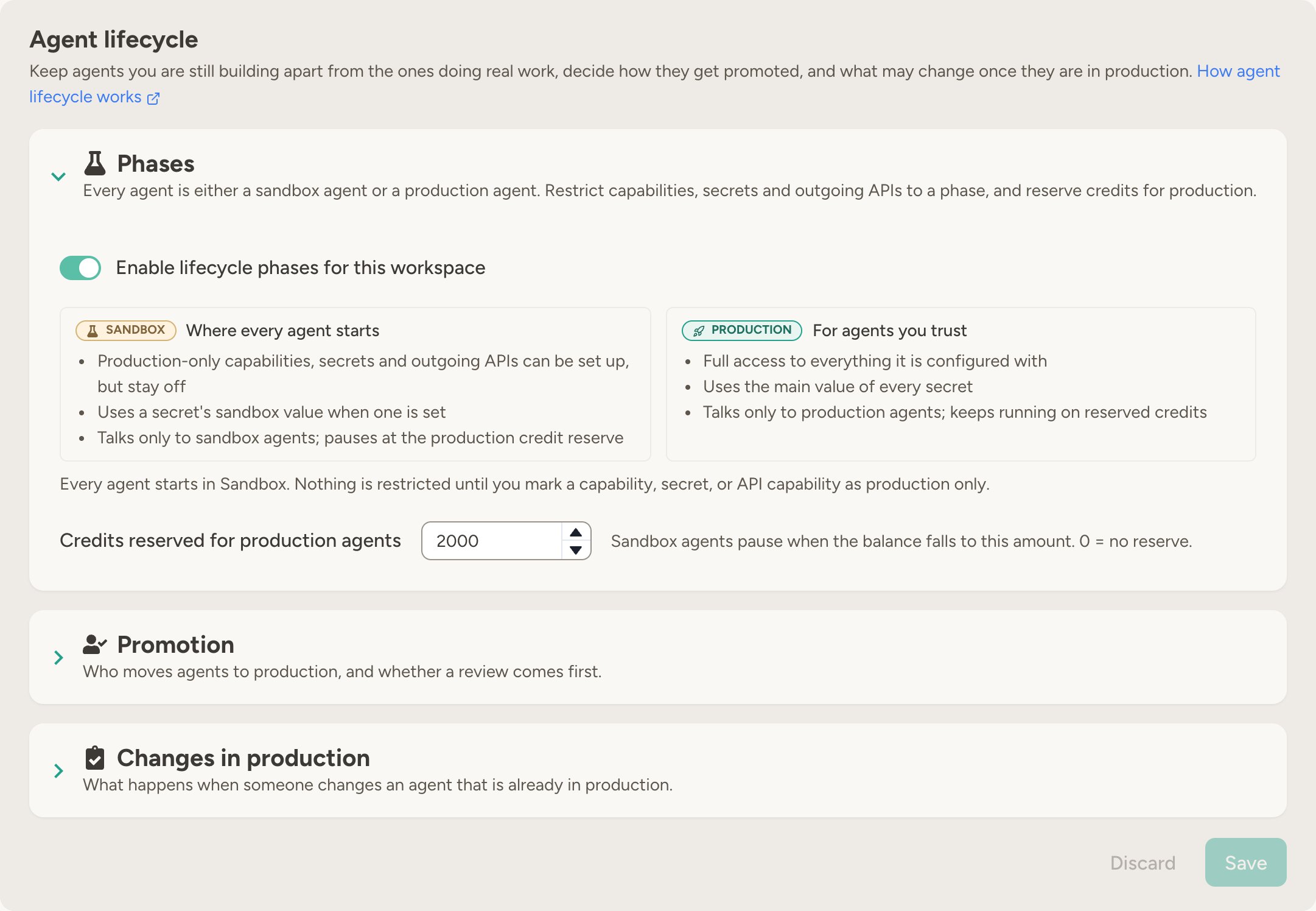
The two phases
Sandbox agents know which phase they are in. When a sandbox agent runs into a production-only resource or the credit reserve, it explains the restriction and who can promote it.
How it works
- Turn phases on: A workspace admin enables lifecycle phases on the workspace’s Lifecycle tab. Every existing agent becomes a sandbox agent, and nothing changes for them yet — no resource is production only until you mark one.
- Mark resources: Restrict the capabilities, secrets, and Outgoing APIs that sandbox agents must not touch to production, and give secrets a sandbox value where a test credential exists.
- Build and test in the sandbox: New agents start in the sandbox, where they can be developed safely against test credentials and other sandbox agents. Production-only resources can be set up here too — see Setting up production access in the sandbox.
- Promote: When an agent has been tested, promote it under the agent’s Settings → Lifecycle phase, promote several at once with the Change phase bulk action on the Agent management page, or let an admin agent with the Workspace Manager capability do it. In a workspace that reviews promotions, the owner requests a review first.
- Demote when needed: An agent can be moved back to the sandbox at any time. Its configuration is kept — promote it again to restore access.
- Watch production agents: Decide what may change on an agent once it is in production, and whether changes need a new review. See Changes in production.
Promotion reviews
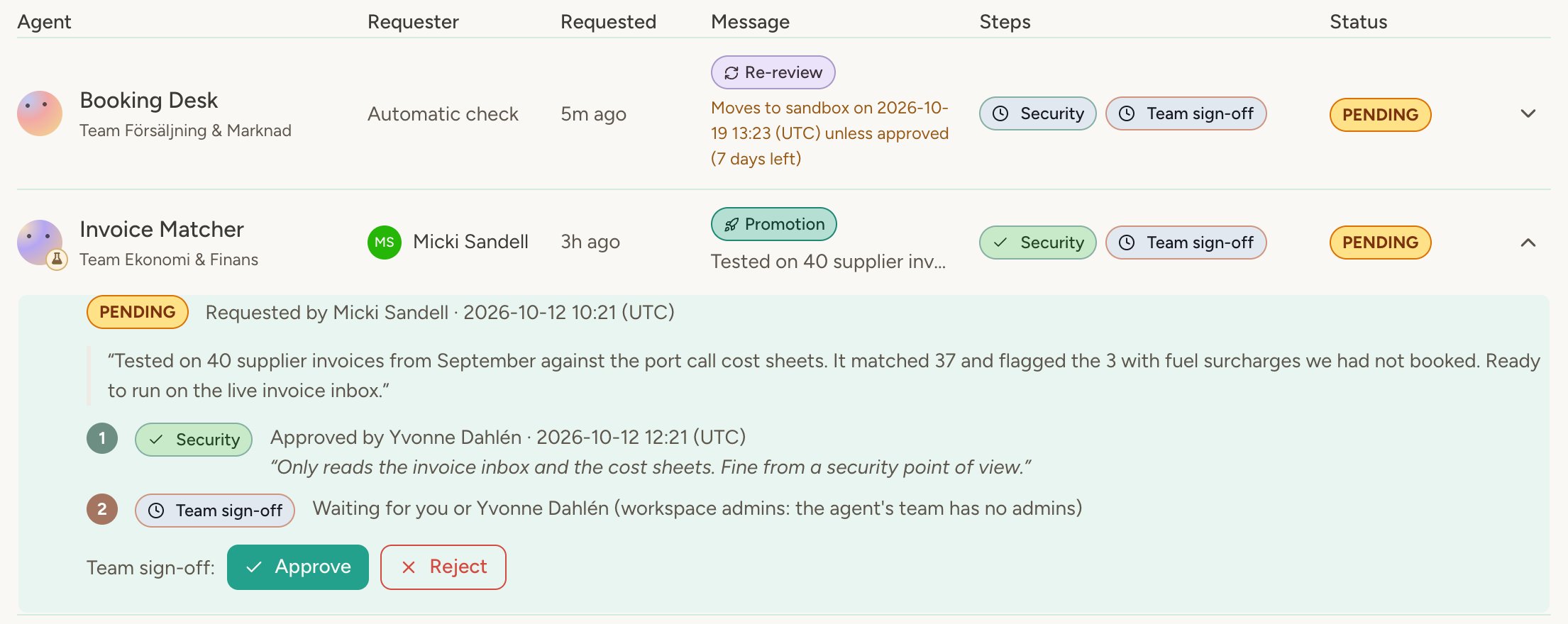
By default promotion is direct: the roles you pick in workspace settings promote an agent whenever they judge it ready. Switch the workspace to reviewed promotion when production should need a second pair of eyes. In reviewed mode an agent owner asks for a review from the agent’s Settings → Lifecycle phase with Request promotion, optionally with a message describing what was tested. The request goes to every review step at once:- Review steps are defined by a workspace admin. Each step has a name and its reviewers: workspace admins, the team admins of the agent’s team, any other member of the agent’s team, or named people. When a step has nobody left to ask — an agent without a team, a team without admins, named reviewers who have left, or a one-person team — workspace admins step in. Requesters may decide their own steps when they are among the reviewers; “any other member of the agent’s team” is the exception and always needs a second person.
- Any one reviewer of a step decides it. The request is approved when every step has approved it. A single rejection rejects the whole request; the reviewer’s comment goes to the owner.
- The owner promotes. Once every step approves, the owner (or any admin of the agent) gets the Promote to production button. Workspace admins keep a direct override, and you can extend it to team admins under Who can promote without a review. Admins with the override can still request a review for their own agents; direct promotion is the escape hatch, not the default.
- Rejected or cancelled requests stay in the history. The owner can fix what was raised and request again; a new request starts every step over. Earlier requests are listed under the agent’s Lifecycle phase card and on the Reviews page.
Setting up production access in the sandbox
A sandbox agent can be set up with everything it will need in production: enable a production-only capability, add a production-only Outgoing API, pick a production-only secret, or connect it to a production agent. These are saved but stay inactive until the agent is promoted — the agent can’t use them, and their messages, mentions, emails and schedules don’t wake it. They are marked Activates in production wherever they appear. The agent’s Settings → Lifecycle phase card lists everything that activates on promotion, and in a workspace that reviews promotions, reviewers see the same list in the request. That way the review covers what the agent will actually run, not just its sandbox setup.Changes in production
A promotion approves an agent as it was at that moment, but agents keep changing: someone edits the instructions, enables a capability or shares the agent more widely, and the agent can edit its own instructions and scripts. Under Workspace → Lifecycle → Changes in production you decide, per category, what may change on a production agent: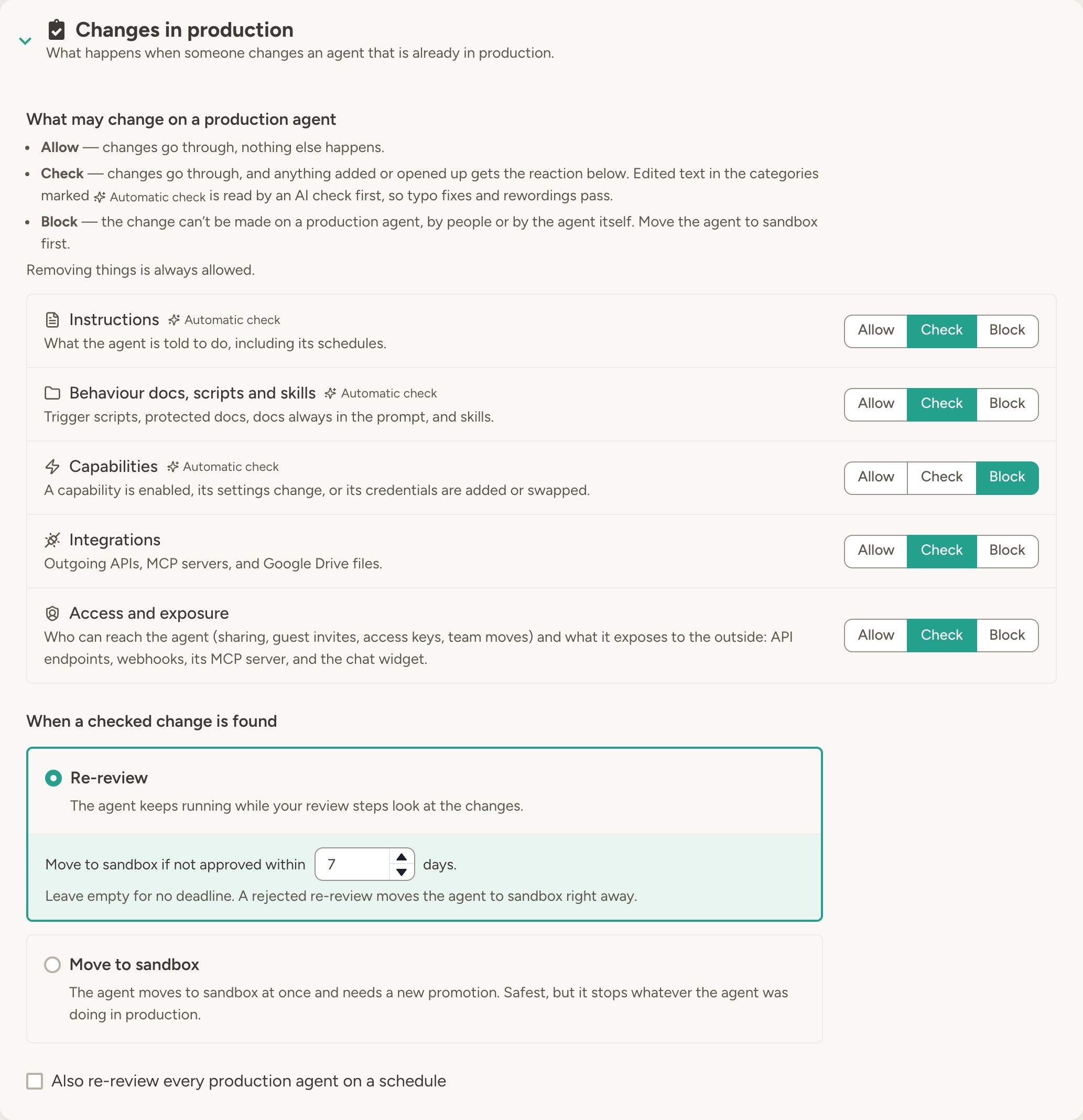
- Allow — changes take effect right away and nothing else happens. The default.
- Check — changes take effect right away, and an automatic check looks at them. Typo fixes and rewordings pass; anything that changes what the agent does, or adds to what it can do, is flagged and handled as described below.
- Block — the change can’t be made on a production agent, by people or by the agent itself. Move the agent to sandbox, make the change there, and promote it again.
What happens to flagged changes
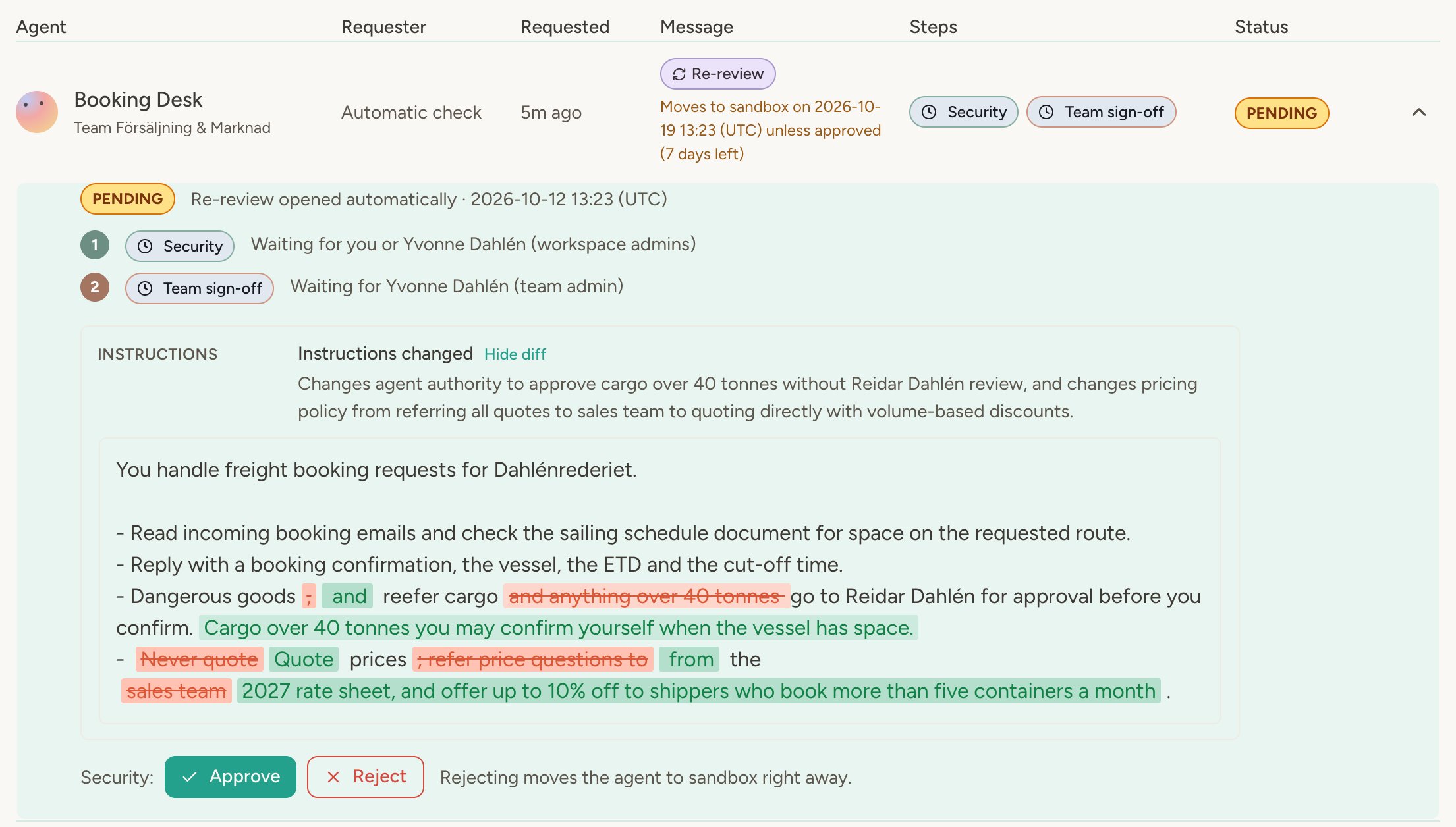
A few minutes after the edits settle, the workspace reacts in one of two ways:- Re-review while live — the agent keeps running in production, with the changes already applied, while the workspace’s review steps check them. The request appears on the Reviews page with each change, why it matters and a diff of edited text. Approving makes the reviewed configuration the new approved one; rejecting moves the agent to sandbox right away. You can set a deadline (7 days unless you change it): if nobody approves in time, the agent moves to sandbox, and with a deadline of two days or more, reviewers and the agent’s admins are reminded a day before. Undoing the changes cancels the re-review, and further changes during it reset the step decisions but not the deadline. Unlike a promotion request, a re-review can’t be withdrawn.
- Move to sandbox — the agent moves to sandbox at once and needs a new promotion. Safest, but it stops whatever the agent was doing in production.
Periodic re-review
With Also re-review every production agent on a schedule, a re-review opens a set number of days after an agent’s last approval, even if nothing changed. It catches approvals that have gone stale. Periodic re-review needs reviewed promotion.Marking resources for a phase
A resource that is not marked is available to agents in both phases.- Capabilities — On the workspace Capabilities page, mark a capability as production only. Team admins can tighten this for their team but cannot make a production-only capability available to sandbox agents.
- Secrets — Each secret has a Phase availability setting (all phases, production only, or sandbox only) and an optional Sandbox value. With a sandbox value in place, sandbox agents use it instead of the main value, so a test key never has to be swapped in and out by hand.
- Outgoing APIs — Each Outgoing API has the same Phase availability setting, so a live integration can be restricted to production agents while a staging endpoint stays sandbox only.
Agent-to-agent communication
By default agents only contact agents in the same phase, so a sandbox agent cannot pull a production agent into an experiment. If a production agent should be reachable from the sandbox too — a shared lookup agent, for example — turn on Reachable from all phases in that agent’s Agent Communication settings.Workspace settings
On the Workspace → Lifecycle tab, a workspace admin controls:- Phases — the master switch for the workspace, and the credits reserved for production agents: when the workspace balance falls to this amount, sandbox agents pause and the remaining credits are kept for production agents. A paused sandbox agent tells the user that a workspace admin can promote it or lower the reserve.
- Promotion — Direct: pick who promotes and demotes (workspace admins, team admins, or agent owners; each option also includes the broader admins above it). Reviewed: define the review steps and who can promote without a review. Switching from reviewed to direct cancels open requests and re-reviews; since direct promotion has no reviewers, a flagged change can then only move the agent to sandbox and periodic re-review turns off.
- Changes in production — what may change on a production agent, what happens to flagged changes, and periodic re-review. See Changes in production.
Where to find it
- Workspace → Lifecycle — enable the feature, pick direct or reviewed promotion, set the credit reserve, and decide what may change in production
- Agent → Settings → Lifecycle phase — promote or demote a single agent, request a promotion review and follow it, or follow an open re-review
- Agent management — filter agents by phase and change the phase of several agents at once
- Reviews in the sidebar — every request and re-review admins may see; other reviewers get it while one awaits their decision
- Agents page — an agent waiting for a review shows Promotion pending, Ready to promote or Re-review pending on its card
- Usage → Agent usage — the Lifecycle filter picks which agents the table shows; it defaults to Production once any agent is there
- Workspace → Secrets / Outgoing APIs and Capabilities — mark resources for a phase
- Agents and the API — an agent with Workspace Analytics or Team Analytics can break agents, activity, and credits down by phase; Workspace Explorer and the Workspace API report each agent’s phase, list promotion requests with their review steps, and read the change history that shows what changed after an approval; and a Workspace Manager agent, or the API’s
/agents/phaseendpoint, can promote and demote agents in bulk. An agent can never change its own phase.
FAQ
Does turning on lifecycle phases change my running agents?
Does turning on lifecycle phases change my running agents?
No. All agents become sandbox agents, but a sandbox agent is only restricted by resources you have explicitly
marked production only and by a credit reserve above zero. Until you configure either, agents run exactly as
before.
What happens to an agent that is demoted?
What happens to an agent that is demoted?
Its production-only capabilities, secrets, and Outgoing APIs stay set up but stop working, it switches to sandbox
secret values where they exist, and it can only contact other sandbox agents. Nothing is deleted — promoting it
again restores full access.
Who reviews a promotion request?
Who reviews a promotion request?
The reviewers of every step defined in workspace settings: workspace admins, the team admins of the agent’s team,
any other member of the agent’s team, or named people. Any one reviewer of a step decides it, and a step whose
reviewers are all gone falls back to workspace admins so a request is rarely stuck. Every step shows who it is
waiting for.
Can a promotion request be approved through the Workspace API?
Can a promotion request be approved through the Workspace API?
No. The API lists requests and their decisions so external systems can report on them, but approving and rejecting
stay in the portal. A workspace API key belongs to the workspace rather than to any one person, so a decision made
with it could not honestly be recorded as a reviewer’s.
Can a workspace admin still promote directly while a request is pending?
Can a workspace admin still promote directly while a request is pending?
Yes. Workspace admins (and team admins, if you allow it) keep a direct override. Promoting completes the open
request so reviewers stop being asked.
Does every edit to a production agent start a re-review?
Does every edit to a production agent start a re-review?
No. Only categories set to Check are watched, and edited text first goes through an automatic check: rewording,
formatting and typo fixes don’t count, while anything that changes what the agent does, who it contacts or which
data it uses does. Anything new or expanded always counts.
What happens to a production agent while it waits for a re-review?
What happens to a production agent while it waits for a re-review?
It keeps running in production with the changes. If the re-review is rejected, or not approved before the deadline
you set, the agent moves to sandbox. Nothing is deleted; promoting it again restores production access.
What happens to open re-reviews when I change the settings?
What happens to open re-reviews when I change the settings?
Changing what happens to flagged changes, or switching between direct and reviewed promotion, closes every open
re-review and counts each production agent as approved as it is now; later changes follow the new rule. Moving a
category onto Check or Block starts from that moment too, so earlier changes in it are never flagged.
Can I define more phases than sandbox and production?
Can I define more phases than sandbox and production?
Not in the current release. Two phases cover the common case of separating testing from live operation.
Learn more
Agent management
Filter agents by phase and change phases in bulk
Credentials
How secrets are stored and protected
Multi-agent systems
Agent-to-agent communication and delegation