

Why use evals
Catch regressions. You improve one behavior and accidentally break another. Evals catch this before your users do. Compare models. Run the same tests across Claude, GPT, and Gemini to find the best fit for your use case—or discover a cheaper model works just as well. Ensure consistency. Unlike manual testing, evals check the same criteria every time. No more “it worked when I tried it.” Iterate with confidence. Refine instructions, adjust capabilities, experiment freely—evals tell you if you’re making progress.Quick start
The fastest way to understand evals is to create one.- Navigate to your agent’s Evals tab and click Add Eval
- Give it a name: “Knows its own name”
- Enter a trigger prompt: “What is your name?”
- Enter a grader prompt: “Pass if the agent identifies itself as Scout (or whatever your agent is called). Fail if it gives a different name or says it doesn’t have one.”
- Click Save, then click Run
How evals work
Each eval follows a simple flow:- Trigger — You define a prompt that simulates a user message or scenario
- Execute — The agent processes the prompt using its regular configuration
- Validate — Optional validation rules check tool usage (was tool X called?)
- Grade — An optional grader evaluates the response against your criteria, using either a grader model or a script
Creating an eval
Navigate to your agent’s Instructions page and Evals tab and click Add Eval. The eval editor has three tabs: Test Prompt, Tools, and Grader.Test prompt tab
Write the prompt your agent will receive when the eval runs. This simulates a user message or scenario.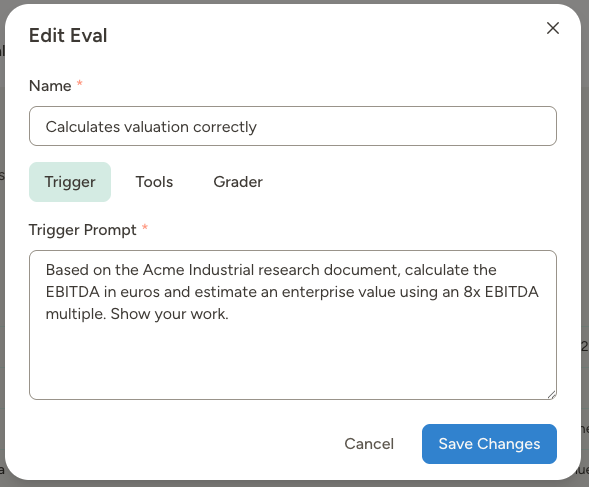
- “Evaluate this company: Acme Industrial, $45M revenue, manufacturing sector, Germany”
- “Research Nordic Components AB and assess fit against our investment criteria”
- “Is TechStartup Inc ($2M revenue, SaaS, San Francisco) worth pursuing?”
- Execution mode
- Chat (default): Runs like a normal chat message
- Trigger: Runs through the trigger pipeline used for autonomous events (useful for testing trigger-based behavior)
- Clone the agent for this eval
- On (default): Runs on a temporary clone to isolate state changes
- Off: Runs against the real agent state
- Include the agent’s system prompt
- On (default): The model receives the agent’s system prompt and identity, just like a real chat or trigger
- Off: Sends only the test prompt with no agent identity or instructions. Useful for benchmarking raw model capabilities side-by-side, independent of your agent’s instructions. Tools are controlled separately on the Tools tab — exclude them there if you want a fully tool-free run.
Tools tab (optional)
Here you can exclude or fake specific tools during the eval.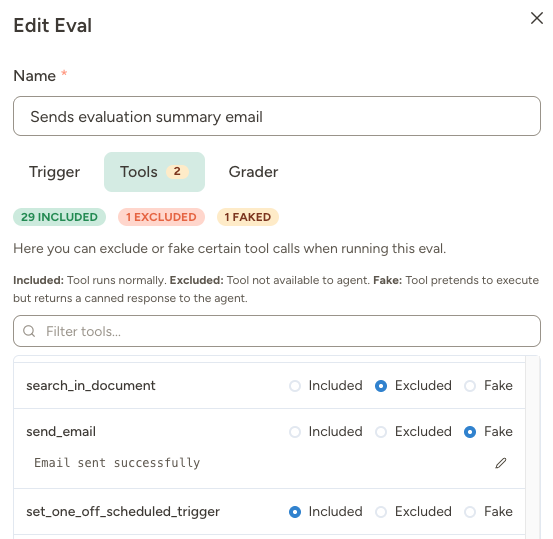
When to fake tools:
- Prevent side effects — Fake
send_emailso the agent thinks it sent an email, but nothing actually goes out - Control inputs for deterministic testing — Fake
perplexity_researchto return specific company data, so you know exactly what answer to expect - Speed up tests — Fake slow external API calls
- Test how the agent handles missing capabilities
- Ensure the agent doesn’t use certain tools for specific scenarios
Faked tools return a default message: “This tool was faked for testing. Assume it succeeded and continue normally.” You can customize this per-tool.
Grader tab
This is where you define how the eval result is determined.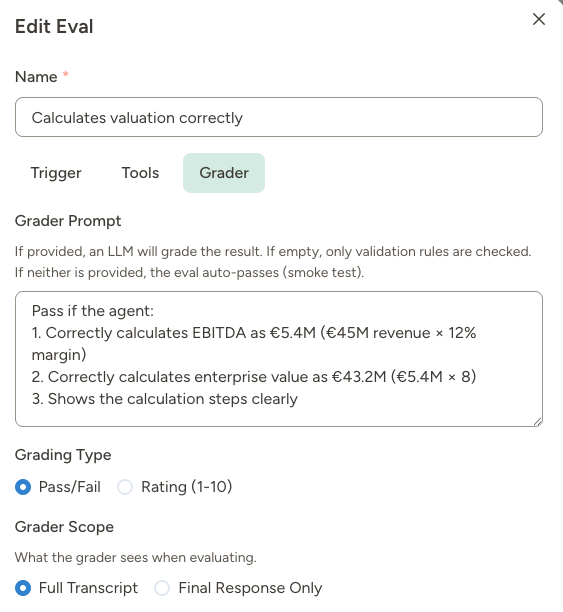
Grader prompt (optional, grader model only) — If provided, an LLM examines the transcript and uses your prompt to determine the result.
For a screening agent:
- “Pass if the agent correctly identified this target doesn’t meet our minimum revenue criteria ($20M) and rejected it.”
- “Rate the research completeness from 1-10. Award 2 points each for: revenue verified, ownership structure found, industry position assessed, geographic presence confirmed, M&A history checked.”
Grader scope (grader model only) — What should the grader see?
Validation rules (optional) — Code-based assertions about tool usage. These run before the grader and fail fast if not met.
To configure validation rules in today’s UI:
- Click Edit Rules in the Grader tab.
- For each tool, click Must be called or Must NOT be called.
- Use Filter tools to quickly find a tool in larger tool lists.
- Click Done to return to the summary list, where each rule shows a checkmark/X icon and can be removed individually.
Grading with a script
Select Script as the grader and pick one of the agent’s script documents. The script decides the verdict itself, so no grader model runs and grading costs no credits. The script uses the same signature as trigger scripts,(async function(args) { ... }), and receives:
A grader script runs in the same sandbox as trigger scripts, with two deliberate differences:
- It cannot call tools.
callTool()always fails. A grader judges what already happened, so it has no reason to reach your agent’s capabilities or your data. - It times out after 60 seconds, rather than the usual 30 minutes, so a stuck grader can’t hold up an eval run.
finalResponse is empty when the agent’s last turn was only tool calls with no text. Check for an empty string before grading it, and fall back to transcript if you need to inspect what the agent actually did.Managing eval definitions
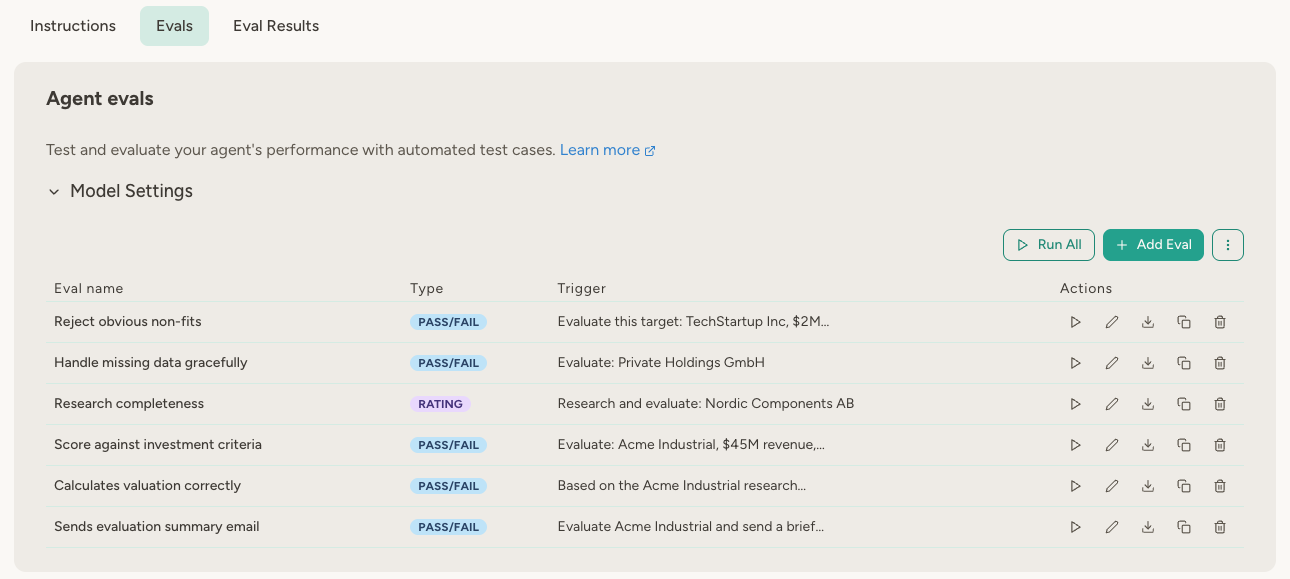
From the eval list, you can quickly:- Run an eval
- Edit an eval
- Duplicate an eval (useful when creating variants)
- Export an eval as JSON
- Delete an eval (including all results linked to it)
Running evals
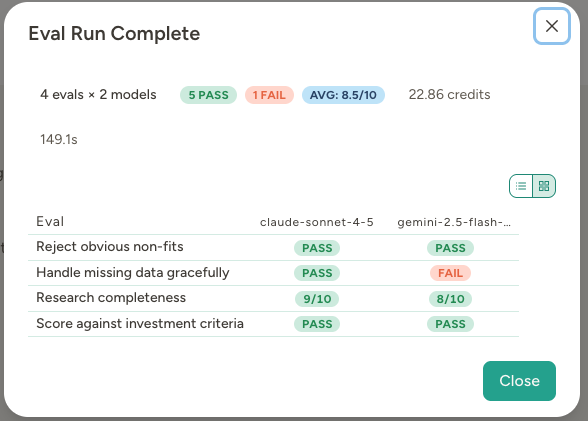
Once your eval is defined, click the play button on that row to run it, or click Run All to run all evals at once. A run summary modal opens immediately and shows live progress while results arrive. You can also abort an in-progress run from this modal. When the run completes, you can inspect results there or later in the Eval Results tab.Evals consume credits for both execution and grading. Running against multiple models multiplies usage proportionally.
Model settings
Expand Model Settings in the Evals tab to configure: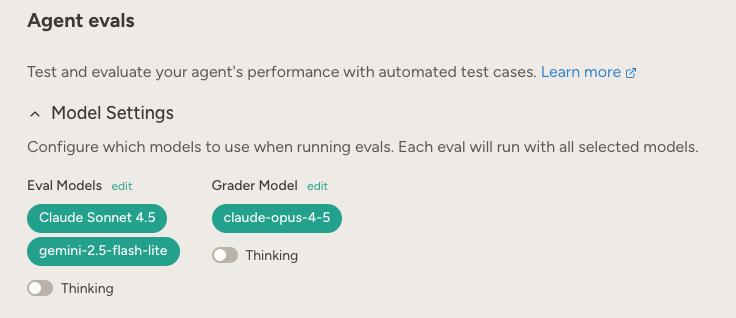
If your workspace admin disables a model, it is excluded from eval runs and removed from the model picker. Previously selected disabled models remain in your config but are shown as orange warning tags — re-select a different model to keep that comparison active.The grader model works differently, because a run with no grader can’t produce verdicts: if it is disabled or no longer available, the run is refused before it starts, with a message telling you to pick a new one. Nothing is spent.
Viewing results
The Eval Results tab shows your eval history organized by run.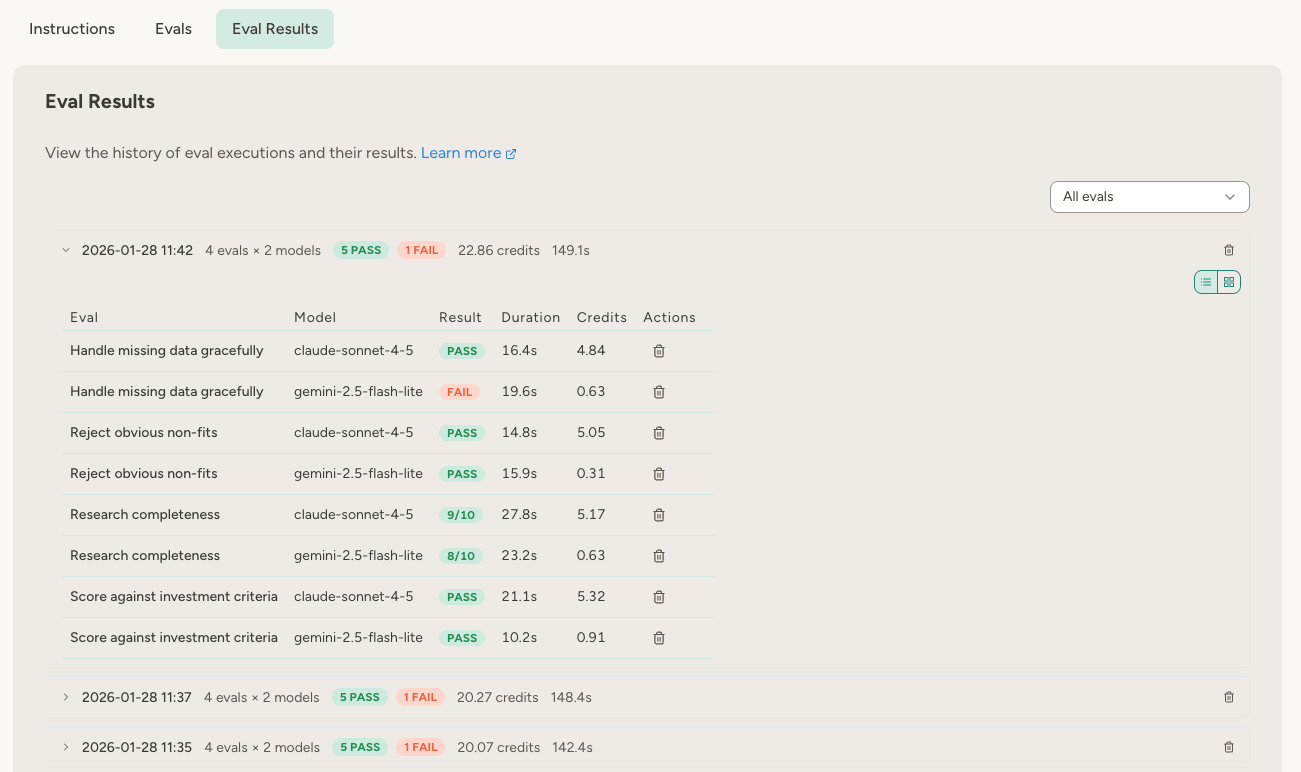
- The main value shows test credits (agent execution).
- If grader costs are present, they appear as a side note (for example,
7.98 credits (+8.66 grader)).
- List view — Results listed by eval and model
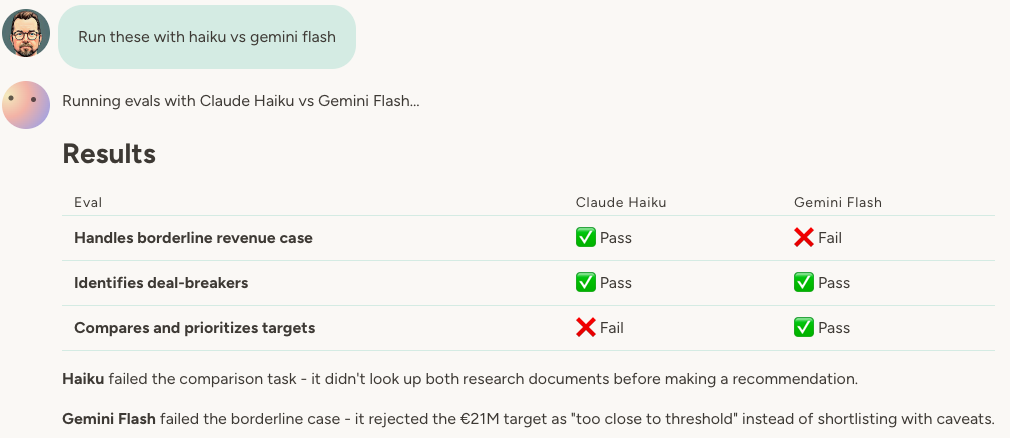
- Grid view — A matrix of eval × model, where each cell shows pass/fail/rating. Useful for comparing how different models perform on the same tests.
Result details
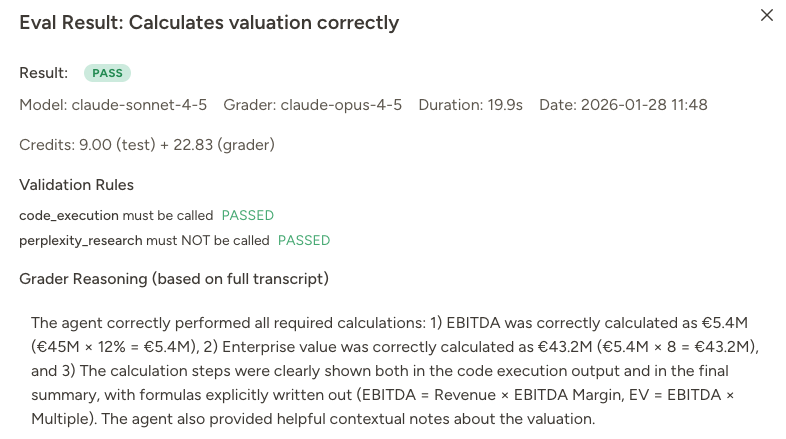
Click on the Pass/Fail/Rating badge to see more details about the eval run.- The agent’s complete response
- Grader reasoning (why it passed or failed)
- Validation rule results
- Test credits and grader credits shown as separate values
- Full conversation transcript including tool calls
- Friendly format for quick human review
- Raw JSON for full structured data
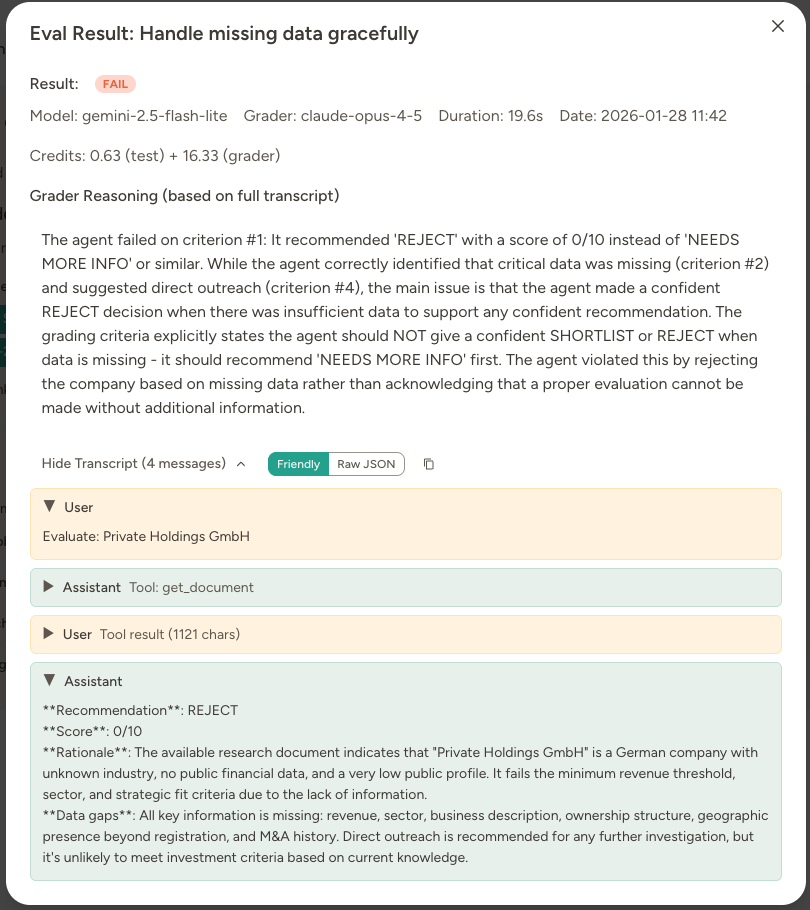
Sub-agent calls in transcripts
If your agent delegates or calls another agent during an eval, the sub-agent runs with its own tools and configured model. Its full conversation is captured and shown as a nested, collapsible transcript inside the parent’s tool call, labelled with the sub-agent’s name and model. Tool actions performed by a sub-agent are real (e.g. document edits) unless you fake or exclude those tools in the eval configuration. Agent-to-agent calls can recurse up to 3 levels deep within an eval.Managing run history
In Eval Results, you can manage runs as units:- Give a run a custom name for easier tracking
- Delete an entire run (all results in that run)
- Open a run summary grid to compare evals across models
Writing effective evals
Now that you understand the mechanics, here’s how to write evals that actually catch problems.Write deterministic grader prompts
Include the expected answer so the grader can simply check—don’t make it figure out what “correct” means. Think of it like a teacher intern grading a test. The intern shouldn’t solve the problems themselves—they should have an answer key. You’re testing the agent, not the grader. Good (deterministic):- “The target should be rejected. Revenue 2 million USD is below our 20 million USD minimum threshold.”
- “Research completeness should include: revenue source identified, ownership structure mapped, industry position assessed.”
- “Check if the investment analysis is accurate.”
- “Verify the research is thorough.”
Control inputs for deterministic testing
To write deterministic graders, you need to control what the agent sees. Two approaches: 1. Fake tools with predetermined responses: For a screening agent, fakeperplexity_research to return specific company data:
- Tool override:
perplexity_research→ Faked with: “Nordic Components AB: €52M revenue, family-owned since 1985, automotive parts manufacturing, headquarters in Sweden with plants in Germany and Poland” - Grader: “Check that the agent identified: revenue €52M (above threshold ✓), family-owned (succession opportunity ✓), manufacturing sector (matches criteria ✓), European presence (✓). Should recommend adding to shortlist.”
- Trigger: “Evaluate this target based on the following data—do not perform additional research: Company: Acme Industrial, Revenue: $45M, Sector: Manufacturing, Ownership: Family (founder retiring), Location: Munich, Germany”
Example: Target Screening Agent eval suite
Here’s how a complete eval suite might look for an investment screening agent:“Reject obvious non-fits” (Pass/Fail + Validation)
Scenario: Agent should reject targets that don’t meet basic criteria.- Trigger: “Research and evaluate this target: TechStartup Inc, $2M revenue, SaaS, VC-backed, San Francisco”
- Validation:
perplexity_researchmust be called - Grader: “Pass if the agent correctly identified this doesn’t meet criteria (revenue below $20M minimum, wrong sector, wrong geography) and rejected it without extensive research.”
”Score against investment criteria” (Rating 1-10)
Scenario: Assess the quality of the agent’s scoring logic.- Trigger: “Evaluate: Acme Industrial, $45M revenue, manufacturing sector, family-owned (founder age 68), based in Germany”
- Tool overrides:
perplexity_research→ Faked with predetermined company profile - Grader: “Rate scoring accuracy 1-10. A qualified target should score 7-8/10 based on: revenue above threshold (✓), manufacturing sector (✓), European location (✓), succession situation (✓). Deduct points if scoring seems arbitrary or doesn’t reference specific criteria.”
”Research completeness” (Rating 1-10)
Scenario: Ensure the agent gathers sufficient information before scoring.- Trigger: “Research and evaluate: Nordic Components AB”
- Tool overrides:
perplexity_research→ Faked with partial company data - Grader: “Rate research completeness 1-10. Award 2 points each for: revenue verified, ownership structure identified, industry position assessed, geographic footprint mapped, M&A history checked.”
”Handle missing data gracefully” (Pass/Fail)
Scenario: When information is unavailable, the agent should acknowledge uncertainty.- Trigger: “Evaluate: Private Holdings GmbH”
- Tool overrides:
perplexity_research→ Faked with very limited results - Grader: “Pass if the agent explicitly notes which data points couldn’t be verified and either: (a) recommends direct outreach before scoring, or (b) provides a tentative score with clear caveats. Fail if it presents guesses as facts or gives a confident score despite missing information.”
Using evals to improve your agent
Scenario: Agent was too optimistic The “Reject obvious non-fits” eval kept failing—the agent was adding everything to the shortlist “for further review.” Fix: Added instruction: “If a target clearly fails to meet minimum criteria (revenue below $20M, outside target sectors, wrong geography), reject immediately. Don’t shortlist for ‘potential’ or ‘further review.’” Result: Eval now passes. Analysts spend less time reviewing obvious non-fits.Scenario: Research quality varied by model Ran “Research completeness” eval across three models:
- Claude Sonnet: 8/10
- Claude Haiku: 5/10
- Gemini Flash: 6/10
Scenario: Scoring was inconsistent The “Score against criteria” eval showed wild variance—same target got 6/10 one run, 9/10 the next. Fix: Added explicit scoring rubric to instructions: “Score 2 points for each criterion met: revenue above $20M, target sector, European presence, succession situation, strategic fit. Maximum 10 points.” Result: Scores now consistent within ±1 point across runs.
Import and export
Share evals between agents using JSON export/import. To export:- Click the Export icon on an eval row to export that single eval.
- Open the top-right actions menu and click Export All to export every eval.
Letting the agent manage its own evals
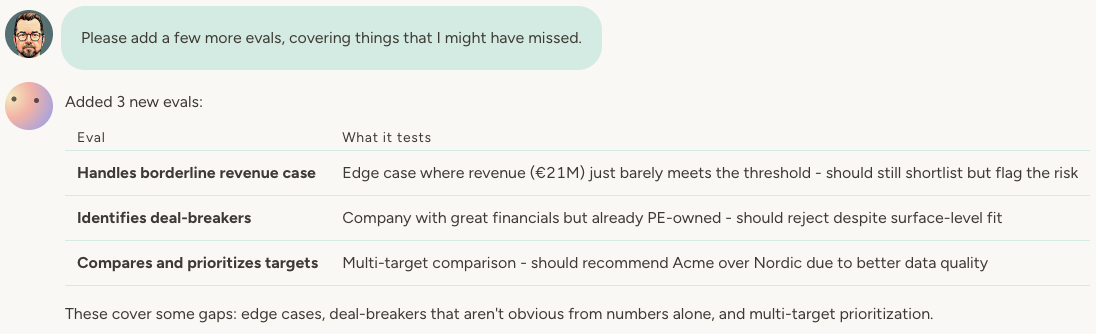
Toggle the Evals capability on to let your agent manage evals end to end. With this capability enabled, your agent can:- Create, replace, remove, and run evals
- Review eval run history and open full result details
- View and update eval model settings (including grader model and effort settings)
Eval design tips
- Start simple, add complexity. Begin with basic evals to verify functionality. Add grading criteria once you understand what “good” looks like.
- Control inputs for deterministic grading. Fake tools or simulate scenarios so you know exactly what answer to expect.
- Use validation rules for tool behavior. They’re faster and cheaper than graders for checking which tools were called.
- Fake tools with side effects. Always fake or exclude tools that send emails, make API calls, or modify external systems.
- Run evals after changes. Change instructions → run evals. Add capability → run evals. Update model → run evals.
- Use ratings for quality tracking. Pass/fail tells you if something works. Ratings (1-10) tell you if it’s getting better.
FAQ
Do I need a grader prompt?
Do I need a grader prompt?
No. Without a grader prompt, the eval operates in “smoke test” mode (passes if no errors) or “validation-only” mode (passes if validation rules pass). Add a grader when you need LLM-based evaluation.
Should I grade with a model or a script?
Should I grade with a model or a script?
Use a script when “correct” is something code can decide—exact totals, valid JSON, required sections present. It’s free, gives the same answer every time, and can’t be talked out of a verdict. Use a grader model when correctness needs judgment, like tone or thoroughness. Validation rules still run first either way.
Do eval runs have side effects?
Do eval runs have side effects?
By default, evals run on a temporary cloned agent, so state changes are isolated. If you disable cloning for an eval, then side effects are possible depending on enabled tools (for example, document edits).
Can I test that a tool was called with specific arguments?
Can I test that a tool was called with specific arguments?
Yes, if you mention that in the grader prompt. The normal tool validation rules only check whether a tool was called, not the arguments.
Can I schedule evals to run automatically?
Can I schedule evals to run automatically?
Evals are normally triggered manually. But if you enable the “Evals capability” on your agent, you can ask it to run them on a schedule.
How many evals can I create?
How many evals can I create?
No limit. Create as many test cases as needed to thoroughly validate your agent’s behavior.
Should I use a more capable model for grading?
Should I use a more capable model for grading?
That depends on the complexity of the grading criteria. If the criteria are simple, you can use a cheaper model for grading. If the criteria are complex, you should use a more capable model for grading. Experiment!