

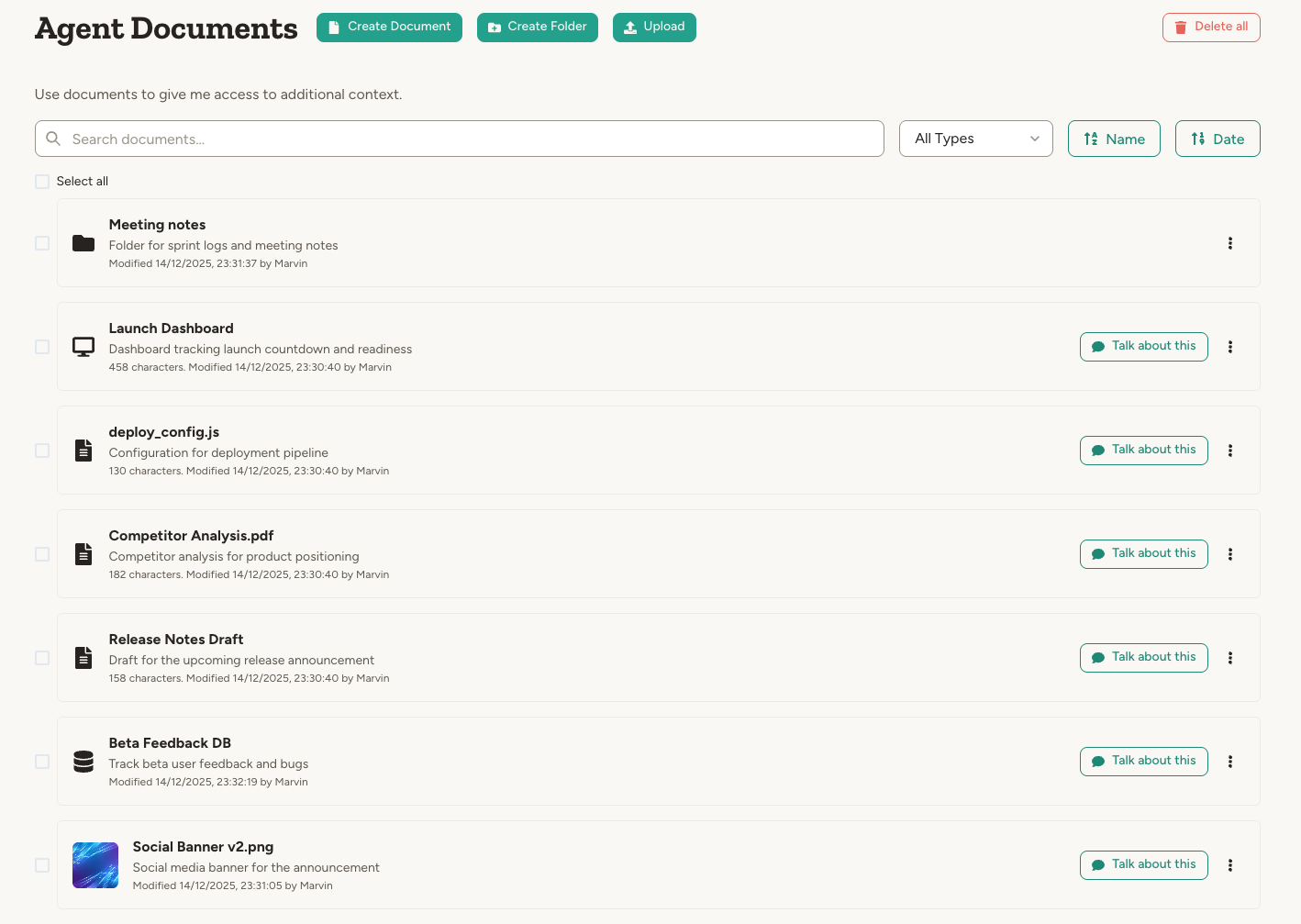
Where documents live
Documents are organized into three scopes, mirroring how teams share information in real life:- Workspace documents — Shared with everyone in your workspace. Find them on the Workspace page under the Documents tab. By default, only workspace admins can add, remove, and edit files; admins can adjust this under the workspace Settings tab, in the Documents section, to also let all members and/or agents edit.
- Team documents — Shared within a single team. Find them on the team’s home page under Documents. By default, only team admins can edit; team admins can adjust this under the team’s Settings tab, in the Documents section, to also let all team members and/or team agents edit. Workspace admins can always manage any team’s documents.
- Agent documents — Belong to a single agent. Find them in the agent’s Documents page. Anyone with edit access to the agent can manage them.
Supported file types
Documents are plain text by default—typically Markdown for simple formatting. You can also upload other file types:
A single document’s text or data is limited to about 15 MB. Anything larger — whether pasted into the editor or written by an agent — is rejected with a clear “too large” message rather than saved. Upload big files as files instead, or split the content into smaller documents. An oversized text attachment on an incoming email is skipped instead: the email still reaches the agent, just without that attachment.
For uploaded files (PDF, audio, video, etc.), the platform creates a text version that the agent works with. Transcription runs automatically in the background as soon as the file is uploaded — whether you drop it into a chat or add it to an agent, workspace, or team library — and a short description is auto-generated afterwards so the file is easier to find later. For example, upload a meeting recording (audio or video) and the transcript is ready moments later, so you can ask the agent questions about what was said. You can access the original via the Original file button. If you edit the text, it will diverge from the original—the agent always works with the text version.
Working with documents
Click any document to open it in a modal with a mode selector. Available modes depend on document type and context. Links follow a fixed pattern, so you can also build one yourself when you know the ids. Start from your Abundly address (https://app.abundly.ai, or https://<your-tenant>.app.abundly.ai on a dedicated deployment) and add:
- Agent document —
/portal/{workspaceId}/agent/{agentId}/docs?docId={documentId} - Workspace document —
/portal/{workspaceId}/workspace?docId={documentId}#documents - Team document —
/portal/{workspaceId}/teams/{teamId}?docId={documentId}#documents
https://app.abundly.ai/portal/68f3c1a04b2e5d7f9a0c1b23/agent/6902ab77c4d1e05f38b6a914/docs?docId=691f4d2c8ae30b5619cf7d82
Folders and apps use the same docId parameter — pass the folder’s id and the link opens that folder, or runs it when the folder is an app. Documents that live inside a chat have no link of their own; save one to the agent, team, or workspace library first.
Text mode
The text representation of the document—this is what the agent sees and works with. You can edit the text directly here.View mode
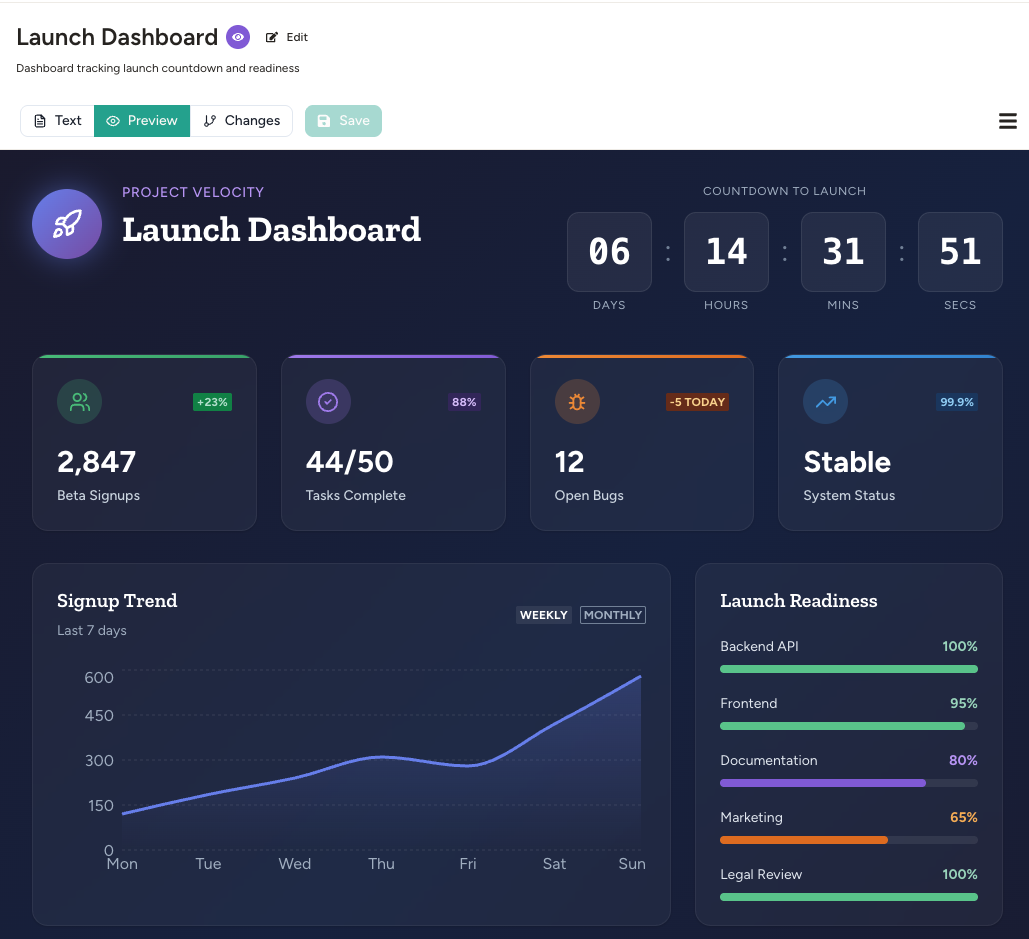
A visual rendering of the document, depending on its type:- Markdown → Rendered with formatting, headings, and links
- React or HTML → Live rendered application or web page
- Mermaid diagrams → Rendered flowcharts, sequence diagrams, etc.
- SVG → Rendered vector graphic (editable as text)
- Database documents → Interactive table view of the data
Data mode (for databases)
For agent databases, you can open a dedicated Data mode to view and edit raw JSON plus the schema.Changes mode
A version timeline showing every change made to the document. Click any version to view it, or click between two versions to see a diff of what changed. You can approve or undo individual changes, or revert to any previous version.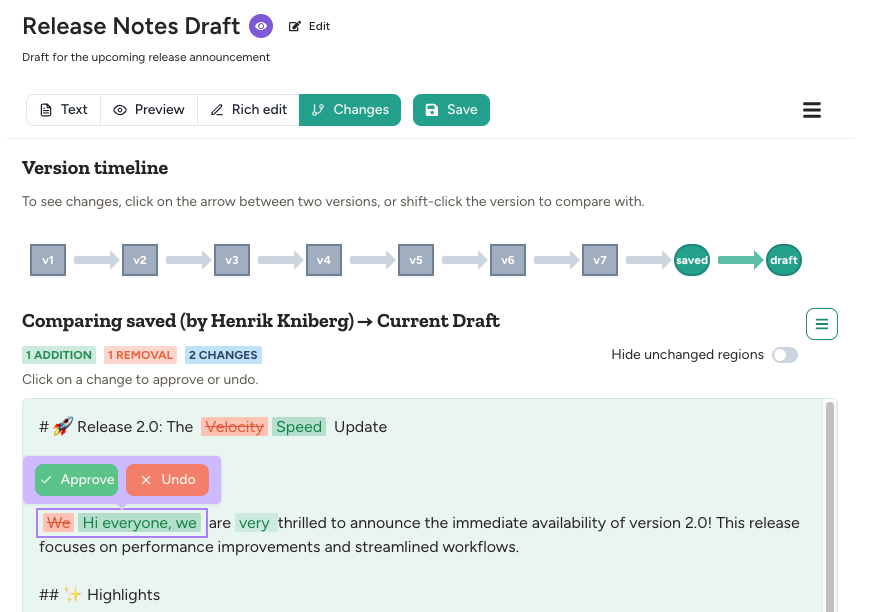
Visibility levels
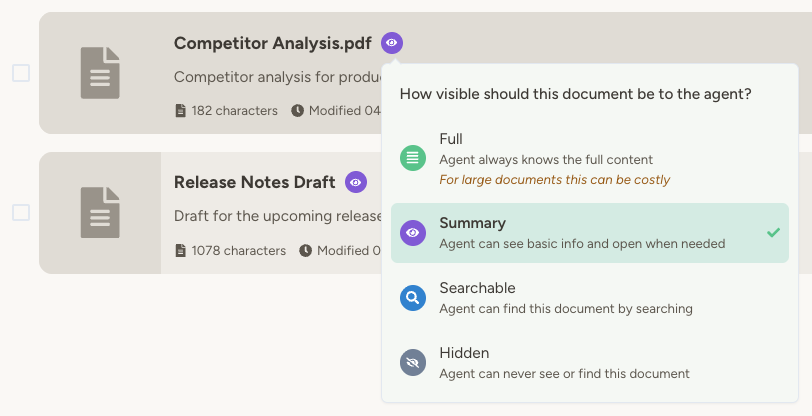
Documents have two separate controls:- Visibility to the agent controls what your agent can discover and read while working.
- Publishing controls whether people outside your workspace can open a public link.
To change visibility, click the visibility icon next to the document name in the Documents panel. Agents can set a document to Summary or Full, but only people can make one Hidden.
Folder visibility
Folders have their own visibility control with just Visible and Hidden (folders have no content of their own, so Full doesn’t apply). Click the visibility icon next to a folder name to change it. Hiding a folder cascades to everything inside it:- Every document and sub-folder underneath is treated as Hidden for the agent, regardless of the child’s own visibility setting.
- The folder and its contents disappear from the agent’s system prompt, from search results, and from folder browsing tools.
- In the Documents panel and file explorer, descendant documents and sub-folders show their visibility badge greyed out, with a tooltip explaining that an ancestor folder is hiding them — so you can tell at a glance which items are hidden because of a folder rather than their own setting.
- People who can see the workspace still see the folder normally in the Documents panel and the in-chat file explorer—only the agent’s view is affected.
Adding documents
You can add documents in three ways. The flow is the same for workspace, team, and agent documents—open the corresponding Documents page or tab and use the same controls. 1. Upload or create directly Each Documents view has Create document and Upload document buttons at the top—use them to start a new text document or upload files from your computer. You can also drag files straight onto the list. Each section and folder still has a kebab menu with New Folder, New Document, and Upload when you want to add content into a specific folder, and individual documents and folders have a row-level menu (⋮) with Rename, Move, and Delete so you can manage items right from the list without opening them first. 2. Save from a conversation Drag a file into the chat, discuss it with the agent, then ask it to save the result. For example:- Drag a meeting transcript, ask for a summary, then “save this as an agent document”
- Ask the agent to draft a newsletter, refine it together, then “save this to the newsletters folder”
- “When processing an invoice, add it to the processed invoices database”
- “Save all incoming emails to a message log”
- “After posting release notes, save a copy to the ‘release notes’ folder”
- “When you receive an email with an attachment, save it as an agent document”
Finding documents
Each Documents view—agent, workspace, or team—has a free-text search field at the top. It matches by document name, description, or type, and results appear as a flat list with folder-path breadcrumbs so you can see where each match lives. The search is scoped to the current section, so a workspace-documents search won’t surface agent or team documents. The search loads the whole library up front, so results appear straight away even in libraries with thousands of documents. When a query matches more items than the view can show, the field tells you how many extra matches were left out — narrow the keywords to reach them.Organizing with folders
Documents can be organized into folders. Create folders in the Documents panel and drag documents to organize them. Folders can be nested as deeply as you need, and nesting works the same way across workspace, team, agent, and chat document libraries. Reference folders in your agent’s instructions: “Save meeting notes to the ‘meetings’ folder.” Deleting a folder that still contains documents or sub-folders prompts for confirmation and shows what will be removed, so you don’t lose files by mistake.Version control
Every edit—by you or the agent—creates a new version automatically. The Changes mode lets you:- Browse history — See all versions with timestamps and who made each change
- Compare versions — Side-by-side diff view to see exactly what changed
- Approve or reject — Optionally mark changes as approved or rejected (rejecting creates a new version with that change undone)
- Revert — Roll back to any previous version if needed
Publishing documents
You can publish a document to make it available to anyone with the link. Open the document menu and choose Publish (or Publish details if it is already published). This works for documents in any scope—workspace, team, or agent. Anyone with the link can view the document—no Abundly account required. If it is an app, they can interact with it. Published documents are marked with a Published badge in the Documents view. Logged-in visitors can also use Copy to my agent from the viewer to clone the published document into one of their own agents—handy for sharing templates, dashboards, or reference material across workspaces. Use cases:- Share a live dashboard with colleagues
- Publish an input form for data collection
- Share reports, drafts, or documentation externally
- Create a public-facing interactive app
- Read to query and view data
- Create to insert new items
- Update to modify existing items
- Delete to remove items
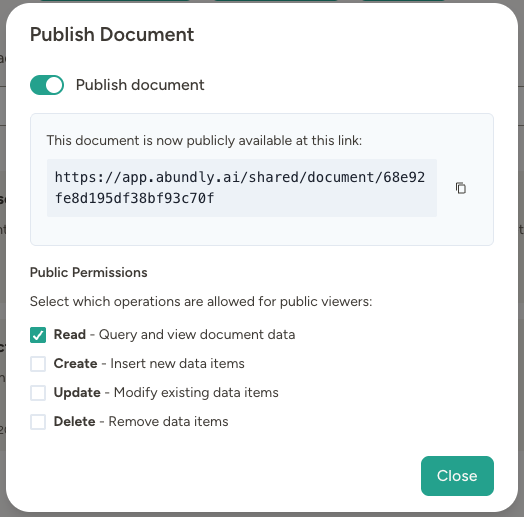
Turning off publishing for a workspace
Workspace admins can disable document publishing for the whole workspace under Workspace → Settings → Documents. When it is off:- New publish attempts are rejected everywhere — the Publish button, agent tools that generate public images or audio, and any external API that tries to set a document as published all refuse the change.
- Any documents that were already published stop resolving at their public links, and any external referrers (for example agent-sent emails with embedded images, or published apps that load their own assets) will no longer work until publishing is turned back on.
Editing and searching documents
Agents don’t need to rewrite entire documents to make changes. They can:- Edit precisely — Replace, insert, or append text
- Search within a document — Exact match, full-text, or semantic (meaning-based) search
- Find documents — Fuzzy keyword matching across names, descriptions, and content. In very large libraries the agent gets the most relevant matches back plus a count of the remaining ones, so it can narrow the query rather than stalling on an unbounded result set
- Browse folders — Page through very large folders instead of trying to load everything at once
- Rename and describe — Update document names and summaries
Copying and downloading documents
Use Copy text content to copy a document to the clipboard. For Markdown documents (including uploaded files whose text has been extracted to Markdown), both a formatted version and the raw Markdown are placed on the clipboard in one copy — so pasting into rich editors like Slack, Google Docs, Word, or email keeps headings, bold text, lists, and tables, while “Paste without formatting” (Cmd/Ctrl+Shift+V) or plain-text-only targets receive the raw Markdown. You can download individual documents in several formats:- Download file — Get the document as a file with its own extension (
.md,.csv,.json, …). For uploaded files whose text has been extracted, this appears as Download text content and gives you the extracted text. - Download as MS Word — Convert Markdown content to a
.docxfile - Download as PDF — Convert a document to a PDF. Markdown, rendered documents (HTML, SVG, React apps), and embedded images are all included.
- Download original — For non-text files (PDF, audio, etc.), download the original file
Documents as extended context
Agent documents are a powerful way to give your agent additional context without bloating its instructions. Instead of pasting everything into the instructions, store reference materials as documents:- Checklists — Step-by-step procedures for specific tasks
- Templates — Formats for reports, emails, or communications
- Guidelines — Company policies, compliance rules, or style guides
- Reference data — Product catalogs, contact directories, FAQs
- “Before responding to compliance inquiries, read the compliance guidelines document first”
- “When drafting emails, use the email template in the templates folder”
- “All meeting notes are saved by date—search for them when you need context”
Chatting about documents
Click Chat about this next to any document to start a new conversation about it. The document is attached to your first message and a short prompt is prefilled — edit it or add your question, then send. The agent has immediate access to the document, making it easy to ask questions, request edits, or work through the content together. For folders, use Chat about this folder. The folder is attached the same way, and sending the first message includes a recursive listing of its documents and subfolders — names, ids, and descriptions only, not the full contents — so the agent knows what’s inside and can pull up any specific document on demand with its document tools.FAQ
Where are my documents stored?
Where are my documents stored?
It depends on the document type:
- Agent documents (created directly in Abundly) are stored in EU data centers in Stockholm, Sweden. They remain fully under your control—you can delete them at any time.
- External documents (Google Drive, SharePoint, etc.) remain on their original provider’s servers. The agent accesses them through your permission but doesn’t copy them to Abundly’s infrastructure.