

Available channels
By default, only chat is enabled. This is a security measure—you decide how your agent is allowed to communicate. Go to Settings → Capabilities to enable additional channels.
Enabling communication channels
If you ask your agent to use a communication channel that isn’t enabled, it will show you a capability card where you can toggle it on. You can also proactively enable channels in Settings → Capabilities before you need them.Example use cases
- “Every Monday morning, email me a summary of last week’s incoming book manuscripts”
- “Post a summary of this conversation to the #engineering Slack channel”
- “When you receive support tickets via email: Check the knowledgebase. For simple questions with obvious answers, reply yourself. Otherwise, text me and create a ticket in Notion.”
- “When a new lead fills out the contact form, research their company, send them a personalized welcome email using the template I gave you, and post a summary to #sales on Slack.”
Multi-modal content
Beyond text, agents can work with different types of media:- Images — Generate, analyze, and include images in messages
- Audio — Transcribe recordings, generate voiceovers
- Documents — Read and create PDFs, presentations, spreadsheets
- Diagrams — Generate visual diagrams and charts
Generating voiceovers
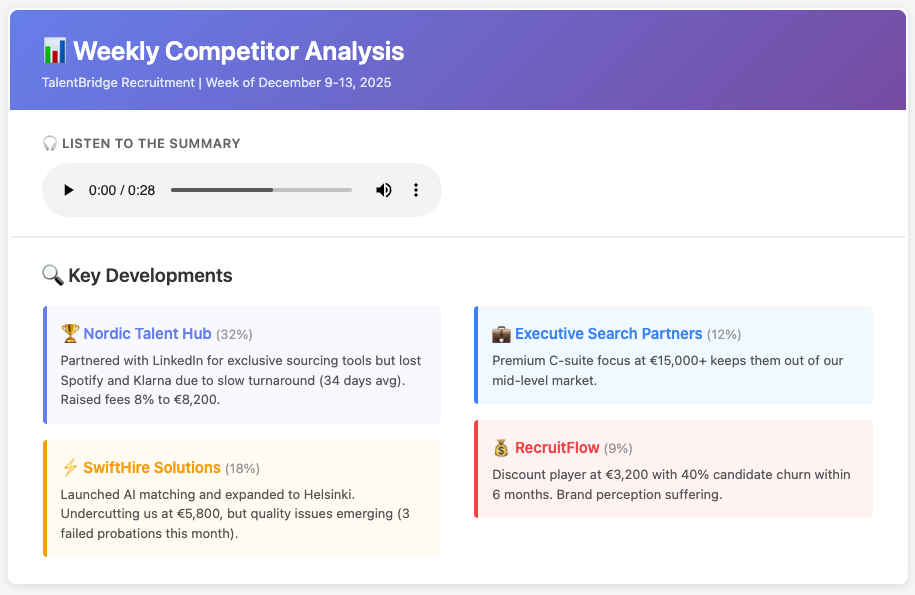
Your agent can generate audio files and embed them in emails, documents, and messages. This is useful when you want content that can be consumed on the go—during a commute, while exercising, or between meetings. How to enable: Go to Settings → Capabilities and enable Text to Speech. Example use cases:- “Generate a voiceover for this script using a male Scottish voice”
- “Every morning, generate a ‘daily briefing’ that I can listen to while driving to work”
- “In the weekly competitive analysis email, include an audio clip of the executive summary”
Other examples
- “When you receive an email with a voice memo attached, transcribe it and add the notes to my meeting log”
- “When a customer sends a photo of a damaged product, analyze it and draft a response”
Learn more
Advanced chat
Rich chat interface with voice input, file uploads, and interactive apps
Email & SMS
Send and receive emails and text messages
Voice
Voice input, text-to-speech, and phone calls