

Code vs agent vs human
Knowledge work in organizations is traditionally carried out by either code or by humans. Agents are a new option—not quite code, not quite human, but somewhere in between.
This isn’t an “either/or” choice. Agents can use code for computations and data processing. Agents can interact with humans for approvals and escalations. The question is: which tasks benefit from having an agent involved?
Step 1: Map how you spend your time
Start by analyzing how your team spends its time. What does a typical week look like? Make a list of the different types of tasks you do—each sticky note represents a task type.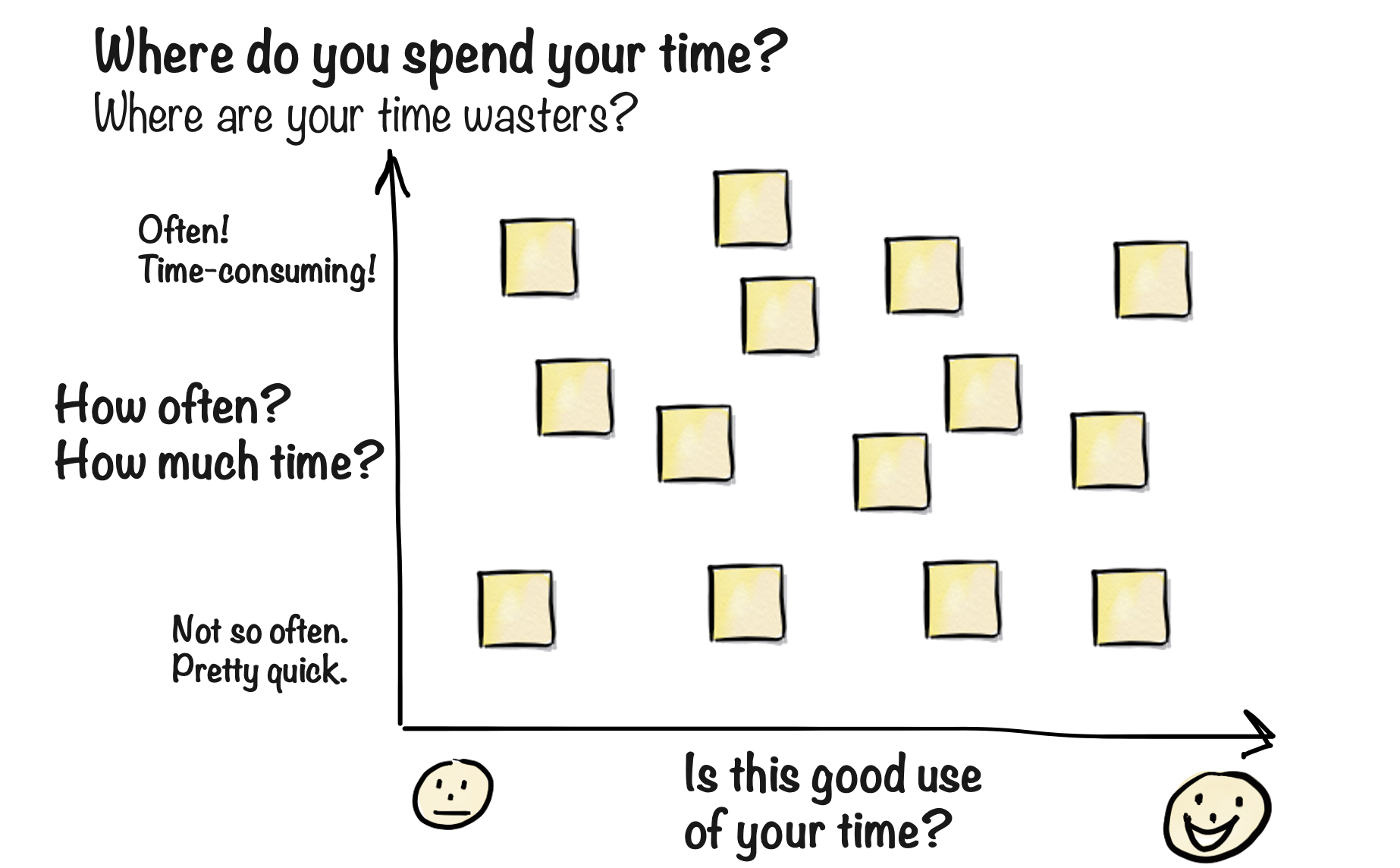
- How often do you do this task?
- How much cumulative time does it take?
- Tasks at the top are routine, repetitive, or time-consuming
- Does this feel like high-value work?
- Would you be sad if this was automated away?
- Tasks on the left feel like “someone should be doing this, but does it have to be me?”
Step 2: Assess intelligence requirements
Now add another dimension: how much intelligence and creativity does each task require?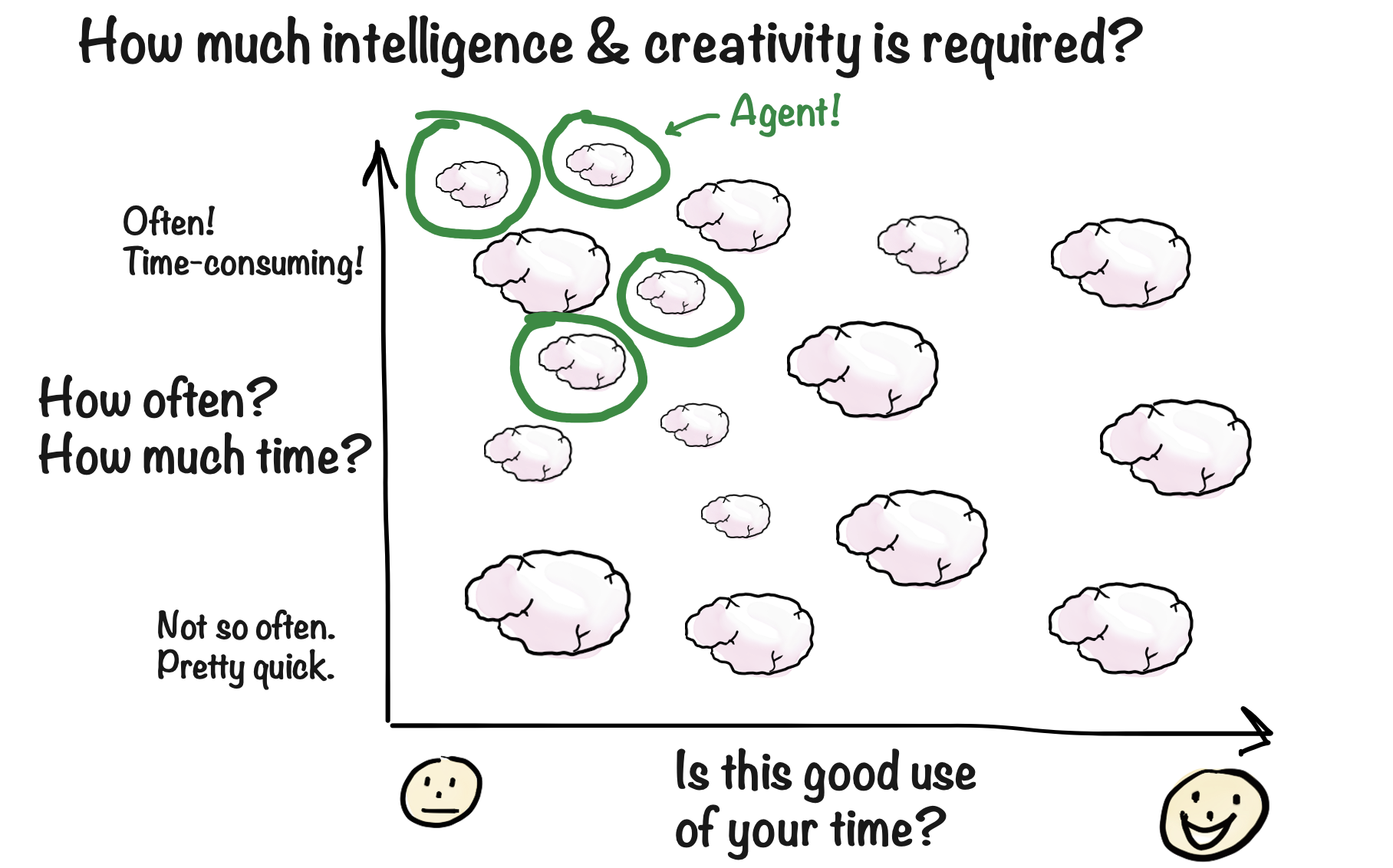
- Large brain — Requires significant judgment, creativity, or expertise
- Small brain — Requires only a bit of intelligence to handle fuzzy inputs
The sweet spot for agents
Perfect agent tasks share these characteristics:
Examples of good agent use cases:
- Screening incoming emails and routing to the right person
- Generating weekly summaries from multiple data sources
- Reviewing documents against a checklist
- Researching competitors and compiling reports
- Handling routine customer inquiries
- Highly creative work requiring original thinking
- High-stakes decisions with irreversible consequences
- Tasks that happen once a year
- Simple if-then logic that code handles perfectly
Sample Use Cases
Browse real examples of agents in production
Start simple
Good starter projects:- A daily news digest on a topic you care about
- Summarizing meeting notes and emailing action items
- Monitoring a website for changes
- Answering FAQs from a knowledge base
From use case to design
Once you’ve identified a promising use case, the design process begins. This is where you work out the details: exactly what the agent should do, how it interacts with humans, what information it needs, and how you’ll measure success. For simple agents, you can skip the formal design process—just create an agent and tell it what to do. But for anything beyond a basic assistant, a structured approach pays off.Agent Design
Learn the structured approach to designing effective agents
FAQ
What if I can't think of any good use cases?
What if I can't think of any good use cases?
Start by tracking your work for a week. Every time you think “this is tedious” or “I wish I didn’t have to do this,” write it down. Patterns will emerge.You can also look at what other organizations automate—the use cases page has examples from various industries.
Should I automate my most painful task first?
Should I automate my most painful task first?
Not necessarily. Your most painful task might also be your most complex. Start with something manageable to build your skills, then tackle the bigger challenges.
How do I know if a task is too complex for an agent?
How do I know if a task is too complex for an agent?
If you can explain the task to a new hire in 30 minutes, an agent can probably handle it. If it requires months of training and deep expertise, you might need a human—or a human-agent collaboration where the agent does the grunt work and humans make the final calls.