

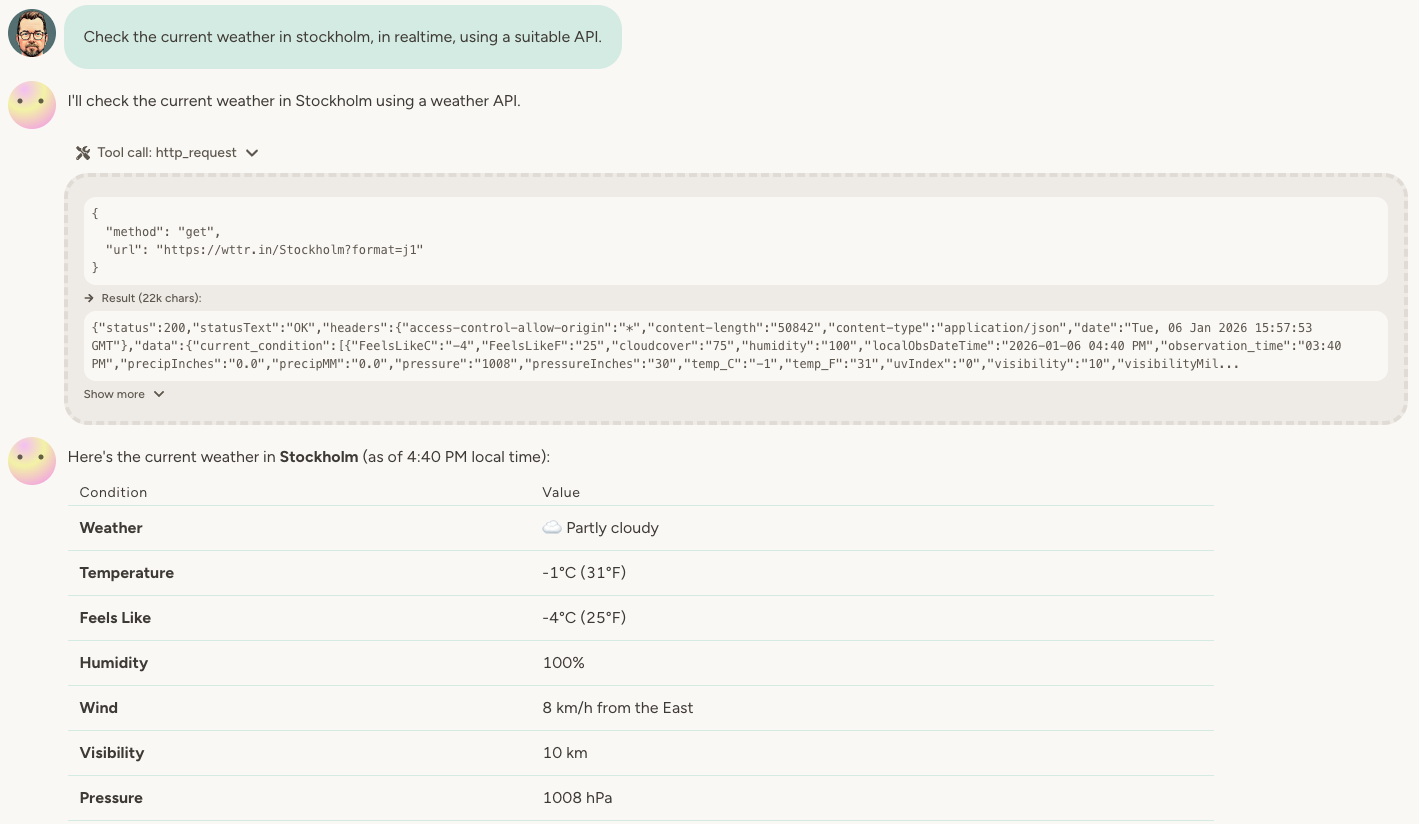
How it works
Once enabled, you simply tell your agent which API you want to interact with—either in the chat or in your instructions. The agent figures out how to call the API and handles the request for you.How the agent learns APIs
Think about what a human developer would need to work with an API—your agent needs the same things: Well-known APIs — For popular services (weather APIs, social platforms, major SaaS tools), the agent often knows how to use them already from the LLM’s training data. Things usually work right off the bat. Less familiar APIs — For niche or custom APIs, you have several options:- Let it experiment — Ask the agent to try the API and figure it out through trial and error
- Point to documentation — Give the agent a URL to the API reference, or upload a PDF with the docs
- Use web search — Enable Web Search and ask the agent to research the API online
- Describe it yourself — If you know the API, just explain the endpoints and expected responses in the chat
Guardrails and approval
The HTTP capability card on the agent has two main guardrails:- Allow requests to any URL (without secrets) — When on, the agent can hit any public HTTPS URL. When off, requests are only permitted to endpoints defined by an enabled API Capability, so the agent is locked down to a specific set of APIs.
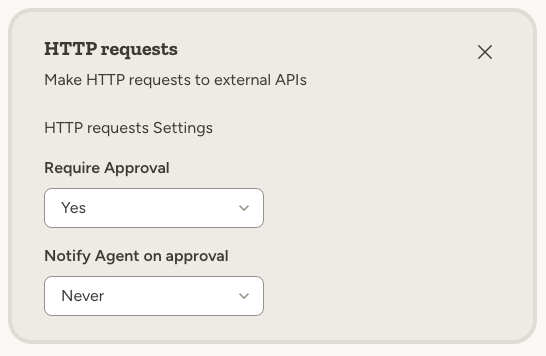
- Require Approval — Choose No, Yes, for all requests, or Yes, except GET requests. When approval is required, the agent must wait for a workspace member to approve each outgoing request before it executes.
When to use HTTP requests
The HTTP capability is ideal when:- No existing capability — The service you need isn’t available as a built-in capability or MCP server
- Quick prototyping — You want to test an integration before investing in a proper setup
- Internal APIs — You have proprietary services or internal databases with REST endpoints
- Combining APIs — Your workflow requires calling multiple APIs in sequence
If a dedicated capability or MCP server exists for the service you need, prefer those—they’re more reliable and better tested. Use HTTP as a fallback or for experimentation.
Example use cases
Real-time data lookups:- “Check the current Bitcoin price using a cryptocurrency API”
- “Get the latest exchange rate between USD and EUR”
- “Look up the shipping status for order #12345 via the carrier’s API”
- “Convert this address to GPS coordinates, then find the nearest coffee shops using a places API”
- “Fetch the weather forecast, then post a summary to Slack”
- “Look up the company info from this domain, then add it to my CRM”
- “Connect to our internal inventory API and check stock levels for product SKU-1234”
- “Query our company’s time tracking API and summarize my hours this week”
Real-world example: Office location analyzer
We built an HR agent that knows where all our employees live and helps analyze potential new office locations by calculating transit times for each person.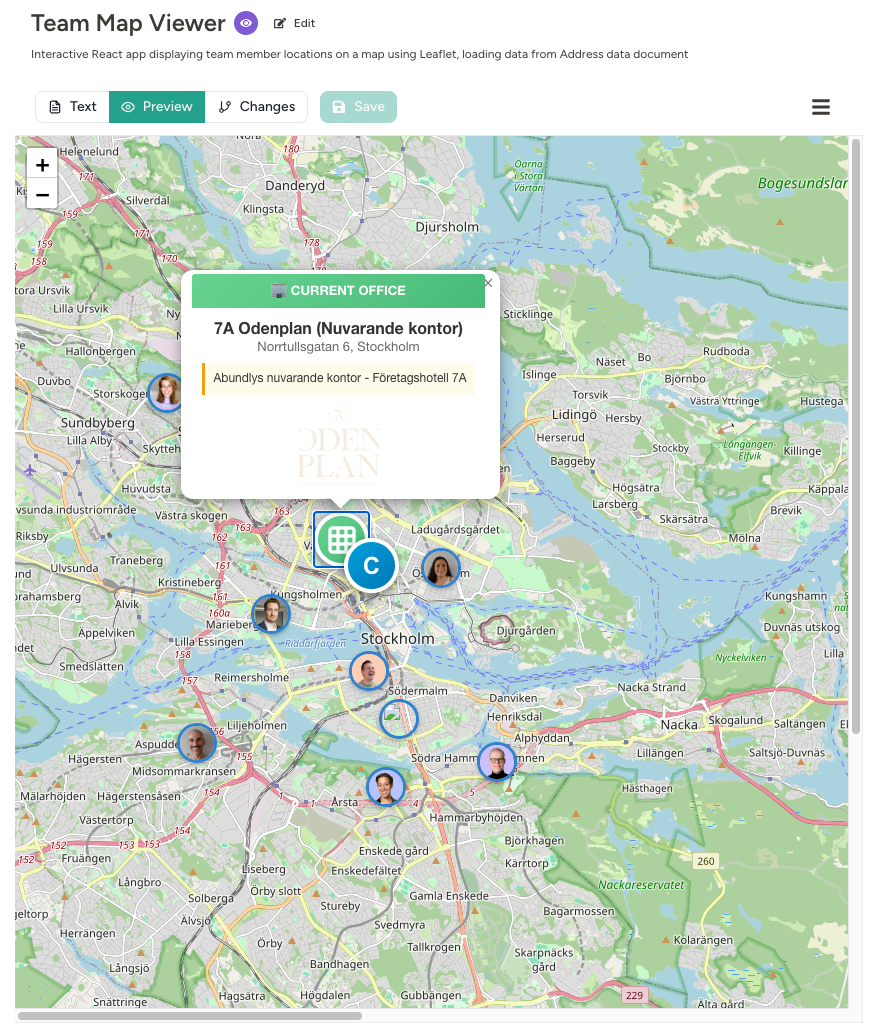
- Geocoding API — Convert street addresses to GPS coordinates
- Transit time API — Calculate commute times between coordinates
- Map visualization — The agent built an interactive map to display the results
Handling credentials
For authenticated APIs, define an API Capability (Shared Assets → API Capabilities) that describes the endpoints and its keyholes — what kind of key the API needs and where it goes in the request. A keyhole holds no key itself: when you enable the API on an agent (on that agent’s Capabilities page), you choose which Secret goes in each keyhole, or create a new key right there. Different agents can use different keys for the same API, and each key keeps its own access settings. The platform supports bearer tokens, API key headers, basic auth, query parameters, and custom headers — plus managed flows including OAuth 2.0 client credentials, GCP service accounts, and signed JWT bearer tokens (RS256 / ES256). The agent references the API by name; the actual secret value is injected server-side and never reaches the LLM. Both Secrets and API Capabilities have a single agent access setting — No one, Entire workspace, Certain teams (all agents in the teams you pick), or Certain agents — and the platform only lets those agents use them. New ones start at No one until you make that choice. If your workspace uses agent lifecycle phases, you can also limit a secret or API Capability to production or sandbox agents, and give sandbox agents a separate test value of a secret. See Credentials for more on how secrets are stored and protected.Defining endpoints
Every API Capability lists one or more endpoint patterns. They do two jobs:- Routing — when the agent makes a request, the platform matches the URL against the patterns to work out which API it belongs to, and injects that API’s credentials.
- Restriction — with Allow requests to any URL turned off, the agent can only reach URLs that match one of the patterns.
A few rules worth knowing:
- Agents call HTTPS on port 443 only. You can write the
https://prefix or leave it out — but a pattern that asks forhttp://or another port is rejected, and a plainhttp://request is refused before it leaves the platform, so a credential can never travel unencrypted. - The path is matched as a prefix, so
/api/3/already covers everything below it — a trailing*is optional. *stands for a single path segment, or a single subdomain level in the host. It never spans a/or a..- OpenAPI-style placeholders such as
{id}are not supported — use*instead.
Available methods
The agent can use any standard HTTP method:Tips for reliability
Ask the agent to remember what worked. Once your agent successfully calls an API, ask it to update its instructions with the details—endpoint URLs, required headers, expected responses. This “codifies” the API and makes future calls instant. Start simple. Test with basic GET requests before building complex multi-step workflows. Provide documentation. If you have API docs, share them with the agent. The more context it has, the faster it can figure out the correct calls.FAQ
Can the agent access any URL?
Can the agent access any URL?
By default it can reach any publicly accessible HTTPS address — plain
http:// and non-standard ports are always refused. If you want to restrict it to a known set of endpoints, turn off Allow requests to any URL on the capability card and define the allowed endpoints as an API Capability. Approval can still be required on top of either setup.What happens if the response is very large?
What happens if the response is very large?
Large responses won’t overwhelm the agent’s context. When a response is too big, the platform steps in and guides the agent on how to handle it—for example, previewing a portion to understand the shape of the data, or processing the full response with code execution so only the useful parts end up in the conversation. If the agent needs to work through a big payload in one pass, it can delegate the task to a sub-agent, which has more room to work with.
Why did my agent try multiple APIs before finding one that works?
Why did my agent try multiple APIs before finding one that works?
When you ask for something general like “check the weather using an API,” the agent may try several APIs before finding one that works without authentication or meets your needs. Once it finds a working solution, ask it to document the approach in its instructions.
Can I restrict which APIs the agent can call?
Can I restrict which APIs the agent can call?
Yes. Define an API Capability for each endpoint the agent should be able to call, then turn off Allow requests to any URL on the HTTP capability card. The agent will only be able to call those defined endpoints.
Learn more
Web Search
Let your agent find APIs and documentation online
MCP Servers
Connect to external tools via Model Context Protocol
Instructions
Codify API knowledge in your agent’s instructions