

- Agent usage — What each agent delivers, how much it is used, and what it costs
- Credit balance — The workspace’s credits: balance, burn rate, and where the credits went (workspace admins only)
- Member adoption — How actively your workspace members are using Abundly
- User action log — Append-only log of workspace configuration changes (audit trail; workspace admins only)
Agent usage
The Agent usage tab is one table with a row per agent, answering the three questions an owner asks: what did the agent deliver, how much was it used, and what did it cost.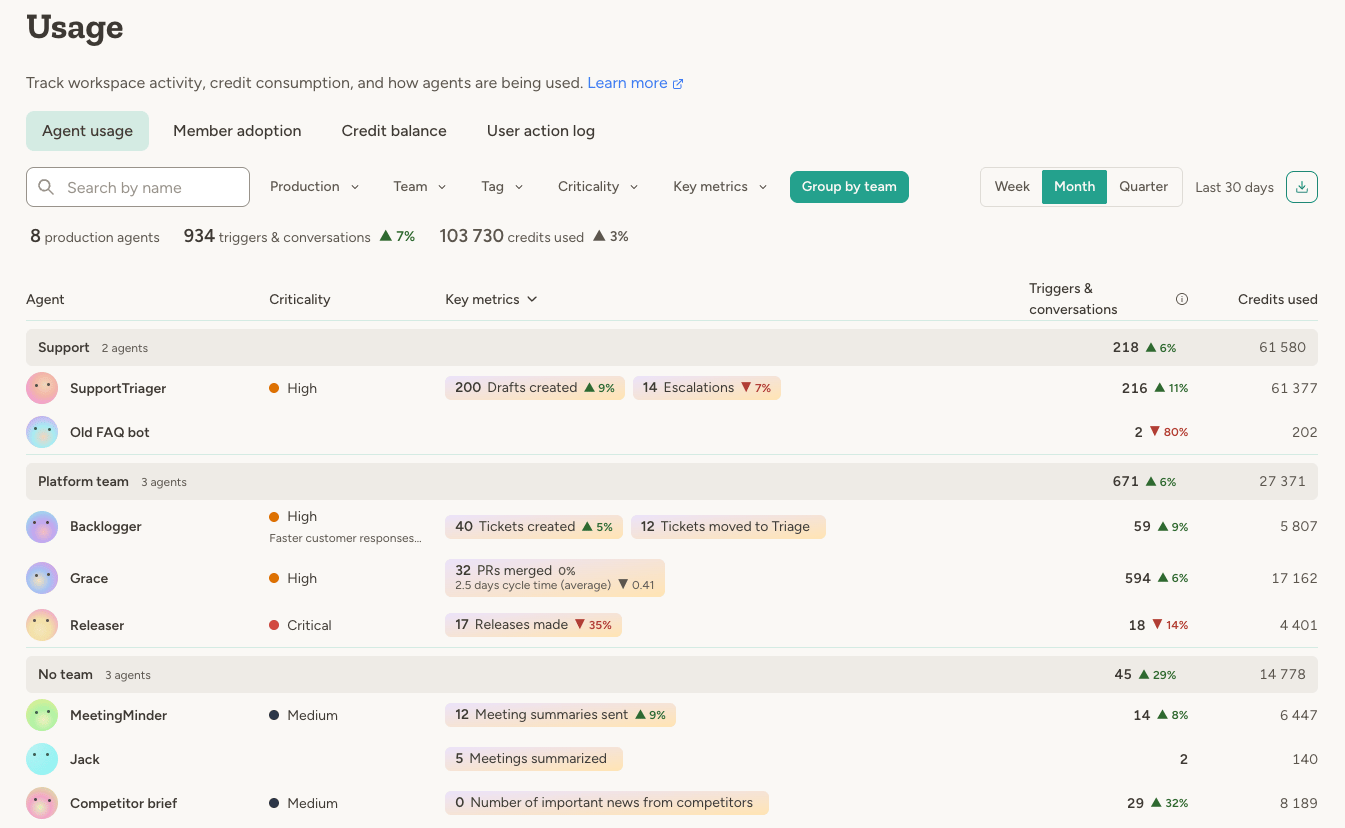
/workspaceapi/agent-usage endpoint, together with the period and filters that produced them. That is the format to hand to an agent or paste into a chat.
Agents with default access set to Nothing (fully private) are excluded from this view so usage analytics stay aligned with who can actually use those agents.
Team administrators see agent usage scoped to agents on teams they administer. Workspace administrators see all
agents.
Per-agent usage
To see one agent you can access, open its Activity page and use the Usage tab. It shows the same three things over the chosen period, in more depth: each key metric with its daily records, activity by channel and who took part, and credits used broken down by what consumed them.Credit balance
The Credit balance tab, for workspace administrators, is about the account rather than individual agents: how many credits are left, how fast they are going, and where they went. Per-agent figures live on the Agent usage tab.- Current balance — Your remaining credits, and the next top-up date and amount when the workspace has a subscription
- Burn rate — Average credits used per day over the last 14 days
- Credits used — Total credits used in the current billing period, or the last 30 days without a subscription
- Credit balance history — How your balance has changed over the selected period, with the monthly allowance marked
- Credits used over time — Daily, weekly or monthly bars for a date range of your choice, stacked by team when the workspace uses teams
Member adoption
The Member adoption tab shows how actively people in your workspace are using Abundly — useful for tracking rollout, identifying inactive seats, and spotting which teams have taken to the platform.- Active members — How many workspace members were active (logged in or interacted with an agent) in the selected period
- Adoption rate — Active members as a share of total members
- Average sessions per member — Mean session count across active members
- New members — How many members joined the workspace in the period
Team administrators see member adoption scoped to teams they administer. Workspace administrators see all members.
Agent limits
The Agent limits tab on the Agent management page lets you set daily limits for your agents to prevent runaway credit usage. When an agent reaches its limit, it pauses automatically until the next day (UTC midnight).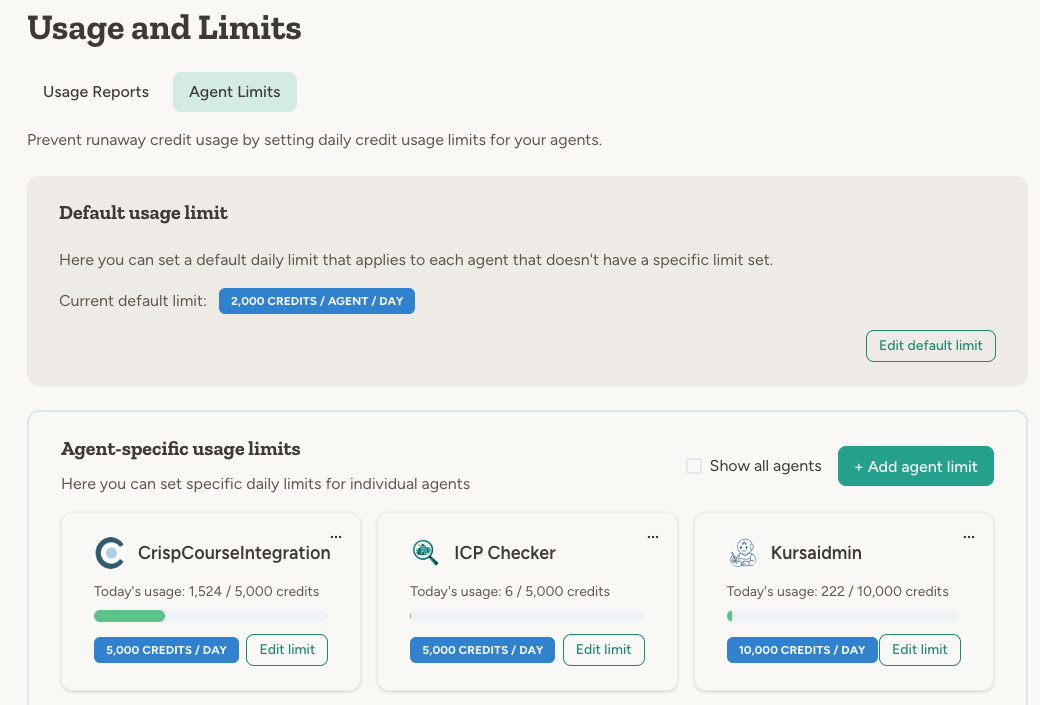
Default limit
Set a default daily limit that applies to all agents without a specific limit. This acts as a safety net across your workspace. New workspaces start at 5,000 credits per agent per day, and workspaces that have already set their own default keep it. Only workspace administrators can set or change the workspace default.Agent-specific limits
You can override the default limit for individual agents, for example to set a higher or lower limit. Setting the limit to 0 will effectively pause the agent. Workspace administrators can set limits for all agents. Team administrators can set limits for agents in their teams.When limits are reached
When an agent hits its daily limit:- The agent stops immediately and shows an error message
- No additional credits are consumed
- All data and configurations remain intact
- The limit resets automatically at UTC midnight
- Yellow badge when an agent approaches its limit (80%+)
- Red badge when the limit is exceeded
Workspace administrators can set the workspace default daily limit, set team monthly limits, and edit limits for any
agent. Team administrators can edit daily limits for agents in teams they administer.
Team monthly limits
If your workspace uses teams, workspace administrators can cap how many credits each team consumes per month. When a team reaches its monthly limit, every agent that belongs to the team pauses until the limit is raised or the calendar month rolls over. Set monthly limits from the Settings tab on the Team management page. Each team card shows the current month’s usage, the configured limit (if any), and a progress bar. Team monthly limits are enforced in addition to per-agent daily limits — an agent is blocked if either its own daily limit or its team’s monthly limit is exceeded. Chat and banner messages adapt to the viewer’s role:- Workspace admins see a message with a link to edit the limit
- Team admins are told to ask a workspace admin to raise the limit
- Members are directed to their team administrator
Sidebar usage widget
When you open an agent, the left sidebar can show a compact daily usage widget with:- Credits used today
- A progress bar when the agent has a daily limit
- A quick link to that agent’s Settings → Usage & Limits
Resetting daily usage
You can manually reset an agent’s daily credit counter at any time. This is useful if an agent hit its limit due to a one-time spike and you want to resume normal operation without waiting for midnight UTC.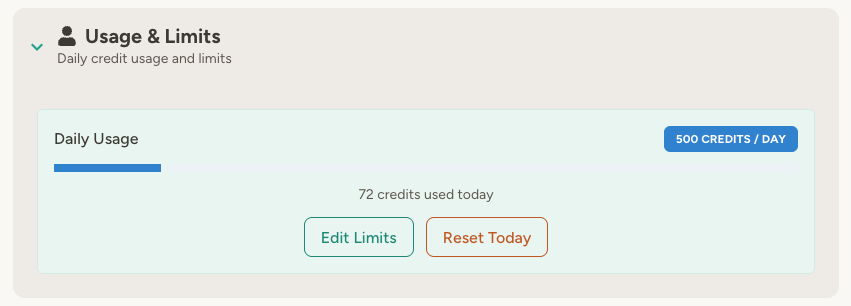
- Open the agent’s settings
- Under Main Settings, find Usage & Limits
- Click Reset Today
What counts toward credits
Both LLM usage (tokens) and tool usage count toward credits:- LLM tokens — Input, output, and reasoning tokens are converted to credits based on model-specific rates
- Tool usage — Tools like web search, document processing, and external APIs also consume credits
FAQ
What time zone is used for the daily reset?
What time zone is used for the daily reset?
UTC. The daily limit resets at midnight UTC, not your local time zone.
Can I set an agent to unlimited while keeping a default limit?
Can I set an agent to unlimited while keeping a default limit?
Not directly. If you want one agent to be unlimited while others have a default limit, set that agent’s limit to a
very high number (e.g., 999,999 credits/day).
Learn more
Monitoring
Track agent activity, execution logs, and performance
Agent Optimization
Detailed examples of credit usage and optimization strategies
User action log
The User action log tab gives workspace administrators an append-only audit trail of configuration changes across the workspace — useful for reviewing who changed what, spotting unexpected changes, and satisfying compliance requirements. Tracked change types include:- Agents — created, edited, enabled/disabled, deleted, ownership and team changes
- Teams — created, edited, membership and admin changes
- Workspace settings — configuration, capabilities, model selection, notification settings
- Secrets — created, updated, deleted
- API capabilities — created, updated, deleted
- HTTP APIs and documents — created, updated, deleted
Sensitive text fields — such as agent instructions and prompts — are shown as short hash tokens rather than raw
content. This lets admins confirm that content changed without exposing the underlying text.