

Security starts at design time
During the agent design process, think through:- What capabilities does this agent need?
- What data does it need access to?
- Who will it communicate with?
- What could go wrong, and how bad would it be?
Agent Design Canvas
A structured framework for designing agents that actually work—including security considerations.
Agent Design Training
Courses on designing, building, and securing effective AI agents.
The intern metaphor
Agent design can be compared to hiring a new intern. Does the intern need access to the company bank account? Probably not. Most jobs don’t require it, and removing that access entirely eliminates a whole category of risk. What if they need access to customer data AND email? Now you have a potential leak vector. The intern could accidentally (or be manipulated into) sharing sensitive information externally. You need to think about:- Do they really need both? Can you separate the tasks so one role has data access and another handles email?
- If yes, what safeguards? Maybe require approval for external emails. Maybe restrict email to specific domains. Maybe monitor closely at first.
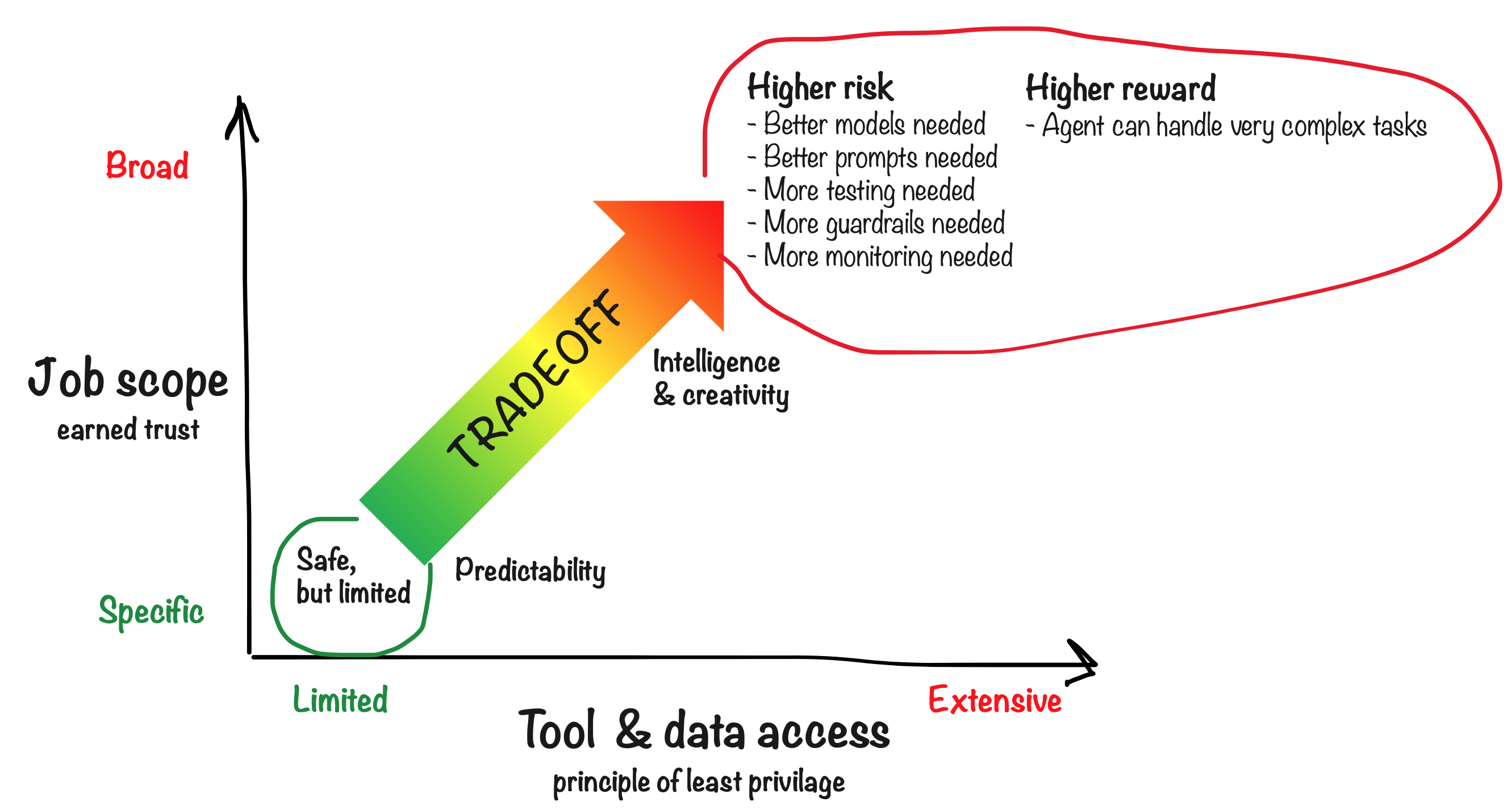
Risk vs Reward
An agent that scores “lower risk” across all factors needs minimal guardrails. An agent that scores “higher risk” on several factors may be more capable and valuable, but needs serious attention to security configuration.
Examples across the spectrum
Low-risk: Ticket priority agent
Imagine an agent whose only job is to set the priority field on incoming support tickets. That’s it—no email, no customer data, no external communication. Just read the ticket and set a priority. What’s the worst that can happen? A ticket gets the wrong priority. Not the end of the world. This agent is safe essentially out of the box, just by nature of its limited scope and tools. Minimal guardrails needed.High-risk: Customer inquiry handler
Now imagine an agent that handles incoming customer inquiries. It has access to public-facing email, a database with customer information, and can reach out to people and make decisions with real impact. This could be a VERY valuable agent—but it takes more work to make it safe:- Better models — Use the best available (usually also the most expensive)
- Better instructions — Spend more time crafting and iterating on clear guidelines
- More testing — Test edge cases and adversarial scenarios thoroughly
- Guardrails — Code-enforced constraints like whitelists that can’t be bypassed
- Human-in-the-loop — Require approval for important decisions
- More monitoring — Watch closely, especially early on
- Gradual autonomy — Start with limited scope (like a trainee), expand as it proves itself
The reality: Most agents are in between
Most agents fall somewhere between these extremes. The most crucial decisions are usually best left to humans, while the agent handles the grunt work—the boring, repetitive tasks—and provides data and insights the human can use.Who decides?
A crucial part of agent design is deciding who makes decisions—the agent or the human. This is a spectrum: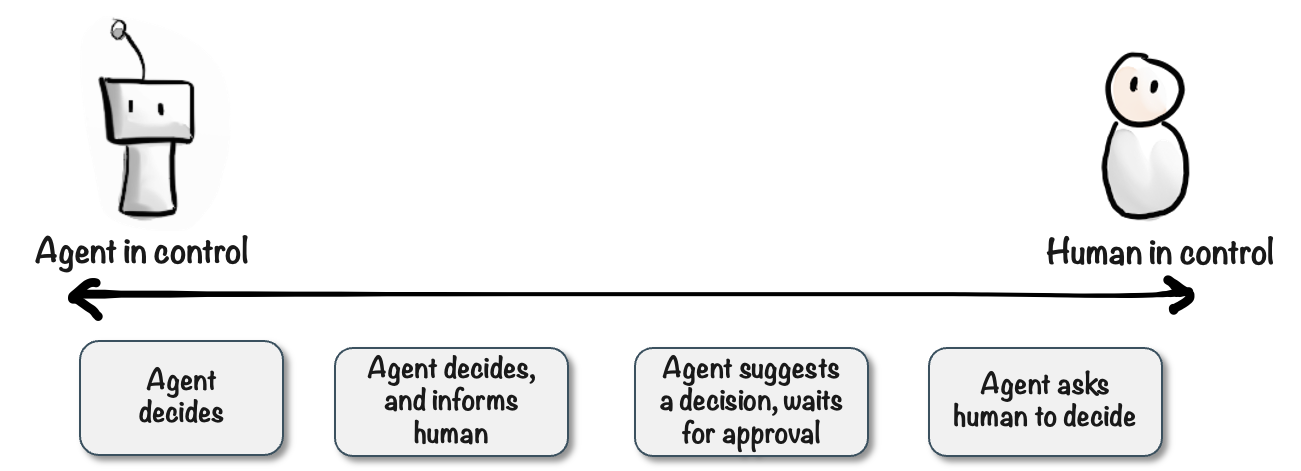
You can adjust this as you gain confidence in the agent. Start with more human oversight, then gradually give the agent more autonomy as it proves itself.
Guiding principles
- Principle of Least Privilege — Give agents only the capabilities and data they need for their job—no more. An agent that doesn’t have email access can’t accidentally send a bad email.
- Principle of Earned Trust — Start narrow and expand as the agent proves itself. Begin with approval requirements, then relax them once you’re confident in the agent’s behavior.
Advanced agents with broad scope CAN be safe—it just requires more careful design and ongoing attention. Don’t be afraid of powerful agents; be thoughtful about how you build them.
Learn more
Guardrails
Configure whitelists, limits, and code-enforced constraints.
User Approval
Require human approval for sensitive actions.
Monitoring
Track agent activity through diary and activity logs.