

When to use approval
Approval is most valuable when:- External communication — Emails, SMS, or calls to people outside your organization
- High-stakes actions — Anything that would be difficult or embarrassing to undo
- Early in agent lifecycle — While you’re building confidence in the agent’s behavior
- Sensitive data access — Actions involving confidential information
What actions can require approval
Approval is configured per capability in the agent’s capability settings. Communication capabilities (Send Email, Send SMS, Make Phone Call) let you restrict the agent to an allow-list of recipients, then choose what happens for recipients inside and outside the list independently:- Inside the allowed list — send straight through, or ask for your approval
- Outside the allowed list — block, or ask for your approval
Where approval requests appear
In chat
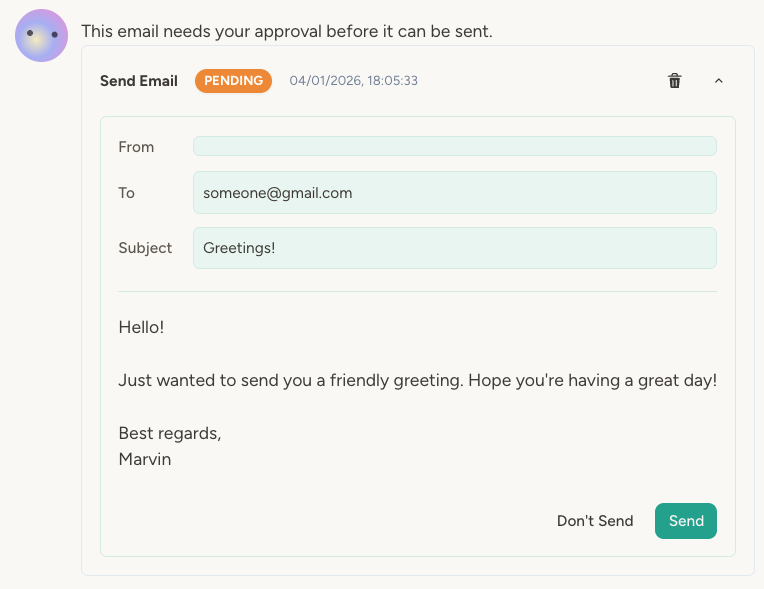
When an agent needs approval during a conversation, an approval widget appears inline in the chat. You’ll see:- The action the agent wants to take (e.g., “Send email”)
- Details of the action (recipient, subject, content)
- Approve and Reject buttons
- Status badge showing “Pending”
Activity page
All approval requests—from chat and from background triggers—are listed on the agent’s Activity page under the Approvals tab. This is where you’ll see approval requests that happened outside of a chat conversation, such as:- An email trigger that needs approval to respond
- A scheduled task that wants to send a report
When an approval is created from a non-chat trigger (scheduled task, incoming email, webhook, etc.), the agent’s owners get an in-app notification in the bell menu — and an email too if you’ve enabled that channel in your notification preferences. Approvals created during a chat conversation don’t trigger a notification, since you already see the approval card in the chat. If the agent has no owner, the notification escalates to team admins or workspace admins as a backup.
The approval flow
Here’s what happens when an agent attempts an action that requires approval:- Agent calls tool — The agent tries to send an email (or SMS, or make a call, etc.)
- Platform checks settings — Is approval required for this capability? Is the recipient on the allow-list?
- Approval record created — If approval is needed, a pending approval record is created
- Agent pauses — The agent reports that the action is awaiting approval
- You review — In chat or on the Activity page, you see the pending action
- You decide — Optionally edit the content (email approvals), optionally tick Notify agent, then click Approve or Reject
- Action executes (or doesn’t) — Approved actions execute immediately; rejected actions are cancelled
- Agent notified (optional) — If you ticked Notify agent, the agent learns the outcome and can take follow-up actions; otherwise it stays in the dark
Editing an email before approving
Often the agent’s draft is close but needs a tweak. For email approvals, an Edit button on the approval card lets you change the recipients, subject, and body before sending — no need to reject and re-prompt the agent. Save your changes, then click Send as usual; the edited version is what goes out. Two things to know:- If the agent is restricted to an allow-list with “block” behavior for outside recipients, you can’t redirect the email to a blocked address — the allow-list still applies to your edits.
- The agent sees the edited version as what was sent, along with a note that you changed it before approving.
Notifying the agent of your decision
Each approval card has a Notify agent checkbox next to the Approve and Reject buttons. Tick it before clicking, and the agent learns the outcome and can take follow-up steps — for example updating a CRM after a sent email, or trying a different approach when you reject a call. Leave it unchecked, and the action either executes or doesn’t and that’s the end of it.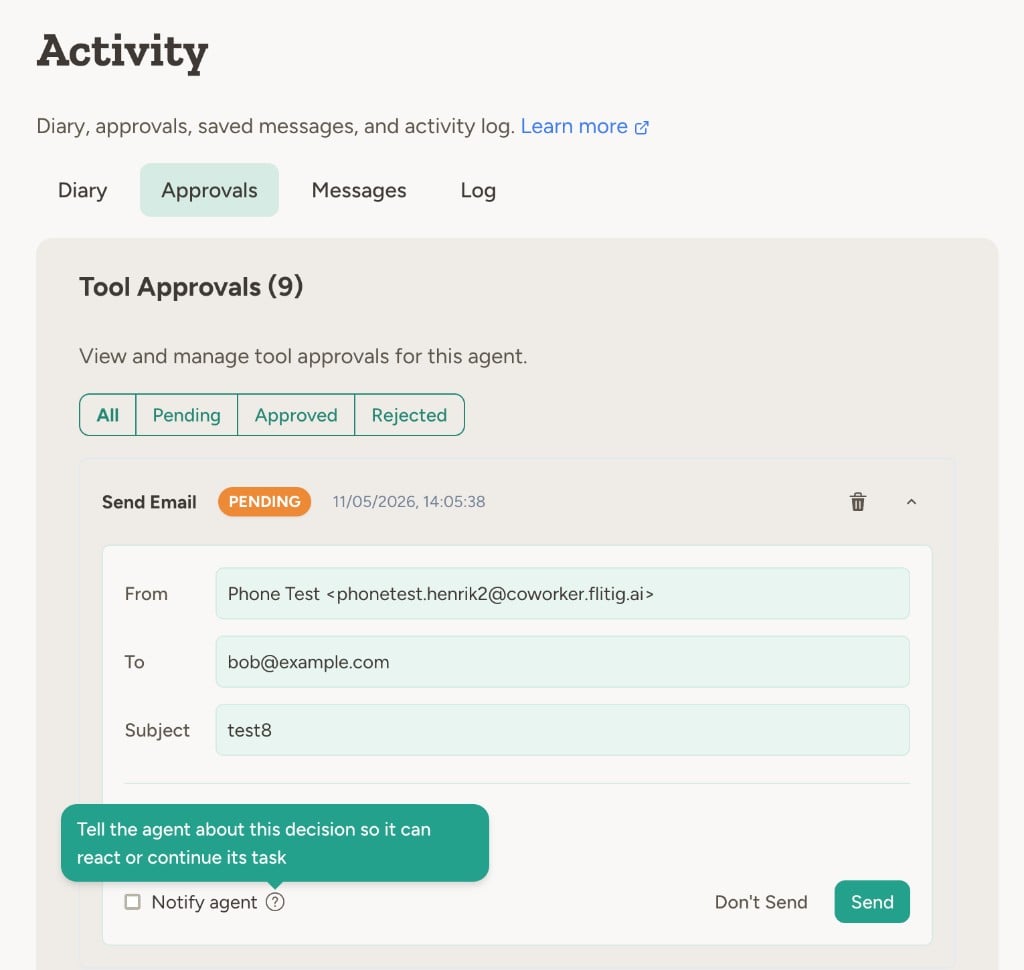
Configuring approval
Configure approval in each capability’s settings. Open the agent, go to Capabilities, and find the capability you want to configure. Choose whether to restrict recipients to an allow-list, then set the inside-list and outside-list rules. See Guardrails for step-by-step instructions and details on configuring allow-lists.Best practices
Start with approval, then relax. When deploying a new agent, require approval for external communication. Once you’ve seen the agent handle a variety of situations correctly, you can switch to “ask only outside the allowed list” or disable approval entirely. Combine an allow-list with “ask for approval” outside it. This gives you the best of both worlds: the agent communicates freely with known contacts, and you review anything new. Watch the bell menu. Approvals created by background triggers fire an in-app notification (and an email, if you’ve opted in) to the agent’s owners. The Activity page is still where you’ll see the full list of pending approvals. Review before approving. Take a moment to actually read what the agent wants to do. The approval flow is only useful if you’re reviewing, not just clicking Approve.FAQ
Can I approve multiple actions at once?
Can I approve multiple actions at once?
Not currently. Each approval request must be handled individually. This is intentional—batch approval would defeat the purpose of human review.
Do approvals expire?
Do approvals expire?
No. Approval requests remain pending until you explicitly approve or reject them. If you don’t want a pending approval, reject it.
Will I be notified of pending approvals?
Will I be notified of pending approvals?
Yes, for approvals created by background triggers (scheduled tasks, incoming emails, webhooks, etc.). Agent owners receive an in-app notification in the bell menu, and an email too if email notifications are enabled in your account settings. If the agent has no owner, the notification escalates to team admins or workspace admins. Approvals created during a chat conversation don’t trigger a notification — you already see the approval card in the chat.
What happens if I reject an action?
What happens if I reject an action?
The action is cancelled and won’t execute. If you ticked Notify agent before rejecting, the agent learns about the rejection and can adjust; otherwise the action just doesn’t happen and the agent isn’t told. If the agent was actively waiting for the action to complete (e.g. in a chat), it always receives a failure response.
Learn more
Guardrails
Configure allow-lists and approval requirements
Monitoring
Track agent activity and review what happened
Risk & Autonomy
Decide when approval is appropriate for your use case