

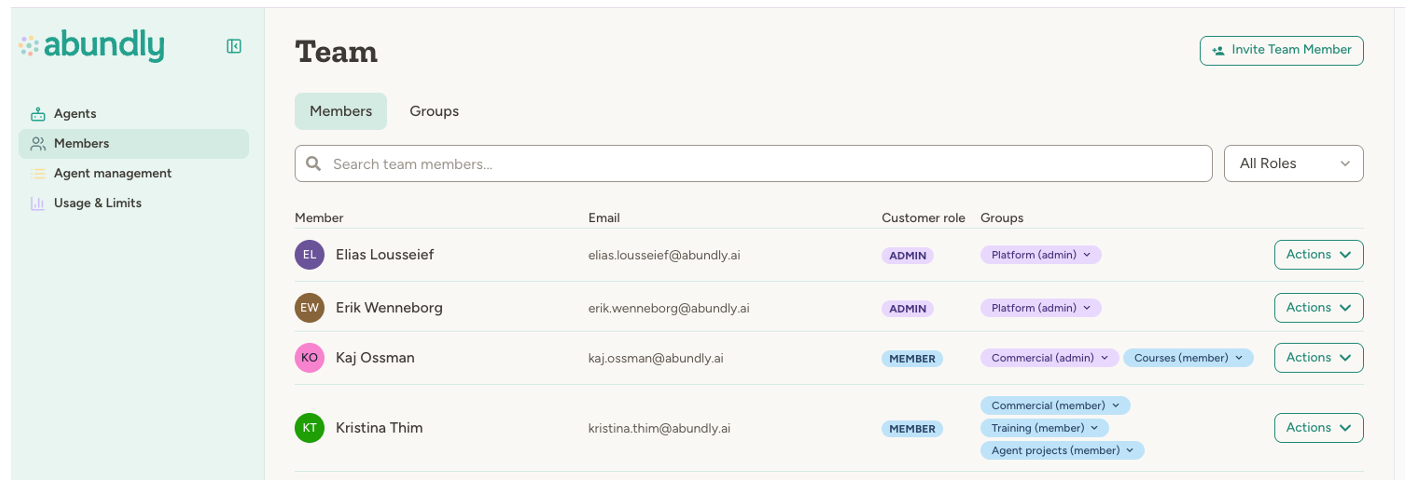
Workspace roles
Every user in your workspace has a role that determines their base level of access:
Workspace admins automatically have Owner access to all agents in the workspace, regardless of agent-specific settings. See Workspace Members for how to assign roles.
Agent access levels
Each agent has access settings that control what workspace members can do with it. There are four levels:
The hierarchy is: Owner > Edit > Use > Nothing. Owner was previously called Full Access; it is the same level.
Default access vs. user-specific access
Agent access is controlled through two settings, found in the agent’s Settings > User access tab: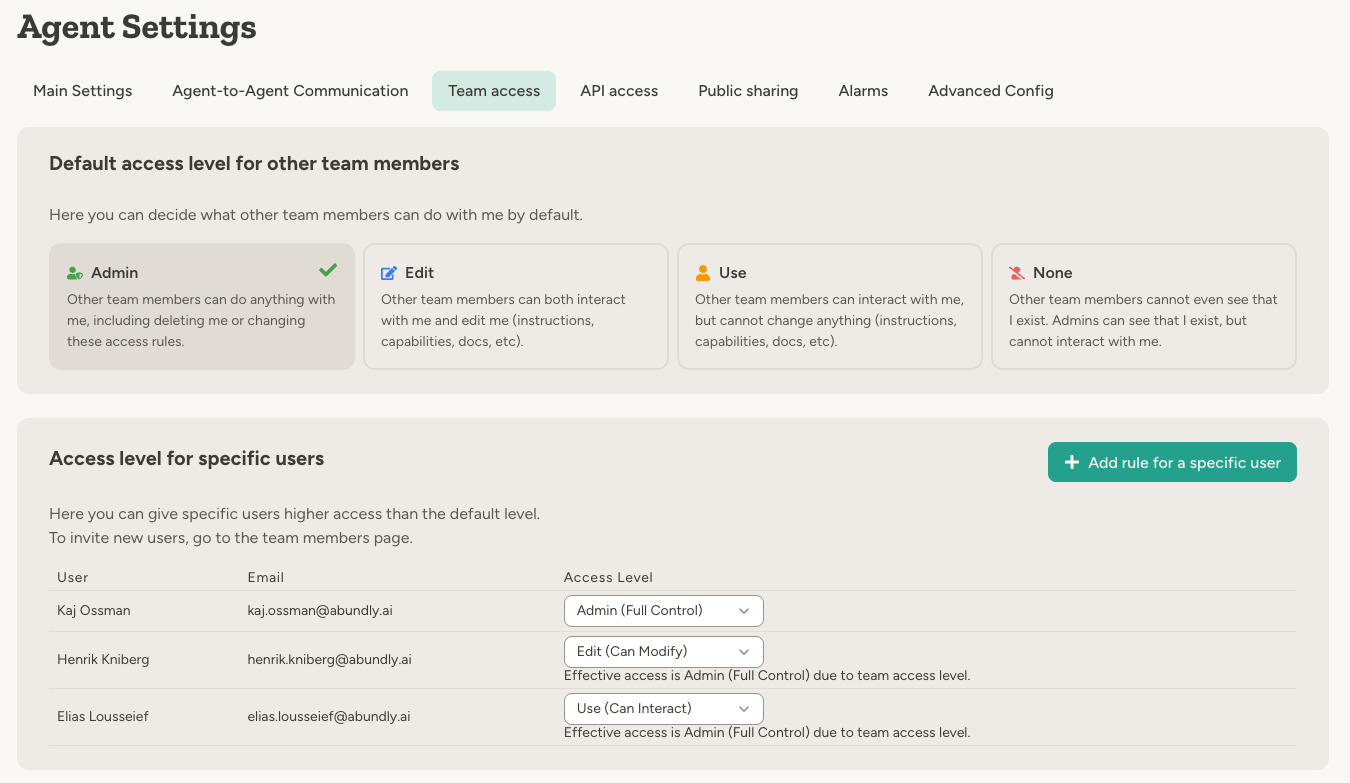
User-specific rules only ever increase access: the effective level is the higher of the default and the person’s rule. A rule can never take access away — to restrict someone, lower the default and give everyone else a higher individual rule instead.
Private agents
When you set the default access to “Nothing,” the agent becomes private:- Other workspace or team members cannot see the agent—it won’t appear in their agent list
- Workspace administrators (and team administrators, if the agent is assigned to a team) can still see the agent in the management view — including its description, instructions, agent-to-agent connections, and exposure hooks (MCP server, HTTP API, webhooks, widget) — but cannot interact with it directly
- Only users with explicit user-specific access can interact with it
Inviting guests by email
The Invite by email section on the agent’s User access tab lets you grant access to this agent by email address — including to people who are not in your workspace yet:- If the email belongs to an existing workspace member, they get the chosen access level directly. If the agent belongs to a team they are not in, they are also added to that team as a Guest, so the access actually takes effect.
- Otherwise an invitation is sent (the email is optional — the invite also appears when the person logs in). When they accept, they join the workspace as a Guest and receive the chosen access level on the agent.
From the UI, guests can be granted Use or Edit access. Their access to the agent works exactly like any other user-specific access rule.
Admin-restricted agents
In each agent’s Settings > User access tab, under Narrow to admins only, owners can narrow who in the portal can see and interact with the agent. There are three tiers:
When a restriction is active, the agent — its chats, instructions, capabilities, and configuration — is hidden from anyone outside the chosen admin tier, regardless of any default or user-specific access rules above.
Use the tighter tiers for agents that work with internal data — billing, analytics, member lists, audit logs — that the rest of the workspace or team shouldn’t see. Some capabilities (for example workspace and team analytics) are also gated behind the matching admin tier for the same reason.
Because Team admins only is defined by the agent’s team, an agent on that tier can’t be moved out of its team into the workspace-global space. Change the restriction first, then move it.
Admin restrictions narrow the portal only. External entry points an admin has enabled — embeddable widget, HTTP API, MCP, webhooks, public clone link — keep working under their own authentication. Agent-to-agent communication is also unaffected, so other agents can still reach the agent if they’re configured to.
Teams
For larger workspaces, teams add another layer of access control between the workspace and individual agents:- Agents can belong to a team
- Users must be members of that team to access the agent (unless they’re workspace admins)
- Team admins can manage agents within their team
Teams are an enterprise feature. Contact support@abundly.ai to enable them for your workspace.
Making a team agent available to other teams
An agent that belongs to a team can optionally be made available beyond it, from the Beyond [team] panel in Settings → User access. You can pick selected teams or the entire workspace. Only the agent’s owners can change this. The agent still belongs to exactly one team, and all of its credit usage is still counted against that team. People reached through this sharing always get Use access at most — they can chat with the agent and trigger it, but they can never edit it, however high the workspace default access is set. Everything else about access still applies:- If the agent’s workspace access is Nothing (a private agent), sharing on its own grants nothing — users outside the agent’s own team still need an individual access rule.
- Guests of a shared team don’t get access by default, exactly as in the agent’s own team.
- An admin restriction still narrows the shared audience: only admins within it can use the agent.
Agent-to-agent access
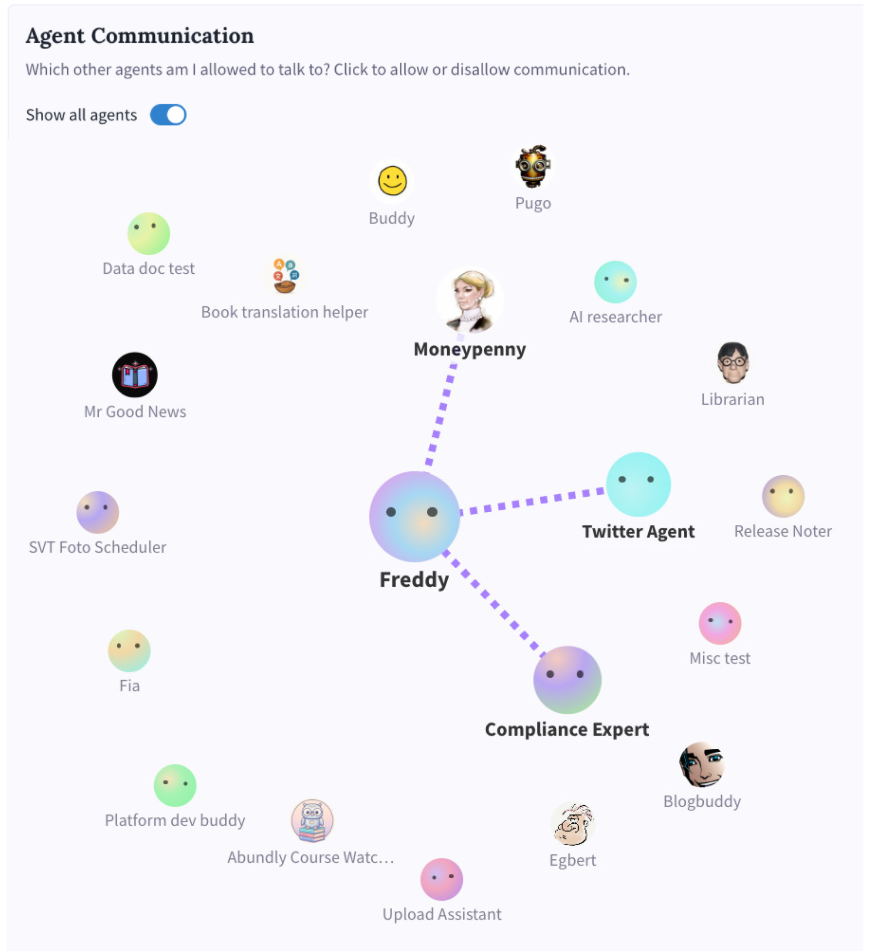
Agent-to-agent access is configured per agent in Settings → Agent Communication, and has two sides:- Discoverability (inbound) — who is even allowed to reach this agent: No one, Team (agents in the same team, default), or Everyone (any agent in the workspace, including across teams).
- Outbound — which other agents this agent is configured to call. Picked explicitly per target from the communication graph.
Best practices
Start with restrictive defaults. Set the default access to “Use” or “Nothing” for sensitive agents, then grant higher access to specific users who need it. Use teams for scale. If you have many agents or multiple departments, teams make access management much simpler than per-agent user rules. Review access after membership changes. When someone leaves or changes roles, audit their access to ensure it’s still appropriate. Keep at least one owner. The platform prevents you from removing the last owner from an agent—every agent needs at least one.FAQ
What's the difference between 'Edit' and 'Owner'?
What's the difference between 'Edit' and 'Owner'?
Edit access lets you modify how the agent works—instructions, capabilities, documents, and other settings.Owner (full access) includes everything in Edit, plus the ability to delete the agent and change who else can access it.
Can I restrict a user to less access than the default?
Can I restrict a user to less access than the default?
No—rules only increase access, so a rule below the default has no effect. To restrict a person, lower the default access level and grant everyone else a higher individual rule. To remove a rule entirely, click the red trash button next to their row.
Can Guests use agents?
Can Guests use agents?
Guests cannot access agents through the default access level—they need explicit user-specific access to each agent. This makes the Guest role useful for external collaborators who should only see specific agents.
Do I need to be in a team to access an agent in that team?
Do I need to be in a team to access an agent in that team?
Yes. If an agent belongs to a team, you must be a member of that team to access it. The exception is workspace administrators, who automatically have access to all teams.
Can agents access each other's data?
Can agents access each other's data?
Only if you explicitly configure agent-to-agent communication between them. By default, agents are isolated—they can’t see each other’s documents, databases, or conversations.
What happens when someone leaves the workspace?
What happens when someone leaves the workspace?
Remove them from the workspace in the Members page. They’ll immediately lose access to all agents and data. Their past conversations and actions remain in the logs.
Learn more
Agent Management
Workspace-level agent and capability controls
Teams
Organize agents and users by department or function
Multi-Agent
How agents collaborate and communicate