> ## Documentation Index
> Fetch the complete documentation index at: https://docs.abundly.ai/llms.txt
> Use this file to discover all available pages before exploring further.
# Steep
> Query your Steep metrics in plain English — same definitions your team already uses
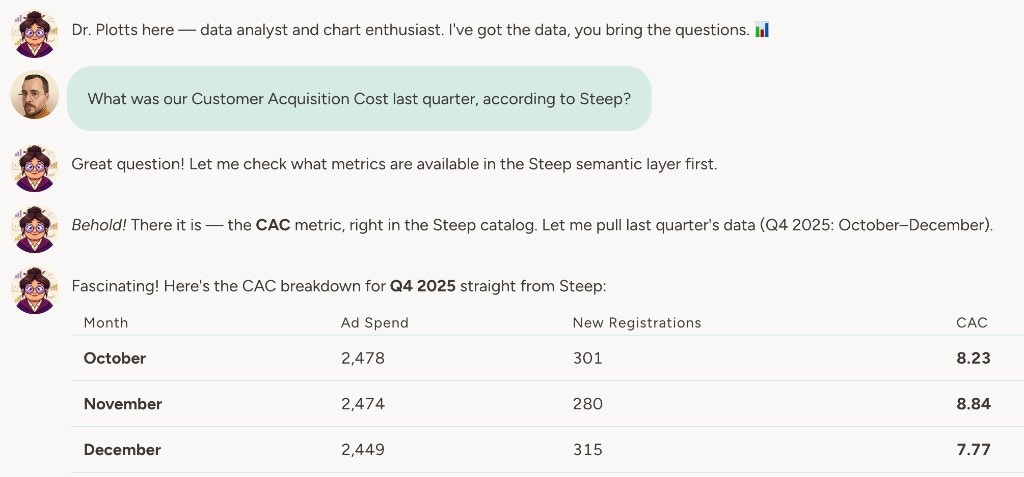
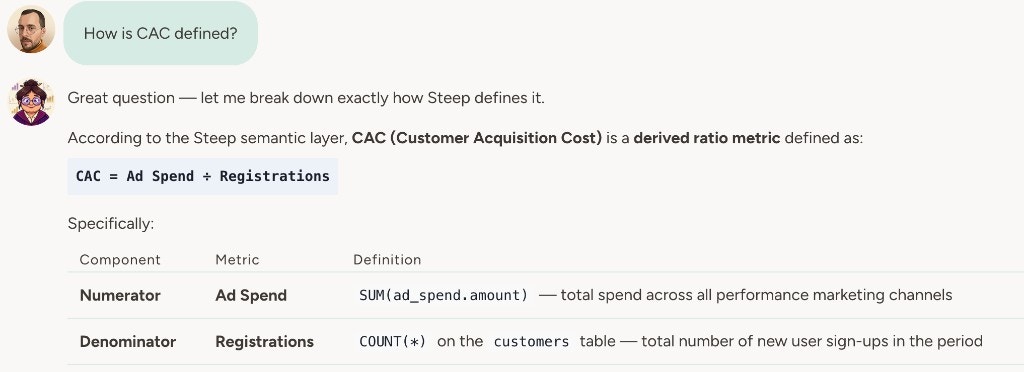
Your agent can discover and query your Steep metrics so you get answers in chat, in reports, or in automations without opening a dashboard or writing SQL. If you use Steep so your team shares one definition of MRR, conversion, or whatever matters — the agent uses those same [defined metrics](https://help.steep.app/introduction/why-steep). You ask in plain English; you get aggregated data (and the generated SQL when relevant) from the semantic layer you've already set up.
 ## How to enable
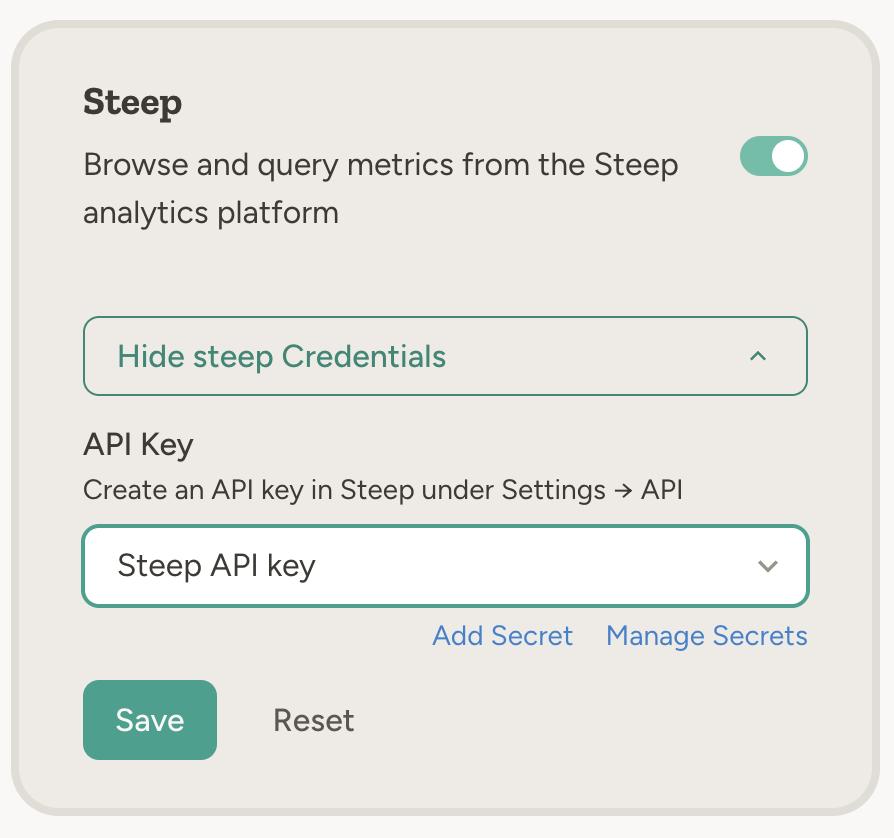
Go to **Settings → Capabilities** and enable **Steep**. Create an API key in Steep under **Settings → API** and paste it into the capability card. The key is stored as a team secret.
## Example use cases
* **Metric lookups** — "What was our MRR last month according to Steep?"
* **Scheduled reports** — "Every Monday, get the key product metrics from Steep and email a summary to the leadership team"
* **Cross-tool workflows** — "Pull this week's conversion metrics from Steep and add them to the weekly update in Notion"
* **Trends and analysis** — "Query Steep for signups by region over the last quarter and summarize the trend"
* **Board prep** — "Get our standard KPIs from Steep for the last 30 days and put the numbers into a one-pager for the board meeting"
## How to enable
Go to **Settings → Capabilities** and enable **Steep**. Create an API key in Steep under **Settings → API** and paste it into the capability card. The key is stored as a team secret.
## Example use cases
* **Metric lookups** — "What was our MRR last month according to Steep?"
* **Scheduled reports** — "Every Monday, get the key product metrics from Steep and email a summary to the leadership team"
* **Cross-tool workflows** — "Pull this week's conversion metrics from Steep and add them to the weekly update in Notion"
* **Trends and analysis** — "Query Steep for signups by region over the last quarter and summarize the trend"
* **Board prep** — "Get our standard KPIs from Steep for the last 30 days and put the numbers into a one-pager for the board meeting"
 The agent talks to Steep's API (api.steep.app). Ensure your API key has access to the metrics and data the agent needs.
## How to connect Steep
In Steep, go to **Settings → API** and create an API key.
Go to **Settings → Capabilities** and enable **Steep**. Paste the API key into the capability card. It is stored as a team secret (secret type: Steep).
## Learn more
Query and explore your Google BigQuery data from the agent.
Query and explore your Snowflake data warehouse from the agent.
The agent talks to Steep's API (api.steep.app). Ensure your API key has access to the metrics and data the agent needs.
## How to connect Steep
In Steep, go to **Settings → API** and create an API key.
Go to **Settings → Capabilities** and enable **Steep**. Paste the API key into the capability card. It is stored as a team secret (secret type: Steep).
## Learn more
Query and explore your Google BigQuery data from the agent.
Query and explore your Snowflake data warehouse from the agent.