> ## Documentation Index
> Fetch the complete documentation index at: https://docs.abundly.ai/llms.txt
> Use this file to discover all available pages before exploring further.
# Integration pricing
> How integrations are billed
When your agent uses an external service, who pays for it? The answer depends on whose credentials are being used.
* **User-provided credentials** — If you bring your own account (e.g., Slack, Notion, GitHub), then Abundly doesn't charge for these integrations since you're already paying the provider directly.
* **Platform-provided credentials** — If Abundly provides the account (e.g., web search, image generation), then Abundly pays the provider and converts the cost to credits, which are charged from your account.
So credits are charged whenever your agent uses an external service with platform-provided credentials.
## Example
Suppose your agent has the following capabilities:
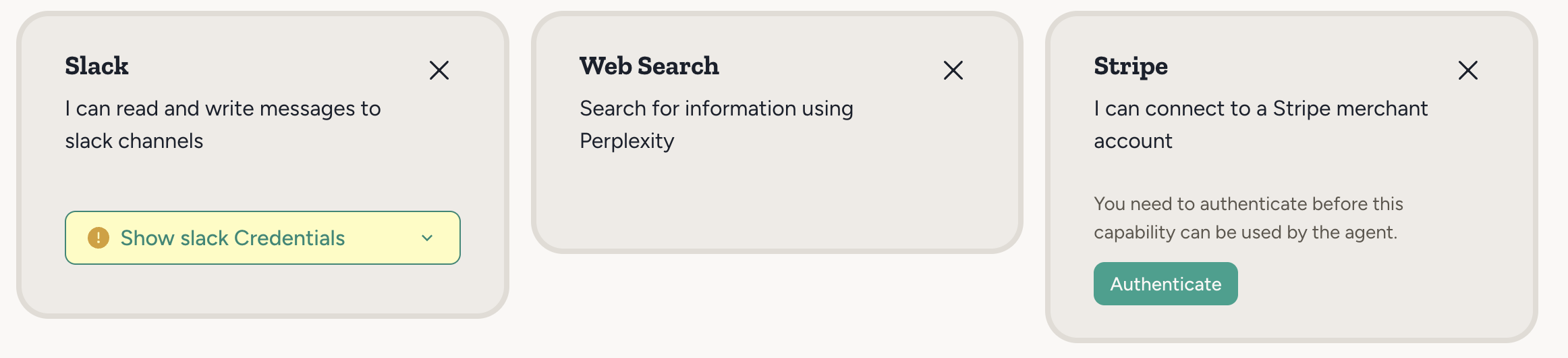 * **Slack** asks you to provide credentials — your account is used, so no credits charged.
* **Stripe** uses OAuth to connect your account — your account is used, so no credits charged.
* **Web Search** works out of the box with no setup. But web search is still an external service (Perplexity) — since no user credentials are provided, Abundly's account is used, so credits are charged on usage.
LLM inference — the "thinking" your agent does — also consumes credits, regardless of which integrations are involved. See [Pricing](/introduction/pricing) for the full picture.
For concrete examples of how many credits different tasks consume, see the [Agent Optimization](/guides/agent-optimization) guide.
## Tracking credit usage
To see how credits are being consumed:
1. Click the Abundly logo in the top left
2. Select **Usage and Limits**
3. View the breakdown by agent or time period
All Abundly accounts are workspaces, so credits are pooled across your entire workspace. Every agent and member draws from the same balance, making it easy to manage costs in one place. See [Pricing](/introduction/pricing) for more details.
You can set per-agent limits to prevent any single agent from consuming too many credits. See [Usage & Limits](/features/usage) for details.
* **Slack** asks you to provide credentials — your account is used, so no credits charged.
* **Stripe** uses OAuth to connect your account — your account is used, so no credits charged.
* **Web Search** works out of the box with no setup. But web search is still an external service (Perplexity) — since no user credentials are provided, Abundly's account is used, so credits are charged on usage.
LLM inference — the "thinking" your agent does — also consumes credits, regardless of which integrations are involved. See [Pricing](/introduction/pricing) for the full picture.
For concrete examples of how many credits different tasks consume, see the [Agent Optimization](/guides/agent-optimization) guide.
## Tracking credit usage
To see how credits are being consumed:
1. Click the Abundly logo in the top left
2. Select **Usage and Limits**
3. View the breakdown by agent or time period
All Abundly accounts are workspaces, so credits are pooled across your entire workspace. Every agent and member draws from the same balance, making it easy to manage costs in one place. See [Pricing](/introduction/pricing) for more details.
You can set per-agent limits to prevent any single agent from consuming too many credits. See [Usage & Limits](/features/usage) for details.