> ## Documentation Index
> Fetch the complete documentation index at: https://docs.abundly.ai/llms.txt
> Use this file to discover all available pages before exploring further.
# Atlassian
> Work with Jira, Confluence, and other Atlassian products
Connect your agent to Atlassian to work across Jira, Confluence, and other Atlassian Cloud products — search issues, create pages, manage projects, and more.
## How to enable
Before you can connect, an Atlassian organization admin must allow Abundly to access your Atlassian instance. After that, each user authenticates with their own Atlassian account.
1. Go to [admin.atlassian.com](https://admin.atlassian.com)
2. In the sidebar, navigate to **Apps → Platform experiences → AI settings → Rovo MCP Server**
3. Click **Add domain** and enter your Abundly app domain with `/**` (for example, `https://app.abundly.ai/**` or `https://your-tenant.app.abundly.ai/**`)
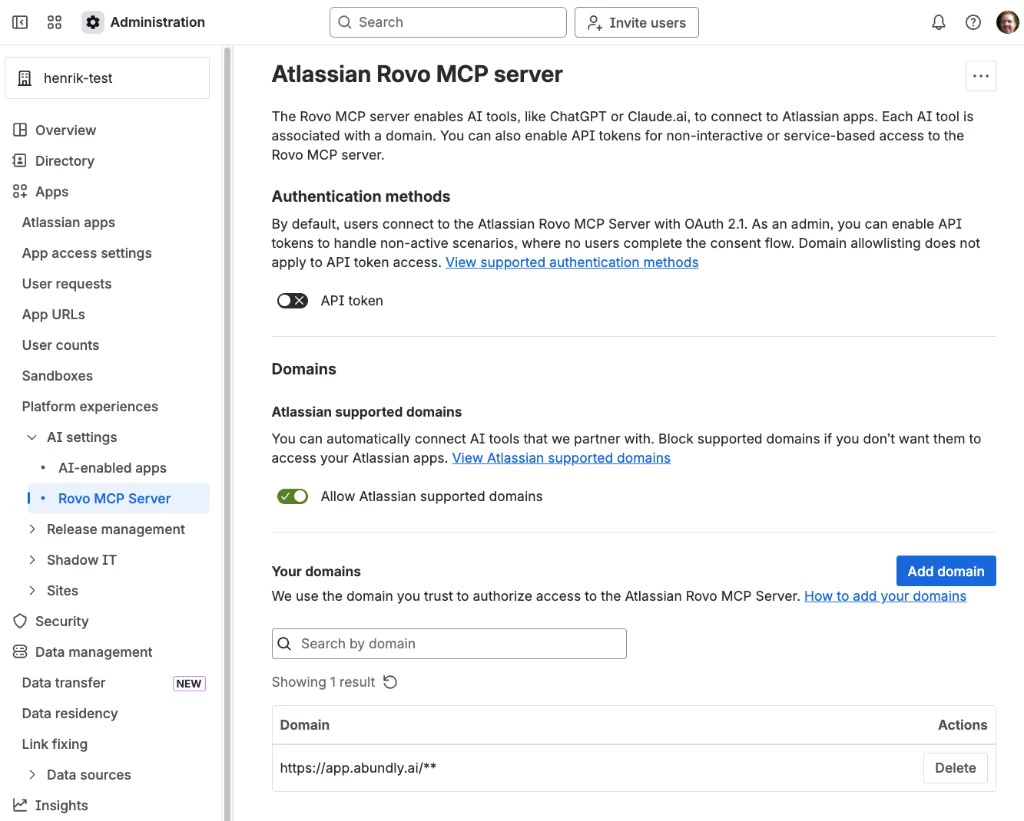 This is a one-time setup. Once the domain is added, all users in the organization can connect their accounts.
Go to the **MCP Servers** tab in your agent's capabilities. You'll find Atlassian in the "Add a server" section — click it to add.
Click **Connect**, then **Continue with OAuth** and complete the OAuth flow to connect your Atlassian account.
API token authentication is also available under advanced settings, but OAuth is recommended — API tokens only expose a limited subset of tools.
## Example use cases
* **Issue triage** — "Every morning, check Jira for new unassigned issues in the Support project and suggest an assignee based on workload"
* **Sprint reporting** — "Summarize the current sprint progress and post an update to Slack every Friday"
* **Documentation sync** — "When a Jira epic is marked as done, create a Confluence page documenting what was shipped"
* **Cross-platform updates** — "When someone mentions a Jira ticket in Slack, look it up and post a summary with the current status"
This is a one-time setup. Once the domain is added, all users in the organization can connect their accounts.
Go to the **MCP Servers** tab in your agent's capabilities. You'll find Atlassian in the "Add a server" section — click it to add.
Click **Connect**, then **Continue with OAuth** and complete the OAuth flow to connect your Atlassian account.
API token authentication is also available under advanced settings, but OAuth is recommended — API tokens only expose a limited subset of tools.
## Example use cases
* **Issue triage** — "Every morning, check Jira for new unassigned issues in the Support project and suggest an assignee based on workload"
* **Sprint reporting** — "Summarize the current sprint progress and post an update to Slack every Friday"
* **Documentation sync** — "When a Jira epic is marked as done, create a Confluence page documenting what was shipped"
* **Cross-platform updates** — "When someone mentions a Jira ticket in Slack, look it up and post a summary with the current status"