> ## Documentation Index
> Fetch the complete documentation index at: https://docs.abundly.ai/llms.txt
> Use this file to discover all available pages before exploring further.
# Find Your Use Case
> Identify which tasks are best suited for AI agents
Before building an agent, you need to find the right use case. Not every task benefits from an agent—some are better done by code, others by humans. The goal is to find tasks in the sweet spot where agents excel.
## Code vs agent vs human
Knowledge work in organizations is traditionally carried out by either code or by humans. Agents are a new option—not quite code, not quite human, but somewhere in between.
 | | Code | Agent | Human |
| ------------------ | ---------------------------- | ------------------------------- | --------------------------- |
| **Speed** | Very fast | Fast | Slow |
| **Predictability** | Completely predictable | Mostly predictable | Unpredictable |
| **Intelligence** | None (follows rules exactly) | Moderate (handles fuzzy inputs) | High (creativity, judgment) |
| **Running cost** | Very low | Low to moderate | High |
This isn't an "either/or" choice. Agents can use code for computations and data processing. Agents can interact with humans for approvals and escalations. The question is: **which tasks benefit from having an agent involved?**
## Step 1: Map how you spend your time
Start by analyzing how your team spends its time. What does a typical week look like? Make a list of the different types of tasks you do—each sticky note represents a task type.
| | Code | Agent | Human |
| ------------------ | ---------------------------- | ------------------------------- | --------------------------- |
| **Speed** | Very fast | Fast | Slow |
| **Predictability** | Completely predictable | Mostly predictable | Unpredictable |
| **Intelligence** | None (follows rules exactly) | Moderate (handles fuzzy inputs) | High (creativity, judgment) |
| **Running cost** | Very low | Low to moderate | High |
This isn't an "either/or" choice. Agents can use code for computations and data processing. Agents can interact with humans for approvals and escalations. The question is: **which tasks benefit from having an agent involved?**
## Step 1: Map how you spend your time
Start by analyzing how your team spends its time. What does a typical week look like? Make a list of the different types of tasks you do—each sticky note represents a task type.
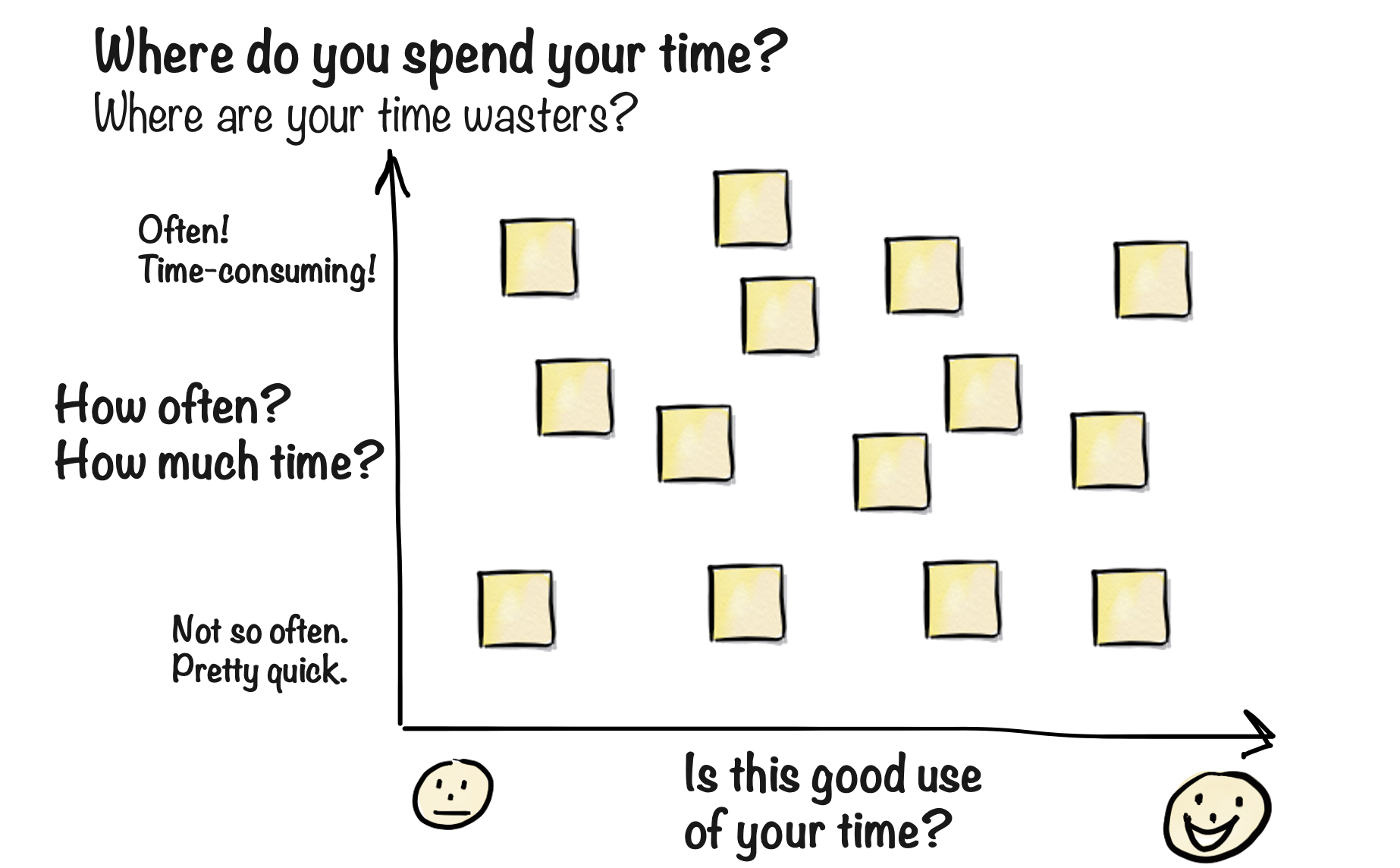 For each task type, assess two dimensions:
**Y-axis: Frequency and time investment**
* How often do you do this task?
* How much cumulative time does it take?
* Tasks at the top are routine, repetitive, or time-consuming
**X-axis: Value of your time**
* Does this feel like high-value work?
* Would you be sad if this was automated away?
* Tasks on the left feel like "someone should be doing this, but does it have to be me?"
The top-left quadrant—frequent tasks that don't feel like good use of your time—are your candidates for agent assistance.
## Step 2: Assess intelligence requirements
Now add another dimension: how much intelligence and creativity does each task require?
For each task type, assess two dimensions:
**Y-axis: Frequency and time investment**
* How often do you do this task?
* How much cumulative time does it take?
* Tasks at the top are routine, repetitive, or time-consuming
**X-axis: Value of your time**
* Does this feel like high-value work?
* Would you be sad if this was automated away?
* Tasks on the left feel like "someone should be doing this, but does it have to be me?"
The top-left quadrant—frequent tasks that don't feel like good use of your time—are your candidates for agent assistance.
## Step 2: Assess intelligence requirements
Now add another dimension: how much intelligence and creativity does each task require?
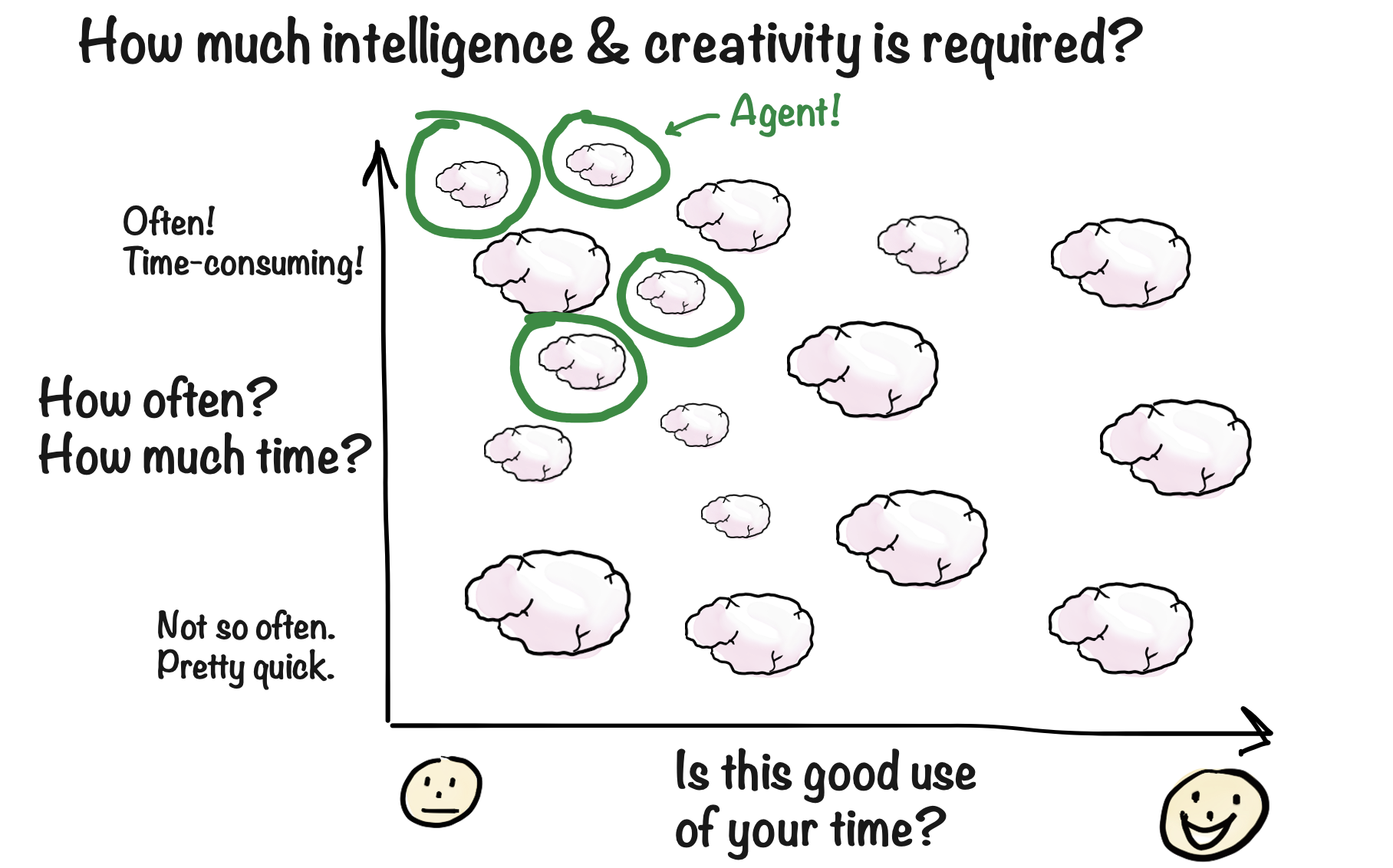 In the diagram, brain size indicates intelligence/creativity requirements:
* **Large brain** — Requires significant judgment, creativity, or expertise
* **Small brain** — Requires only a bit of intelligence to handle fuzzy inputs
Tasks that require massive amounts of creativity and human judgment are better left to humans. Tasks that are completely mechanical can probably be automated with code alone. The sweet spot for agents is in between.
## The sweet spot for agents
Perfect agent tasks share these characteristics:
| Factor | Agent sweet spot |
| ---------------- | ----------------------------------------------------------- |
| **Frequency** | Routine or repetitive—happens often enough to justify setup |
| **Time value** | Not the best use of a human's time |
| **Intelligence** | Requires some judgment, but not deep expertise |
| **Fuzziness** | Involves uncertain inputs that code can't handle |
| **Stakes** | Mistakes are correctable (not mission-critical) |
**Examples of good agent use cases:**
* Screening incoming emails and routing to the right person
* Generating weekly summaries from multiple data sources
* Reviewing documents against a checklist
* Researching competitors and compiling reports
* Handling routine customer inquiries
**Examples of poor agent use cases:**
* Highly creative work requiring original thinking
* High-stakes decisions with irreversible consequences
* Tasks that happen once a year
* Simple if-then logic that code handles perfectly
Browse real examples of agents in production
## Start simple
Start with simple use cases to learn the basics, even if they aren't the highest-value opportunities. Once you're comfortable building agents, tackle more complex workflows.
Good starter projects:
* A daily news digest on a topic you care about
* Summarizing meeting notes and emailing action items
* Monitoring a website for changes
* Answering FAQs from a knowledge base
These build your intuition for how agents think, what context they need, and how to iterate on instructions—skills that transfer to more ambitious projects.
## From use case to design
Once you've identified a promising use case, the design process begins. This is where you work out the details: exactly what the agent should do, how it interacts with humans, what information it needs, and how you'll measure success.
For simple agents, you can skip the formal design process—just create an agent and tell it what to do. But for anything beyond a basic assistant, a structured approach pays off.
Learn the structured approach to designing effective agents
## FAQ
Start by tracking your work for a week. Every time you think "this is tedious" or "I wish I didn't have to do this," write it down. Patterns will emerge.
You can also look at what other organizations automate—the [use cases page](https://www.abundly.ai/use-cases) has examples from various industries.
Not necessarily. Your most painful task might also be your most complex. Start with something manageable to build your skills, then tackle the bigger challenges.
If you can explain the task to a new hire in 30 minutes, an agent can probably handle it. If it requires months of training and deep expertise, you might need a human—or a human-agent collaboration where the agent does the grunt work and humans make the final calls.
In the diagram, brain size indicates intelligence/creativity requirements:
* **Large brain** — Requires significant judgment, creativity, or expertise
* **Small brain** — Requires only a bit of intelligence to handle fuzzy inputs
Tasks that require massive amounts of creativity and human judgment are better left to humans. Tasks that are completely mechanical can probably be automated with code alone. The sweet spot for agents is in between.
## The sweet spot for agents
Perfect agent tasks share these characteristics:
| Factor | Agent sweet spot |
| ---------------- | ----------------------------------------------------------- |
| **Frequency** | Routine or repetitive—happens often enough to justify setup |
| **Time value** | Not the best use of a human's time |
| **Intelligence** | Requires some judgment, but not deep expertise |
| **Fuzziness** | Involves uncertain inputs that code can't handle |
| **Stakes** | Mistakes are correctable (not mission-critical) |
**Examples of good agent use cases:**
* Screening incoming emails and routing to the right person
* Generating weekly summaries from multiple data sources
* Reviewing documents against a checklist
* Researching competitors and compiling reports
* Handling routine customer inquiries
**Examples of poor agent use cases:**
* Highly creative work requiring original thinking
* High-stakes decisions with irreversible consequences
* Tasks that happen once a year
* Simple if-then logic that code handles perfectly
Browse real examples of agents in production
## Start simple
Start with simple use cases to learn the basics, even if they aren't the highest-value opportunities. Once you're comfortable building agents, tackle more complex workflows.
Good starter projects:
* A daily news digest on a topic you care about
* Summarizing meeting notes and emailing action items
* Monitoring a website for changes
* Answering FAQs from a knowledge base
These build your intuition for how agents think, what context they need, and how to iterate on instructions—skills that transfer to more ambitious projects.
## From use case to design
Once you've identified a promising use case, the design process begins. This is where you work out the details: exactly what the agent should do, how it interacts with humans, what information it needs, and how you'll measure success.
For simple agents, you can skip the formal design process—just create an agent and tell it what to do. But for anything beyond a basic assistant, a structured approach pays off.
Learn the structured approach to designing effective agents
## FAQ
Start by tracking your work for a week. Every time you think "this is tedious" or "I wish I didn't have to do this," write it down. Patterns will emerge.
You can also look at what other organizations automate—the [use cases page](https://www.abundly.ai/use-cases) has examples from various industries.
Not necessarily. Your most painful task might also be your most complex. Start with something manageable to build your skills, then tackle the bigger challenges.
If you can explain the task to a new hire in 30 minutes, an agent can probably handle it. If it requires months of training and deep expertise, you might need a human—or a human-agent collaboration where the agent does the grunt work and humans make the final calls.