> ## Documentation Index
> Fetch the complete documentation index at: https://docs.abundly.ai/llms.txt
> Use this file to discover all available pages before exploring further.
# Configurable Capabilities
> Give your agent the tools it needs to do its job
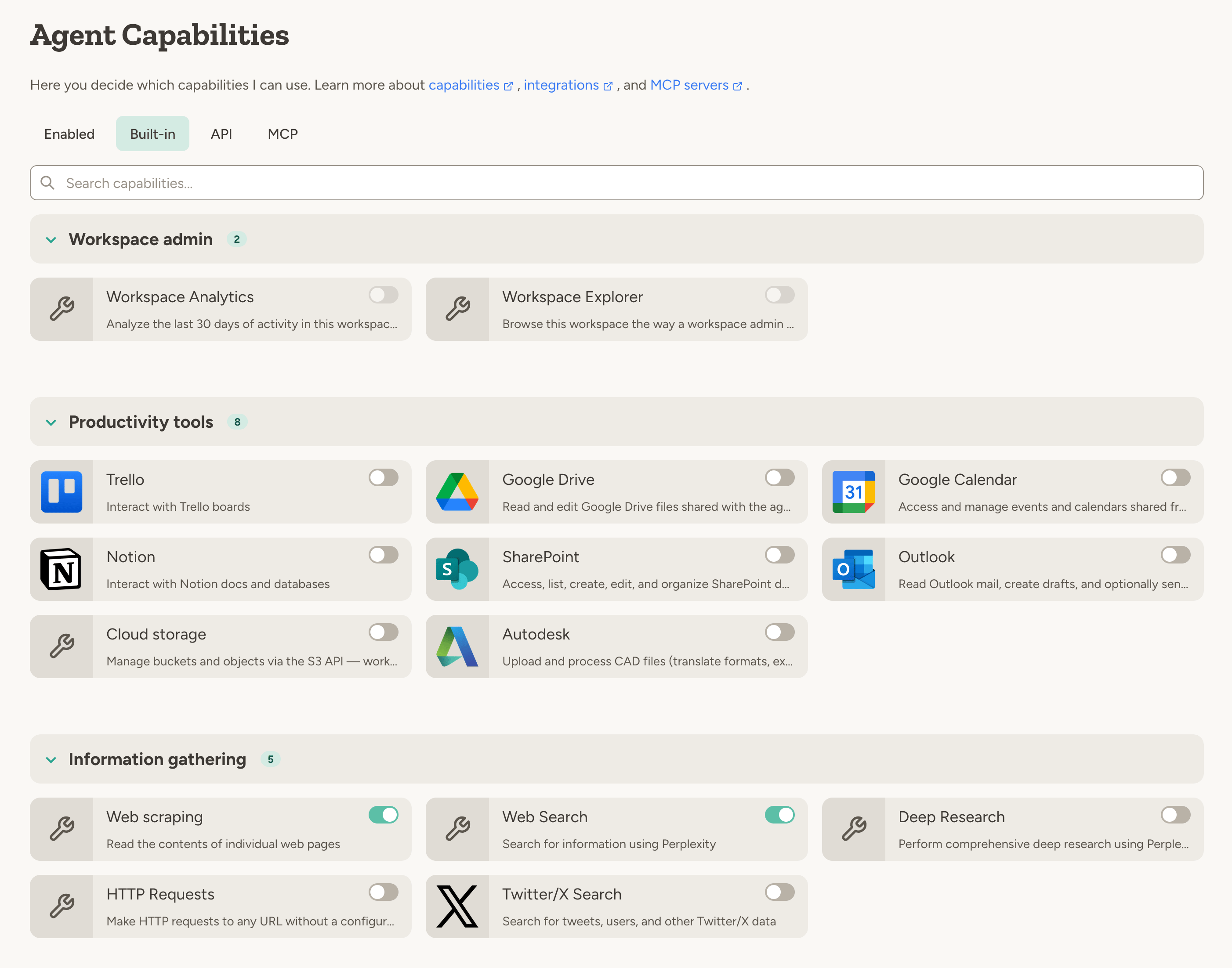
A **capability** is a feature or integration that your agent can use to accomplish tasks. Each agent starts with a basic set of commonly used capabilities, and you can add more as needed. Some capabilities also have configuration options that can be adjusted to match your needs.
 ## Types of capabilities
To browse available options, use the tabs on the agent's capabilities page: **Built-in** for platform features and integrations, **API** for custom API capabilities, and **MCP** for custom MCP servers (if enabled in your workspace).
* Some capabilities represent **Platform features** - such as the ability to generate images, execute code, edit documents, etc.
* Other capabilities represent **external integrations**—such as Slack, Google Drive, HubSpot, and GitHub. You can also add your own integrations using [MCP servers](/integrations/mcp). Learn more about integrations in the [integrations overview](/integrations/overview).
## Managing capabilities
Capabilities are an important part of managing the behavior of your agent.
* If your agent has too few capabilities, it might not be able to do the task you asked it to do.
* If your agent has too many capabilities, or capabilities that it doesn't need, it might get confused about when to use which capability.
Agents can combine capabilities in powerful ways. Here are some examples:
**With Web Search, Edit Documents, and Send Email:**
* "Every morning, search for recent news about our competitors and add a summary to my research document."
* "Research the top 10 AI startups in Europe and email me a summary."
**With Google Drive, Generate PDF, and Send Email:**
* "Every friday at 9am, generate a PDF report of this week's sales data in google drive and email it to the team."
**With Receive Email and Edit Documents:**
* "When you receive an email with an invoice attached, extract the key details and add them to the invoice database."
**With Twitter and Slack:**
* "Monitor Twitter for mentions of our brand and post a daily summary to the #social-listening Slack channel."
Start with minimal capabilities and add more as needed. This lets you get started faster.
## Capabilities your admin has blocked
If your workspace admin has disabled certain capabilities workspace-wide (or for your team), they don't disappear from the **Built-in** tab — they show up as greyed-out cards labelled **Not available**, sorted below the capabilities you can use. Click a greyed card to see why it's unavailable. Category badges on the tab show an available/total count when some capabilities in that category are blocked, so you can tell at a glance where restrictions apply.
See [Guardrails](/security/guardrails) for how workspace-level capability controls work.
## On-demand capabilities
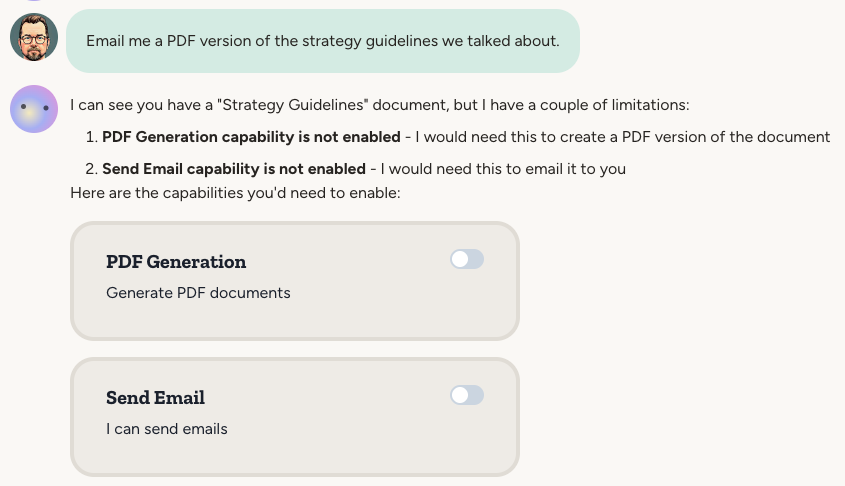
You don't need to configure all capabilities upfront. If you ask the agent to do something that requires a capability that isn't enabled, it will automatically request it by showing a capability card in the conversation.
## Types of capabilities
To browse available options, use the tabs on the agent's capabilities page: **Built-in** for platform features and integrations, **API** for custom API capabilities, and **MCP** for custom MCP servers (if enabled in your workspace).
* Some capabilities represent **Platform features** - such as the ability to generate images, execute code, edit documents, etc.
* Other capabilities represent **external integrations**—such as Slack, Google Drive, HubSpot, and GitHub. You can also add your own integrations using [MCP servers](/integrations/mcp). Learn more about integrations in the [integrations overview](/integrations/overview).
## Managing capabilities
Capabilities are an important part of managing the behavior of your agent.
* If your agent has too few capabilities, it might not be able to do the task you asked it to do.
* If your agent has too many capabilities, or capabilities that it doesn't need, it might get confused about when to use which capability.
Agents can combine capabilities in powerful ways. Here are some examples:
**With Web Search, Edit Documents, and Send Email:**
* "Every morning, search for recent news about our competitors and add a summary to my research document."
* "Research the top 10 AI startups in Europe and email me a summary."
**With Google Drive, Generate PDF, and Send Email:**
* "Every friday at 9am, generate a PDF report of this week's sales data in google drive and email it to the team."
**With Receive Email and Edit Documents:**
* "When you receive an email with an invoice attached, extract the key details and add them to the invoice database."
**With Twitter and Slack:**
* "Monitor Twitter for mentions of our brand and post a daily summary to the #social-listening Slack channel."
Start with minimal capabilities and add more as needed. This lets you get started faster.
## Capabilities your admin has blocked
If your workspace admin has disabled certain capabilities workspace-wide (or for your team), they don't disappear from the **Built-in** tab — they show up as greyed-out cards labelled **Not available**, sorted below the capabilities you can use. Click a greyed card to see why it's unavailable. Category badges on the tab show an available/total count when some capabilities in that category are blocked, so you can tell at a glance where restrictions apply.
See [Guardrails](/security/guardrails) for how workspace-level capability controls work.
## On-demand capabilities
You don't need to configure all capabilities upfront. If you ask the agent to do something that requires a capability that isn't enabled, it will automatically request it by showing a capability card in the conversation.
 ## FAQ
* A **tool** is a lower-level technical function exposed to an LLM. For example, `postSlackMessage` is a tool that posts a message to a Slack channel.
* A **capability** groups related tools together. The Slack capability includes posting messages, listing channels, reading threads, etc. Capabilities are toggled on/off by the user and may require authentication.
* An **MCP server** is an external service that exposes tools to an LLM. Adding an MCP server to your agent creates a capability for those tools. See [MCP Servers](/integrations/mcp).
## FAQ
* A **tool** is a lower-level technical function exposed to an LLM. For example, `postSlackMessage` is a tool that posts a message to a Slack channel.
* A **capability** groups related tools together. The Slack capability includes posting messages, listing channels, reading threads, etc. Capabilities are toggled on/off by the user and may require authentication.
* An **MCP server** is an external service that exposes tools to an LLM. Adding an MCP server to your agent creates a capability for those tools. See [MCP Servers](/integrations/mcp).